
Data recovery on vintage hard drives like the Maxtor 4W060H4 starts with identifying the failure type – electronic, firmware, or mechanical. Each requires a different approach, and misdiagnosis can make things worse. Here’s a quick guide to help you assess your situation and decide on the next step.
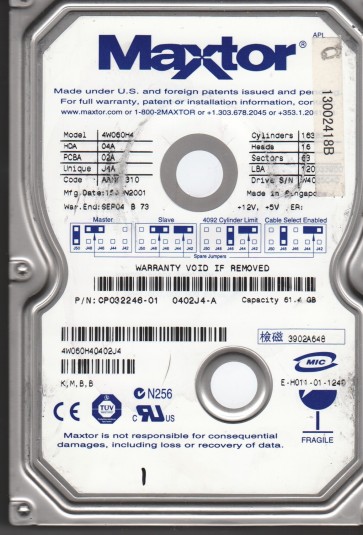
The Maxtor 4W060H4 is a 60 GB 3.5-inch hard disk drive from the DiamondMax Plus 9 family, typically utilizing an 80-pin ATA-100 interface. These drives are known for using a relatively robust spindle motor but are sensitive to PCB (Printed Circuit Board) component failures, particularly the TVS diodes and preamplifier circuits. Being a product from the early 2000s, these drives are susceptible to age-related mechanical degradation such as stiction (head parking media adhesion) and weakened spindle motor bearings. Understanding this base architecture is critical for diagnosis; failures often manifest as either an unresponsive electronic state (no spin, no detection) or mechanical issues (clicking, grinding).The drive’s firmware resides on the PCB’s flash memory and on the platter surface, making certain types of logical failures difficult to address without specialized tools.
Identifying Common Failure Types
1. PCB Electrical Failure
This is the most common failure. The drive shows no signs of life: the platters do not spin up, and no noise is emitted when powered on. Often caused by a failed TVS diode (which shorts to protect against voltage spikes) or a damaged preamplifier chip. A blown TVS diode is easily identified visually as a small black component on the PCB that may appear cracked or burnt. This failure typically does not affect the data on the platters.
2. Firmware Corruption
The drive powers on, the platters spin up, but the drive is not detected by the BIOS or operating system, or it may click softly a few times before going quiet. This is often caused by corruption in the drive’s system tracks (SA/Service Area). On Maxtor drives, this can be triggered by a bad sector blocking access to critical firmware modules. The drive may also report a “0” capacity or an incorrect model name.
3. Mechanical Head Failure (Stiction or Crash)
The drive makes a distinct scratching or grinding noise upon startup, or you may hear the heads clicking repeatedly (seek failure). Stiction occurs when the read/write heads stick to the platter surface due to lubricant degradation, preventing the spindle from rotating. A head crash involves the head physically contacting the platter, which will create a very loud, unstable grinding sound and will almost certainly damage the platter surface. This failure is catastrophic and usually requires cleanroom intervention.
4. Bad Sectors / Logical Degradation
The drive is detected and spins normally but produces read errors, freezes the computer, or exhibits extremely slow performance. The operating system may show “CRC errors” or “I/O device errors.” This is normally a software or logical issue but can also be a precursor to mechanical failure. If the drive begins reallocating large numbers of sectors rapidly, it indicates the heads or platters are degrading.
Potential Recovery Paths
Professional Data Recovery Services
For any mechanical failure (head crash, grinding, stiction) or firmware corruption where the drive is not detected, professional service is strongly recommended. A professional lab will use a class 100 cleanroom to replace the faulty heads with a matched donor head assembly from an identical model. For PCB failures, they will perform a ROM transplant (transferring the unique firmware chip from the patient PCB to a donor PCB) or repair the specific component. For firmware issues, they use specialized tools (e.g., PC-3000, MRT) to rebuild or rewrite the corrupted service area modules. Costs typically range from $300 to $2000+ depending on the severity.Choose a lab that offers free evaluation and a “no data, no charge” policy.
DIY Recovery Paths (Limited Risk)
1. PCB Swapping for Power-On Failure (No Spin)
If the drive is completely dead, you can attempt a donor PCB swap. Locate an exact model-matched donor PCB (Maxtor 4W060H4). Critically, you must transfer the original drive’s 8-pin flash ROM (often a small chip labeled “25P05” or similar) from the original PCB to the donor board. Use a hot air station or soldering iron for this. Without the ROM transplant, the donor PCB will not match the drive’s unique firmware and data will not be accessible. This is a high-skill microsoldering task; a static discharge or improper soldering can kill the drive.
2. Freeze Trick (Temporary for Stiction)
If the platters are seized (drive makes no spin-up sound but the motor tries), place the drive in a sealed anti-static bag and put it in a freezer (not the ice box) for 4-6 hours. Quickly connect power and attempt to read. The contraction of the platters can sometimes free the stuck heads. This is a temporary, one-shot attempt. Data must be copied immediately. This only works for stiction; it will destroy a drive with a head crash. Do not use this on a clicking drive.
3. Software Recovery (For Bad Sectors Only)
If the drive is detected and spin-up is normal, use a read-only cloning tool like DDRescue (Linux) or HDD Raw Copy Tool (Windows). Do not use CHKDSK or ScanDisk, as they can cause write operations that damage the drive further. Use the tool’s manual rescue mode to skip bad sectors and image the drive to a healthy destination. This is a last resort; any unusual noise requires stopping immediately.
What Not to Do
1. Do not open the drive enclosure in a non-cleanroom environment. The air gap between the heads and platters is microscopic; a single dust particle will cause a head crash that is irreversible. Opening the drive voids any chance of professional recovery.2. Do not apply excessive power to a silent drive. If the PCB has a blown TVS diode, a replacement fuse or direct power injection (e.g., “screwdriver trick”) is extremely dangerous and will destroy the preamplifier or controller chip. Only swap the PCB professionally.3. Do not run CHKDSK, Format, or any recovery software that writes to the drive (like “Fix Bad Sector” tools). Writing to a failing drive can overwrite data, cause heads to crash, or scramble the file system.4. Do not shake or smack the drive. Mechanical failures are fragile; vibration can turn a recoverable stiction issue into a catastrophic head crash.5. Do not attempt a head swap as a DIY project. This requires specialized tools, a sterile environment, and advanced alignment techniques. A failed head swap ensures permanent data loss.
Summary
The Maxtor 4W060H4 is an older but recoverable drive. The most frequent failure is a PCB electrical issue (no spin), which carries a high DIY success rate if you can perform a correct ROM transplant. Firmware corruption is best left to professionals due to the need for specialized tools. Mechanical failures (head crash, grinding, motor seizure) are critical and require a cleanroom service; DIY attempts will destroy the data. For minor logical issues with no unusual noise, a careful sector-by-sector clone using read-only software is your best option. The golden rule: if the drive is making any abnormal noise (click, grind, beep), power it off immediately and seek professional help. If it is silent and not spinning, consider a PCB swap only with the correct donor and ROM transfer.