
Data recovery on vintage hard drives like the Maxtor 6B160M0 starts with identifying the failure type – electronic, firmware, or mechanical. Each requires a different approach, and misdiagnosis can make things worse. Here’s a quick guide to help you assess your situation and decide on the next step.
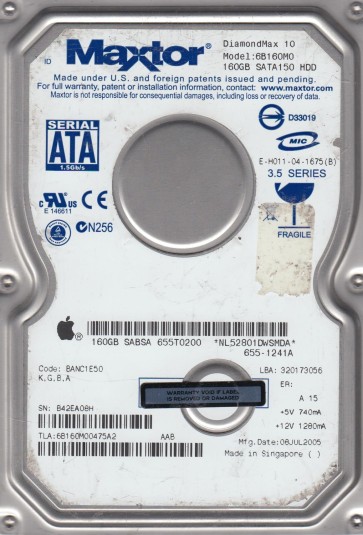
The Maxtor 6B160M0 is a 160GB hard disk drive from the DiamondMax 16 family, manufactured in the mid-2000s. It utilizes an IDE (PATA) interface and operates at 7200 RPM with a 2MB or 8MB cache buffer depending on the specific revision. This drive is known for being a workhorse in older desktop systems but is also prone to specific age-related failures, particularly due to its single-platter design and aging spindle motor bearings. The controller board uses a common Agere (now LSI) chipset. Understanding that it is a Parallel ATA drive is critical for recovery attempts, as modern systems may not have native support without an adapter.
Identifying Common Failure Types
1. Mechanical Failure: Stiction or Seized Spindle Motor
The most common issue with the 6B160M0 is the spindle motor failing to spin up. When powered, the drive may emit a single click or a low hum, but the platters do not rotate. This is often caused by lubricant drying out and causing the motor bearings to seize, or by the read/write heads sticking to the platter surface (stiction). If the heads are stuck, you may hear a faint “chirping” sound as the motor tries to break free. This is a physical failure requiring hardware intervention.
2. Electronic Failure: Burned Preamp or TVS Diode
A common electronic failure involves the TVS (Transient Voltage Suppression) diodes on the PCB. A power surge, even a brief one from a failing power supply, can short a TVS diode, causing the drive to appear completely dead with no power-on activity. In more serious cases, the preamplifier chip on the head stack assembly can fail due to electrostatic discharge or age, leading to the drive clicking repeatedly as it cannot read the servo patterns.
3. Firmware Corruption: Bad Sector or Module Error
Firmware issues manifest as the drive being detected by the BIOS but not by the operating system, or as the drive reporting an incorrect capacity (e.g., 0GB or 1GB). The Maxtor 6B160M0 is known to have corrupt firmware modules, particularly the SMART module or the translator. The drive may spin up normally and click normally (no audible head crash) but remain in a “busy” state or fail to initialize. This is a logical issue, not physical damage.
4. Bad Sectors and Media Degradation
Over time, the magnetic coating on the platters can degrade. The drive begins to reallocate sectors but eventually the G-list (grown defect list) becomes full. The drive then slows down, makes repetitive scraping sounds during reads, and locks up. A drive with thousands of bad sectors may be recoverable with software, but repeated head passes over damaged areas can cause further platter wear.
Potential Recovery Paths
Professional Service (Recommended for Mechanical/Electronic Issues)
For seized motors or stiction: A professional cleanroom (Class 10 or better) is required. The technician will carefully separate the heads from the platters using a tool, or replace the spindle motor by transplanting the platters into a donor drive of the exact same model and firmware revision. For electronic failure: The PCB can be swapped, but the original drive’s ROM chip (often an 8-pin serial flash) must be desoldered and transferred to the donor PCB to unlock the drive. For firmware corruption: Professional tools like PC-3000 or DeepSpar can reprogram the firmware modules using a ROM dump from the same drive family. Cost: $300 – $1500+ depending on severity. Vendor note: Look for labs that list Maxtor 6B160M0 specifically in their supported drives.
DIY Software Recovery (For Bad Sectors Only)
Prerequisite: The drive must spin up, be detected by BIOS, and make no unusual clicking or scraping sounds. If it clicks, stop immediately. Use a USB-to-IDE adapter or a direct motherboard PATA port. Tools: Use DDRescue or HDDSuperClone on Linux, or Runtime Software’s GetDataBack for Windows. Process: Create a full disk image to a healthy drive. Use the ‘–no-scrape’ option first to skip bad areas, then use reverse passes. This minimizes head wear. Warning: Running a full surface scan with chkdsk /r or Windows disk repair tool OVERWRITES bad sectors and can destroy data. Never do that.
DIY Hardware (For Seized Motor – Advanced)
Warning: Only attempt this if data is not critical and you have no alternative. Method: Apply a small amount of penetrating oil (like WD-40 or specialized spindle oil) to the spindle motor bearing visible under the PCB. Turn the platters manually by rotating the hub using a plastic tool. Attempt to power the drive briefly. This can free a seized motor but risks introducing contaminants into the platter chamber. Success rate is very low and often results in permanent head damage.
What Not to Do
- DO NOT open the hard drive enclosure at home. Even a single dust particle can cause a head crash. The internal cleanliness is far beyond normal room air.
- DO NOT apply power to a drive making a repeated clicking sound (head crash). This will scrape the platters further, destroying the data layer.
- DO NOT use disk utility software like SpinRite on a failing drive. It can cause further physical damage by stressing the heads.
- DO NOT freeze the drive. The old myth of freezing a drive to recover it only works for very specific conditions (like stiction) and is almost always harmful due to condensation.
- DO NOT try to swap the PCB without transferring the ROM chip. A generic donor PCB will not match the adaptive parameters of your drive, and applying power can fry the preamp.
- DO NOT run a Defrag or Chkdsk /R on a drive you suspect has physical issues. These operations are intensive and accelerate failure.
Summary
The Maxtor 6B160M0 is a classic PATA drive with common failure points: seized motors, burned TVS diodes, and firmware corruption. The absolute best path for any non-trivial failure (stiction, clicking, no spin) is professional cleanroom recovery. For simple electronic dead drives (no power but no click), a PCB swap with ROM transfer may succeed. For bad sectors with no physical noise, software cloning (like DDRescue) is viable. Never attempt a DIY opening, freezing, or aggressive software repair. The key to maximizing recovery is to minimize the number of power cycles and physical stress on the drive. If the data is valuable, stop immediately and seek a lab that specializes in vintage Maxtor drives.