
Data recovery on vintage hard drives like the Maxtor 6G160E0 starts with identifying the failure type – electronic, firmware, or mechanical. Each requires a different approach, and misdiagnosis can make things worse. Here’s a quick guide to help you assess your situation and decide on the next step.
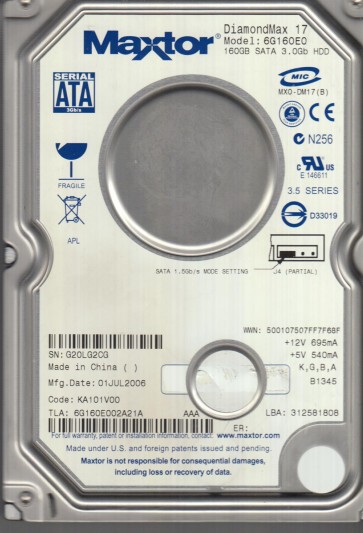
The Maxtor 6G160E0 is a 160GB 7200RPM Parallel ATA (PATA) hard drive from the early 2000s era, part of Maxtor’s DiamondMax 17 series. It features an LBA count of 320,173,056 and uses a MaxiSwitch engine with a dual-processor architecture. These drives are known for high-density platters and a fragile spindle motor bearing. The 6G160E0 typically has a 2MB or 8MB cache version (identifiable by firmware) and is sensitive to temperature fluctuations and voltage irregularities from aging power supplies. Its age makes it a prime candidate for stiction (head-parking grease hardening) and PCB component degradation.
Identifying Common Failure Types
1. Stiction (Head Parking Grease Hardening)
After years of inactivity, the lubricant on the platter landing zone solidifies, causing the heads to stick to the disk surface. Symptoms: drive spins up but emits a soft, repetitive ticking sound (e.g., one click per second) as the voice coil attempts to move the stuck heads. The drive may fail to spin down properly. This is a hardware defect and not recoverable via software.
2. Preamp Failure or Head Crash
The preamplifier chip inside the head stack assembly (HSA) can fail due to electrostatic discharge or age. Symptoms: drive spins up normally, but the computer does not detect it, or the drive sounds like a rhythmic “grinding” or “metal scratching” noise. Head crashes often result from shock or particle contamination. Data recovery from a crashed head requires a clean room environment.
3. Bad Sectors / Firmware Corruption (Media Cache Issue)
Gradual degradation of the magnetic media leads to reallocated sectors. Firmware corruption, especially in the module handling the media cache (MC F/W), can cause the drive to spin up and then beep or click. Symptoms: operating system freezes, S.M.A.R.T. attributes show high ‘Reallocated Sector Count’ or ‘Current Pending Sector’ counts, or the drive appears with incorrect capacity (e.g., 0GB or 128MB) in BIOS. This is often a software/firmware logic corruption, not physical.
Potential Recovery Paths
Professional Data Recovery Services
When to use: Any head crash, stiction, grinding/scraping noises, or if DIY attempts have failed. For the 6G160E0, expect a base fee of $500 to $2000+ depending on the severity (e.g., clean room head swap is expensive). Process: Specialists will open the drive in a Class 10 cleanroom, perform a head stack assembly replacement, and use a PC-3000 or DeepSpar tool to read the media in imaging mode. They can also program a replacement PCB (printed circuit board) after transferring the original firmware ROM. Recommendation: Use for irreplaceable data; never attempt DIY if the drive makes unusual sounds.
DIY Recovery Methods (Caution Required)
Situation 1: Drive is detected but slow, with file errors (Bad Sectors).
Tool: Use a professional-grade imaging tool like DDRescue (on Linux) or HDDSuperClone (bootable). Connect the PATA drive to a known-good system via an IDE-to-USB adapter (avoid cheap ones). Run: ddrescue -f -n /dev/sdX /mnt/destination/sdX.img /mnt/destination/sdX.log then ddrescue -d -f -r3 /dev/sdX /mnt/destination/sdX.img /mnt/destination/sdX.log. This images bad sectors without retrying on first pass, then retries later.
Situation 2: Drive spins up but is not detected or shows 0GB (Firmware Corruption).
Tool: Needs a hardware tool like the MRT Ultra or PC-3000 for Maxtor. If you have the skills, you can attempt to load a matching firmware (from a donor drive of same model, same head map) using terminal commands via the drive’s diagnostics port (serial over TTL adapter at 38400 baud). Common Maxtor firmware fix: repair the Media Cache module. This is high-risk, as a wrong firmware write can brick the drive permanently.
Situation 3: Stiction (heads stuck).
Attempt only if you have a clean bench and anti-static gear: Remove the PCB, set drive upright with platters horizontal. Gently rotate the platters by hand (using a non-magnetic tool) while listening for a release sound. Then reapply power. Success rate is low; permanent platter damage is high. Not recommended unless you accept data loss.
What Not to Do
- Do not open the drive enclosure outside a clean room (Class 10 or better). Dust particles will cause permanent head crashes upon next spin-up.
- Do not apply power repeatedly to a drive making clicking or grinding noises; this grinds the heads into the platter surface, destroying data.
- Do not use any “free” data recovery software that performs read-write cycles (e.g., chkdsk /r, SpinRite) on a drive with bad sectors; this forces the heads to re-read weak areas, worsening the condition and damaging surrounding data.
- Do not freeze the drive. This obsolete method can cause condensation and corrosion on the media, destroying any remaining data.
- Do not attempt to swap PCBs without transferring the original firmware ROM (8-pin serial flash chip) from the old PCB to the donor PCB. Maxtor drives have drive-specific adaptive data in the PCB ROM.
- Do not tap or drop the drive in an attempt to free stuck heads:this guarantees platter damage.
Summary
The Maxtor 6G160E0 is a vintage PATA drive prone to stiction, preamp/head failure, and media cache firmware corruption. For any audible mechanical noise (click, grind, scrape), stop power immediately and seek professional clean room data recovery. For slow or undetected drives with no abnormal sounds, a careful DIY imaging using ddrescue (for bad sectors) or a professional firmware tool (for logic problems) may succeed. Always prioritize data safety over cost:the drive is 20+ years old and every spin is a risk. When in doubt, consult a specialized recovery lab. Remember: the first and most critical step is identifying the failure type accurately.