
Data recovery on vintage hard drives like the Maxtor 96147U8 starts with identifying the failure type – electronic, firmware, or mechanical. Each requires a different approach, and misdiagnosis can make things worse. Here’s a quick guide to help you assess your situation and decide on the next step.
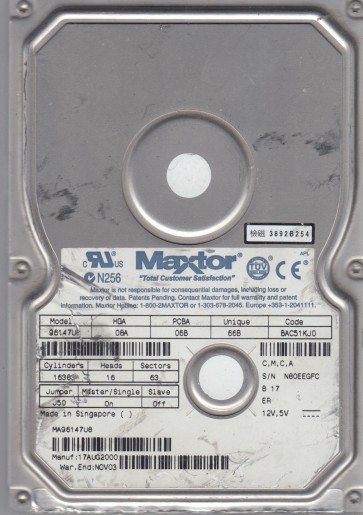
The Maxtor 96147U8 is a legacy hard disk drive from the early 2000s, part of Maxtor’s 96147 series. It is a 3.5-inch Parallel ATA (PATA/IDE) drive with a rotational speed of 5400 RPM and a storage capacity of 60 GB. This drive typically features a single platter and uses a fluid dynamic bearing (FDB) spindle motor. It employs a standard Marvell or Agere controller chip and a preamplifier integrated on the head stack assembly (HSA). Due to its age, the drive is susceptible to specific failure modes related to its mechanical components, aging lubricants, and outdated electronics. Recognizing that this is a pre-2005 drive is critical, as its behavior and recovery methods differ significantly from modern SATA drives.
Identifying Common Failure Types
1. Failed Spindle Motor (Stiction or Bearing Seizure): The most common mechanical failure in aging Maxtor drives. The drive powers on but the platters do not spin up, often accompanied by a faint humming sound or no sound at all. The motor bearings may have seized due to dried lubricant or debris, or the magnetic heads have “parked” onto the platter surface and become stuck (stiction). This is often caused by age and environmental conditions like heat or dust.
2. Bad Sectors and Degraded Media: The magnetic coating on the platters can degrade over time, especially in older drives. This manifests as increasing numbers of bad sectors, slow read/write operations, clicking sounds (from read/write heads retrying), or the drive becoming unresponsive after partial operation. This is typically a physical media issue, not a logical corruption, making software fixes ineffective.
3. Failed Read/Write Heads (HSA Failure): The magnetic heads can fail due to contamination, wear, or shock. Symptoms include the drive spinning up, then a series of loud clicking or tapping sounds (head slap) as the actuator arm repeatedly tries to find the servo data. The drive may also report as “unrecognized” or show a very small capacity (e.g., 10 MB) as the heads cannot read the system tracks.
4. PCB Electronics Failure: The printed circuit board (PCB) at the bottom of the drive can fail due to age, power surges, or component degradation. Common failures include blown TVS diodes (transient voltage suppression) that short the power line, failed motor controller chips (e.g., a L7250 or similar), or cracked solder joints. The drive may show no sign of life (no spin, no sound) or may repeatedly try to spin up and then stop.
Potential Recovery Paths
Professional Data Recovery (Recommended for physical failures): For mechanical issues (heads, motor, media degradation), professional recovery is the only safe method. A specialist lab can perform a clean-room head change, transplant the platters into a known-good donor drive, or use specialized hardware to read severely damaged media. For a Maxtor 96147U8, a professional service will typically charge from $500 to $2000+ depending on complexity. Look for labs with experience in vintage PATA drives.
DIY Attempts (Only for specific software or PCB issues):
– PCB Swap (For Electronics Failure): If the drive has no power but mechanically spins freely (no grinding), a PCB swap may work. You must find an exact donor drive with the same model number and firmware version (often printed on a label). After swapping, you must also transfer the original drive’s NVRAM/flash IC (an 8-pin serial flash chip) to the donor board, as Maxtor drives tie critical calibration data to the board. This requires micro-soldering skills and a hot air station.
– Software Imaging (For Bad Sectors Only): If the drive is detected, spins normally, and only shows bad sectors (no clicking), try a low-level imaging tool like HDD Raw Copy Tool or DDRescue on Linux. Use the “skip bad sectors” option to recover as many healthy sectors as possible. Do not write to the drive. Always image to another healthy drive first.
– Freeze Trick (Controversial, temporary): For a stalled motor due to stiction (not seized bearings), some users suggest sealing the drive in a plastic bag and placing it in a freezer for 2-4 hours. This can shrink the bearing enough to free a stuck spindle. This is a last-ditch, high-risk method that can damage the drive further. It only works if the motor is physically stuck, not if the heads are stuck to the platter.
What Not to Do
1. Do not open the drive outside a cleanroom. The internal platters are extremely sensitive to dust, smoke, and fingerprints. Even a single speck of dust can cause a head crash, destroying the data permanently. Never try to remove the lid at home.
2. Do not apply power if you hear grinding or loud scraping. This indicates a head crash or motor damage. Running the drive will further damage the platters and reduce recovery chances.
3. Do not use chkdsk or repair utilities. On a drive with physical damage, tools like chkdsk, fsck, or SpinRite can cause the heads to repeatedly retry bad sectors, accelerating media wear and potentially causing a head crash. These tools are for logical errors only.
4. Do not freeze a drive as a routine step. The “freeze trick” is a last resort, not a fix. It can cause condensation, thermal stress, and permanent damage to the bearings or platters. Use it only if it is an emergency and you accept the risk.
5. Do not tamper with the PCB without ESD protection. Static discharge can destroy delicate surface-mount components or the main controller chip. Always work on a grounded mat and wear a wrist strap.
Summary
The Maxtor 96147U8 is an aging PATA hard drive with a high probability of mechanical failure, particularly a seized spindle motor or failed read/write heads. A failed PCB is the most DIY-accessible issue, but requires soldering and a matching donor. Software methods are only viable if the drive is mechanically healthy and only suffering from bad sectors. For any physical failure (clicking, grinding, no spin, or stiction), professional clean-room recovery is the only reliable path. Do not attempt to open the drive, apply power to a failing unit, or run repair software. Prioritize imaging over scanning. Given the drive’s age, data preservation is best left to specialists who have the tools and experience to handle these vintage components.