
Data recovery on vintage hard drives like the Hitachi HDS722580VLSA80 starts with identifying the failure type – electronic, firmware, or mechanical. Each requires a different approach, and misdiagnosis can make things worse. Here’s a quick guide to help you assess your situation and decide on the next step.
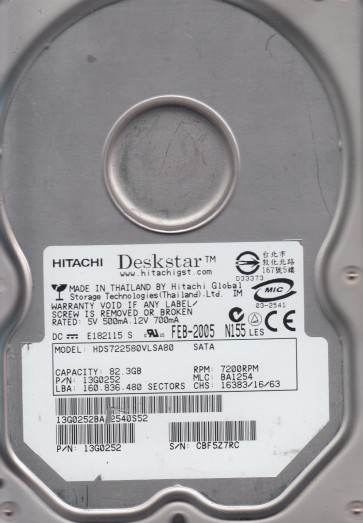
The Hitachi HDS722580VLSA80 is a member of the Deskstar 7K250 series, a 7200 RPM 3.5-inch Serial ATA (SATA) hard drive with a formatted capacity of 80 GB. This generation of drives is known for its relatively robust mechanical design but is particularly susceptible to specific electronic and firmware-related issues as they age. The drive uses a fluid dynamic bearing motor and a single platter (usually) to achieve its capacity. Understanding that this is a legacy drive (manufactured in the mid-2000s) is critical; many common failure modes are now age-related rather than caused by manufacturing defects. The controller board, often referred to as the PCB, is a frequent point of failure, particularly the TVS diodes and the preamplifier circuit.
Identifying Common Failure Types
1. Electrical / PCB Failure (TVS Diode & Controller Chip)
This is arguably the most common failure mode for the HDS722580VLSA80. The primary symptom is the drive not spinning up at all, with no audible motor sound, and the drive being completely undetected by the BIOS. This is frequently caused by a shorted TVS (Transient Voltage Suppression) diode on the 5V or 12V power rail of the PCB. A visual inspection may reveal a charred or cracked diode. A less obvious but related failure is a shorted controller chip (often a Marvell or Infineon processor) which can also prevent power-up. A second symptom of PCB failure is the drive spinning up but failing to be recognized, often due to a damaged preamplifier chip on the PCB or corrupted firmware on the controller.
2. Mechanical / Head Crash or Stiction
Given the age of these drives, mechanical degradation is a significant concern. Symptoms include the drive emitting a repetitive clicking sound (head seeking but failing to land), a loud scraping noise (head crash), or a high-pitched whine with no spin (motor bearing seizure / stiction). The Deskstar 7K250 series has a reputation for possible head sticktion after prolonged inactivity, where the heads adhere to the platter surface. This is often accompanied by the drive attempting to spin up multiple times, drawing more current than usual. A head crash is typically preceded by increasing numbers of bad sectors and slow read/write performance before a total failure.
3. Firmware Corruption (Media cache or Module corruption)
Firmware issues are a subtle but common problem. The drive¡¯s firmware is stored on the platters in a special system area (SA). Symptoms include the drive being detected with an incorrect model name or capacity (e.g., showing as “HITACHI HDS7225” with no size, or a tiny capacity like 0GB). The drive may spin up normally, sound healthy, but refuse to initialize or cause the system to hang during boot. This is often caused by a weak preamplifier or age-related degradation of the media in the system area, leading to corruption of module tables. A user might hear clicking from the drive as it repeatedly attempts to read the system area but fails. This is NOT a mechanical failure in the traditional sense, but it requires specialized tools to address.
Potential Recovery Paths
Professional Services (Recommended for Critical Data)
For any mechanical failure (clicking, scraping, seizure) or firmware corruption resulting in data inaccessibility, professional intervention is strongly advised. A data recovery lab will have a cleanroom (Class 10 or better) for head replacements and donor drives for PCB parts. For electrical failures, a lab can perform a precise PCB swap or component-level repair, then potentially use a PC-3000 or similar tool to fix firmware issues. For mechanical failure, they will need to open the drive, replace the heads with a matched set from a donor drive, and then image the platters using specialized hardware that handles marginal reads. Expect costs to range from $300 to $1500+ depending on the complexity (e.g., a simple PCB swap is cheaper than a head change). A professional will not attempt to perform a firmware fix on a mechanically failing drive.
DIY Recovery (Only for specific, non-critical scenarios)
Scenario 1: Electrical Failure (TVS Diode Only)
If the drive is dead (no spin) and a visual inspection shows a clearly blown TVS diode, a skilled DIYer can attempt a PCB repair. This requires a multimeter, a soldering iron, and replacement TVS diodes. Steps: 1) Power down and disconnect. 2) Remove the PCB (usually 4 T8 Torx screws). 3) Locate the TVS diodes (typically a 5V and 12V pair near the power connector). 4) Use a multimeter in diode mode to check for a short across each. 5) If shorted, carefully desolder and replace with identical SMD diodes. 6) Reassemble and test. Warning: Never connect a drive with a known shorted diode to power without fixing it, as it can damage the motor controller. Also, if the controller chip is the culprit, this method will fail and can damage your soldering equipment.
Scenario 2: PCB Swap (with caution)
This is often attempted but has a high failure rate. A donor PCB from an identical model (exact PCB number, e.g., 0A65722) must be used. However, the drive¡¯s firmware (including adaptive parameters like head offsets) is stored on the PCB’s ROM. You MUST transplant the original ROM chip (an 8-pin serial flash usually labeled 25P05 or similar) from the old PCB to the donor PCB. Without this, the donor board will spin the drive but will not read data correctly. This task requires hot air rework and SMD soldering skills. If you simply swap the whole PCB without moving the ROM, you will likely cause a firmware mismatch, and the data will remain inaccessible. This is a high-risk procedure that often turns a simple electrical problem into a firmware problem.
What Not to Do
- DO NOT apply power repeatedly. If the drive is clicking, scraping, or making unusual noises, powering it on multiple times can grind the heads against the platters, causing irreversible damage to the data surface. One test is enough.
- DO NOT open the drive enclosure. The internal environment is a clean space. Even a single dust particle or a fingerprint on a platter can destroy data when the heads spin over it. Opening the drive outside a cleanroom will void any chance of professional recovery.
- DO NOT use software recovery tools (EaseUS, Recuva, etc.) on a failing drive. These tools are designed for logically corrupted or deleted files. Running a data recovery scanner on a drive with bad sectors or mechanical issues will cause the drive to further stress itself, potentially knocking heads off alignment. It can also force the drive to reallocate sectors, overwriting data.
- DO NOT freeze the drive. This is an old urban legend that rarely works and often causes internal condensation, leading to catastrophic corrosion and head stiction. Never do this.
- DO NOT attempt to “fix” bad sectors with low-level format tools. This will permanently erase your data and can damage the drive¡¯s servo data, rendering it completely unrecoverable.
Summary
The Hitachi HDS722580VLSA80 is an aging drive with distinct failure modes: electrical PCB issues (especially TVS diodes), mechanical head failure, and firmware corruption. The best course of action depends entirely on the symptoms. If the drive is completely dead (no spin) and you are experienced with electronics, a TVS diode replacement or precise ROM-transplant PCB swap may be viable for non-critical data. However, for any clicking, scraping, or detection problems, the only safe path is professional data recovery. The most critical takeaway is to stop using the drive the moment you suspect a failure. Avoid all DIY “fixes” beyond the specific electrical repair described, as improper attempts (especially freezing, software scanning, or PCB swapping without ROM transfer) will almost certainly reduce the chance of a successful recovery and increase the cost of professional intervention. Always prioritize professional diagnosis for data you cannot afford to lose.