
Data recovery on vintage hard drives like the Fujitsu MHT2040AT starts with identifying the failure type – electronic, firmware, or mechanical. Each requires a different approach, and misdiagnosis can make things worse. Here’s a quick guide to help you assess your situation and decide on the next step.
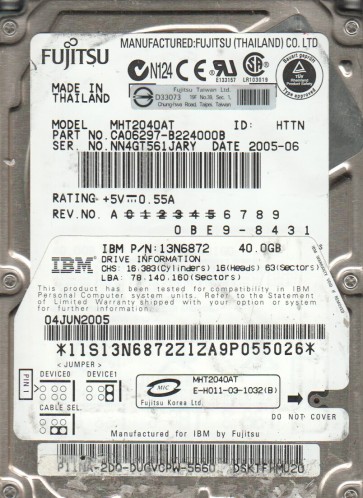
The Fujitsu MHT2040AT is a 2.5-inch PATA (Parallel ATA) hard disk drive with a formatted capacity of 40 GB. It operates at 5400 RPM and features a fluid dynamic bearing motor. This drive was commonly used in laptops and portable devices manufactured in the early to mid-2000s. It uses a standard ATA-6 interface and a single-platter design. Key components include the spindle motor, read/write heads on a rotary actuator, a magnetic platter, and a system-on-a-chip (SoC) controller board which integrates the controller, cache, and servo logic. Understanding this architecture is critical for differentiating between component-level failures.
Identifying Common Failure Types
1. Head Crash or Stiction
A head crash occurs when the read/write head physically contacts the spinning platter surface, scraping away the magnetic coating. For the MHT2040AT, this often produces a repetitive clicking, scraping, or chirping sound. Stiction, where the heads stick to the platter after power-down, can prevent the spindle from spinning up. Signs: Drive spins up but clicks repeatedly (heads fail to land on servo data), or the drive emits a faint high-pitched whine and does not spin. This is a classic physical failure. No software can fix this.
2. Firmware Corruption
The MHT2040AT stores its operational firmware (microcode) in a dedicated SA (Service Area) zone on the platter, often in a region near the outer diameter. Corruption of this firmware:due to weak sectors, power loss during a firmware update, or natural degradation:can cause the drive to fail to identify itself to the host. Symptoms: The drive spins up normally but is not detected in BIOS, shows as ‘0 GB’ in disk management, or reports an incorrect model number. Unlike a head crash, the heads can still read data, but the firmware won’t load properly. This is a firmare-level problem, not a logical file system issue.
3. Logical File System Corruption (Software Issue)
This is a software-level problem where the file system structures (MBR, GPT, NTFS/FAT32 directory entries) are damaged, but the mechanical and firmware are healthy. Causes: improper shutdown, virus, accidental formatting, or partition table deletion. Signs: The drive spins up, is detected in BIOS with the correct model, but Windows reports “The disk is not formatted. Do you want to format it now?” or shows a RAW file system. This is the easiest failure type to recover from without opening the drive.
Potential Recovery Paths
Professional Data Recovery Services
When to use: For any physical failure (head crash, stiction, severe firmware corruption) or if the drive makes unusual noises. The MHT2040AT’s platter is highly sensitive; any particle from a head crash can cause further damage.
Process: A professional lab will open the drive in a Class 100 cleanroom. They often perform a head swap (using a matched donor MHT2040AT), or for stiction, they may carefully lubricate and free the heads. For firmware issues, they use specialised tools like PC-3000 or DeepSpar to access the SA zone and rebuild microcode.
Estimated cost: $300 to $2000+ depending on severity.
DIY Recovery Attempts
For Logical file system corruption:
1. Connect the drive to a SATA-to-USB adapter (or a desktop via PATA) as a secondary drive (do not boot from it).
2. Use data recovery software (e.g., R-Studio, GetDataBack, DMDE). Scan the drive and save recovered files to a different healthy drive. Do not write any data back to the failing MHT2040AT.
For firmware corruption (advanced DIY):
1. Obtain a matching donor MHT2040AT with the same firmware revision (e.g., 000e or similar).
2. Use a hardware programmer like a modified FTDI adapter and software like ‘Mhdd’ or ‘PC-3000 UDMA’ (cloned versions exist) to read the SA from the donor and write it to the patient drive. This is extremely risky and usually accelerates complete failure.
Warning: Never attempt to open the drive seals. The platter is exposed to ambient dust, which guarantees a head crash within minutes at 5400 RPM.
What Not to Do
- Do not apply power repeatedly if the drive is clicking or making scraping sounds. Each spin can damage more platter surface.
- Do not attempt to open the drive enclosure. The interior must be kept in a cleanroom. Opening it in a home environment will deposit microscopic dust particles on the platter, instantly destroying data upon next spin-up.
- Do not run chkdsk /f or any repair utility on the drive if it is detected with a RAW file system. These tools attempt to overwrite the file system structures, which can permanently erase partition data.
- Do not use magnetic degaussers, freeze the drive, or shake it as these are myths that cause more damage. Freezing can cause condensation and rust.
- Do not use ‘DD’ or low-level write tools on a drive with physical or firmware issues, as they will stress the mechanics and worsen firmware problems.
Summary
The Fujitsu MHT2040AT is a vintage PATA drive prone to three main failure modes: physical head/stiction issues (clicking/scraping), firmware corruption (no detection but spins), and logical file system damage (RAW or unformatted). For logical problems, DIY software recovery is safe if the drive is not written to. For any physical or firmware issue, professional recovery is strongly recommended because the drive’s design makes DIY intervention extremely high-risk. Always prioritize backup before failure. The most critical action is to stop using the drive immediately upon noticing any abnormality.

