
Data recovery on vintage hard drives like the Toshiba MK1661GSYB starts with identifying the failure type – electronic, firmware, or mechanical. Each requires a different approach, and misdiagnosis can make things worse. Here’s a quick guide to help you assess your situation and decide on the next step.
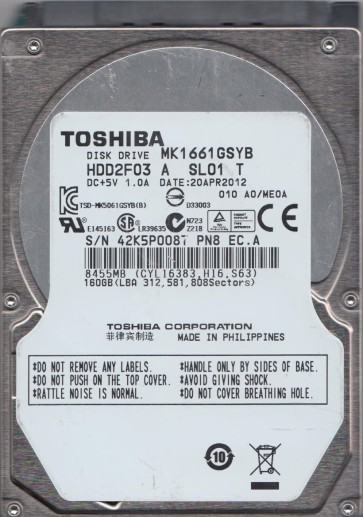
The Toshiba MK1661GSYB is a 2.5-inch hard disk drive (HDD) with a 160GB capacity and a 7200 RPM spindle speed. It utilizes a SATA 3.0 Gb/s interface and was primarily designed for use in laptops, external enclosures, and some early-generation portable gaming systems. This model is known for its relatively high performance for its era, but like all mechanical drives, it is susceptible to physical shock, wear, and electronic failure. The drive uses a single platter, typically glass or aluminum substrate, with a highly polished magnetic coating. Data is stored in concentric tracks at a very high density, making even minor mechanical or electronic anomalies potentially catastrophic for data accessibility.
Identifying Common Failure Types
1. Mechanical Head Failure (Non-Operational)
Often preceded by a click of death or a grinding noise, this occurs when the read/write head assembly becomes misaligned or physically damaged. The drive may spin up but fail to initialize, producing repeated clicking sounds as the head attempts to find the servo data on the platter. Causes include physical shock (dropping the drive while active), contamination from particulate matter, or actuator arm fatigue. This is a hardware failure requiring cleanroom intervention.
2. Firmware Corruption (Logical Failure)
The Toshiba MK1661GSYB, like many Toshiba drives of its generation, stores critical operational firmware (microcode) in a dedicated service area on the platter. If this sector becomes corrupted due to a sudden power loss, a small write error, or a software attack, the drive may spin up but stay busy, refuse to respond to the operating system, or report incorrect capacity (e.g., 0GB or Max LBAs). The drive may appear as a RAW partition or show no recognizable file system. This is a logical failure that often requires specialized software or hardware tools like PC-3000 to reprogram the firmware area.
3. Bad Sector Development (Degradation)
Gradual degradation of the magnetic media leads to sectors that can no longer reliably store data. The drive attempts to reallocate these sectors to a spare area (G-List). Initial symptoms include system freezes, file access errors (such as cyclic redundancy check errors), and slow read/write speeds. As more bad sectors develop, the drive may produce a screeching sound as the head runs over unstable areas. This is a progressive mechanical issue that is often a precursor to total head failure if left unaddressed.
4. Electronic (PCB) Failure
The printed circuit board on the underside of the drive controls all operations. Failure can result from a power surge, ESD (electrostatic discharge), or component aging. Symptoms include the drive not spinning up at all, no sound, or a brief spin then immediate stop. Often, the motor driver chip or the main controller becomes defective. In some cases, a simple logic board replacement with a matching donor board is possible, but due to preamp calibration data stored on the board (specifically in the ROM), the board must be adapted with the original ROM chip.
Potential Recovery Paths
Professional Recovery Services
For mechanical head failure or severe firmware corruption, professional laboratory intervention is strongly recommended. Class 100 cleanroom environment is required for opening the drive to replace the head stack assembly (HSA). Specialized tools such as the PC-3000 or DeepSpar Disk Imager are used to bypass the normal firmware response, directly image the platter, and reconstruct the logical structure. This approach has the highest success rate for inaccessible data due to hardware damage. Costs typically range from $300 to $2000+ depending on complexity and parts needed.
DIY Recovery (For Basic Logical Cases Only)
If the drive is recognized in BIOS and makes no abnormal sounds, you can attempt DIY recovery. Use a dedicated disk imaging tool like ddrescue (Linux) or a trial version of R-Studio. Never attempt to format, chkdsk /f, or run antivirus scans directly on the failing drive. Instead, create a byte-for-byte clone to a healthy destination drive using ddrescue with its LOG file feature. Start with a single pass reading the intact areas, ignoring errors, then retry the bad regions later. This method can salvage data from drives with significant bad sector growth without further damaging the disk.
What Not to Do
- Do not open the drive casing. The interior is a cleanroom environment; any dust or fingerprint will cause permanent media and head damage.
- Do not apply power repeatedly to a drive making clicking or grinding noises. Each power cycle can further damage the head platter interface.
- Do not freeze the drive. This is a dangerous myth that causes condensation inside the drive, leading to immediate and total data loss.
- Do not run chkdsk /f, scandisk, or recovery software on the original drive if you hear abnormal noise or if the drive is clicking. This forces the head to read failing areas, worsening the damage.
- Do not attempt logical reconstruction by running data carving tools directly on the failing disk without making a complete or partial disk image first.
Summary
The Toshiba MK1661GSYB is a robust but aging HDD prone to head crashes, firmware corruption, and media degradation. Success in data recovery heavily depends on early recognition of failure symptoms. For any physical abnormality including clicks, grinding, or spin failures, immediately power off the drive and seek professional cleanroom data recovery. For logical issues such as unrecognized capacity or minor bad sectors, a controlled byte-level imaging process using tools like ddrescue may yield safe results. Always prioritize creating a clone before performing any repair or file extraction. The primary rule is to stop all non-essential drive operations once a problem is suspected, to maximize the window of opportunity for professional recovery.