
Data recovery on vintage hard drives like the Toshiba MK5065GSXW starts with identifying the failure type – electronic, firmware, or mechanical. Each requires a different approach, and misdiagnosis can make things worse. Here’s a quick guide to help you assess your situation and decide on the next step.
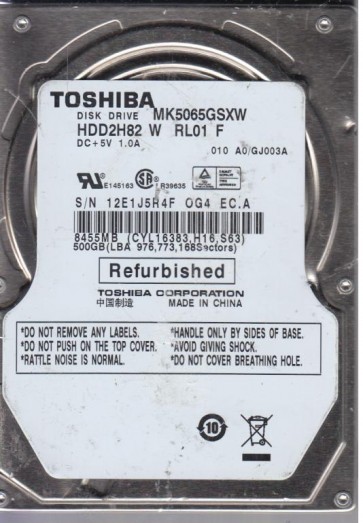
The Toshiba MK5065GSXW is a 2.5-inch SATA hard disk drive (HDD) with a 500GB storage capacity, spinning at 5400 RPM. It was commonly used in laptops and external enclosures from the late 2000s to early 2010s. This drive utilizes perpendicular magnetic recording (PMR) technology and is known for its relatively high thermal output and sensitivity to physical shock due to its thin form factor. Understanding that it is a mechanical device with moving read/write heads and spinning platters is critical for successful data recovery. The drive’s controller board is model-specific, and firmware issues are a notable failure point for this series.
Identifying Common Failure Types
1. Head Crash or Stiction
This is a mechanical failure where the read/write head physically touches the spinning platter surface, damaging the magnetic layer. Symptoms include a repetitive clicking sound (click of death), grinding noises, or the drive failing to spin up at all (stiction). This is often caused by physical shock, rough handling during operation, or gradual wear. Data is still on the platters but is physically damaged in the affected area.
2. Firmware Corruption
A non-physical failure where the drive’s internal operating system (firmware) becomes corrupted or lost. Symptoms include the drive being detected by the BIOS/OS with an incorrect model name, showing as “0GB” or “0MB” capacity, or becoming completely unresponsive (spinning up but not initializing). The MK5065GSXW is known to have weak firmware sectors that degrade over time, leading to this issue. The platters are typically undamaged.
3. Failed Read/Write Channel or Preamp
This is an electronic failure within the drive’s internal circuitry, often on the head-stack assembly (HSA) or preamplifier chip. Symptoms include the drive spinning up normally but then making a faint squealing or chirping noise, followed by a click, or the drive being detected but unable to read any data (extreme slowness, I/O errors). This is a complex hardware failure that often requires specialized tools to diagnose and bypass.
4. Bad Sectors / Media Degradation
While often considered a software-level issue, bad sectors on this PMR drive can indicate physical degradation of the platter surface. Symptoms include the operating system freezing when trying to access certain files, long load times, and reallocated sector counts in S.M.A.R.T. data. While some bad sectors are repairable via firmware remapping, a high number often points to a developing head or media problem.
Potential Recovery Paths
DIY Methods (Caution Advised)
For Firmware Corruption (Low Risk): If the drive is detected with zero capacity or a strange name, and makes no unusual noises, you may attempt to correct firmware parameters using vendor-specific tools (e.g., MRT, PC-3000). This is a complex, risk-prone DO-IT-YOURSELF (DIY) effort requiring technical knowledge and specialized software. For Bad Sectors: Use a read-only imaging tool like ddrescue (Linux) or HDDSuperClone to create a sector-by-sector image to a healthy drive. Stop immediately if the drive starts clicking or slowing down drastically. Never attempt to format, chkdsk /f, or run defrag on a failing drive.
Professional Recovery Services (Recommended for Hardware Failures)
For any mechanical noise (clicking, grinding, squealing) or if the drive has been physically dropped, immediately power off and seek professional help. A data recovery lab (e.g., DriveSavers, Ontrack, Gillware) will perform cleanroom procedures: replacing the head-stack assembly (HSA) with a matched donor part, performing a direct platter transplant (if heads are damaged) into a compatible donor chassis, or using advanced firmware tools to bypass preamp failures. Cost ranges from $500 to $3000+ depending on complexity. Success rates for head crashes can be >90% when handled by experts on the MK5065GSXW due to its common donor parts.
What Not to Do
- DO NOT power cycle rapidly. Repeatedly applying power can cause a damaged head to scratch the platter, making recovery impossible.
- DO NOT open the drive enclosure. The internal environment must be class 10 cleanroom to prevent dust from destroying the platter surface. A single speck of dust will cause a head crash.
- DO NOT apply external voltage or freezer techniques. Freezing a drive can cause condensation and further mechanical damage. It is a myth that works only in extremely rare, specific cases and is not applicable to the MK5065GSXW.
- DO NOT attempt to reconstruct the board (PCB) by swapping components. While a simple PCB swap might work for some drive models, the MK5065GSXW has a unique NVRAM chip on the PCB that stores drive-specific parameters. Swapping the board without transferring this chip will render the drive inoperable or cause immediate head damage.
- DO NOT run CHKDSK, disk repair utilities, or format the drive. These tools write data to the platters, overwriting your files and worsening underlying physical damage.
Summary
The Toshiba MK5065GSXW is a reliable but mechanically susceptible HDD. The primary failure modes include head crashes (clicking), firmware corruption (detection issues), and preamp failures. Rule of thumb: If you hear abnormal noises, it is a hardware failure requiring a professional cleanroom service. If the drive is silent but not recognized, firmware corruption may be a viable DIY target with specialized tools, but high risk remains. Always prioritize creating a read-only image before any other action. Never open the drive or write to it. Success hinges on correctly identifying the failure type and acting immediately to stop further damage.