
Data recovery on vintage hard drives like the Toshiba MK8050GAC starts with identifying the failure type – electronic, firmware, or mechanical. Each requires a different approach, and misdiagnosis can make things worse. Here’s a quick guide to help you assess your situation and decide on the next step.
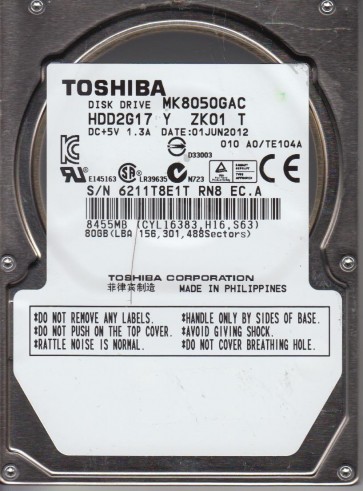
The Toshiba MK8050GAC is a 2.5-inch PATA (Parallel ATA) hard drive with a formatted capacity of 80 GB and a rotational speed of 5400 RPM. It utilizes a glass substrate platter, which is more fragile than aluminum platters found in older drives. This drive was commonly used in laptops and external enclosures during the mid-2000s. Understanding its specific architecture is critical because the head stack assembly (HSA) is prone to stiction (static friction) issues, and the preamplifier on the flex cable is sensitive to electrical surges.
Identifying Common Failure Types
1. Head Crash or Stiction: A clicking or repetitive ticking sound from the drive, often followed by the drive spinning down. The glass platter can develop micro-fractures that are not visible but cause the heads to stick. The drive may be recognized by the BIOS but fails to read any sectors, or it reports “SMART status BAD”. The glass substrate makes this failure mode particularly dangerous for DIY attempts because any contact with the platter can shatter it.
2. Firmware Corruption: The drive spins up normally (no unusual sounds), but the system hangs on the BIOS splash screen or the drive is detected with an incorrect capacity (e.g., 0 GB or 30 GB). The MK8050GAC uses a dedicated SA (System Area) zone on the platter for firmware modules. Electrical noise or sudden power loss can corrupt these modules, making the drive appear dead even though the mechanics are healthy.
3. Bad Sectors / Surface Damage: The drive is detected, and the system boots slowly, or you encounter I/O errors when accessing specific files. The OS may report “Delayed Write Failed” errors. On this specific model, bad sectors often cluster near the end of the LBA range due to the SA zone boundaries. Continued use with bad sectors can spread damage to adjacent areas, especially on glass platters where scratches propagate easily.
Potential Recovery Paths
Professional Data Recovery (Recommended)
For head crashes, stiction, or any unusual sounds: Seek a professional lab immediately. Technicians will open the drive in a cleanroom to replace the heads or unstick the actuator. The glass platter requires specialized handling tools to avoid fractures. Expect costs ranging from $700 to $2000 USD depending on the complexity. For firmware corruption, labs use specialized tools like PC-3000 or MRT to rewrite the SA modules without affecting user data. Do not attempt to force the drive to spin or tap on it.
DIY Approaches (Only for Logical / Bad Sector Issues)
For Bad Sectors (No unusual sounds): Use a Linux Live CD and ddrescue. Run: sudo ddrescue -d -f -r3 /dev/sdX /mnt/recovery/image.img /mnt/recovery/logfile.log where sdX is the failing drive and the destination is a healthy drive. ddrescue will retry bad sectors multiple times and skip them if they are unreadable. This is safe if the drive passes a SMART test without reallocated sectors but fails on reads. Do not run chkdsk /f or any filesystem repair on the source drive.
For Firmware Corruption (Spin up fine but not detected): This is extremely difficult without proper tools. The only safe DIY method is to attempt a forced firmware update from Toshiba if you can find one for the exact model (rare). This usually requires the drive to be recognized by the BIOS first. If it fails, the drive will be left in an unrecoverable state. Do not attempt to short any pins or use serial console commands without schematics.
What Not to Do
- Do not open the drive. The MK8050GAC has a non-standard seal, and the glass platter is extremely fragile. Opening it exposes the platter to dust that will destroy data.
- Do not apply voltage to the motor. Some tutorials suggest jumpering pins to spin up a stuck motor. This can burn the preamplifier or spindle driver chip, making professional recovery impossible.
- Do not freeze the drive. Thermal stress on glass platters can cause micro-cracks. This myth is dangerous for drives with glass media.
- Do not run chkdsk, fsck, or any repair tool. These modify the file system and can overwrite directory structures in bad sector areas, making recovery harder.
- Do not repeatedly power cycle the drive. Each power-on cycle can cause the heads to land on damaged areas, spreading the defect.
Summary
The Toshiba MK8050GAC is a fragile drive, primarily due to its glass platter. The most common failure modes are head crashes (audible clicking), firmware corruption (no detection despite spinning), and bad sectors. For any physical issues (noises, stiction), immediate professional intervention is required. For logical issues (bad sectors) without noise, ddrescue is the only safe DIY tool. Avoid all folk remedies like freezing or opening the case. The best outcome depends on stopping all further use of the drive and acting quickly to prevent mechanical escalation.