
Data recovery on vintage hard drives like the Toshiba MQ04ABF100 starts with identifying the failure type – electronic, firmware, or mechanical. Each requires a different approach, and misdiagnosis can make things worse. Here’s a quick guide to help you assess your situation and decide on the next step.
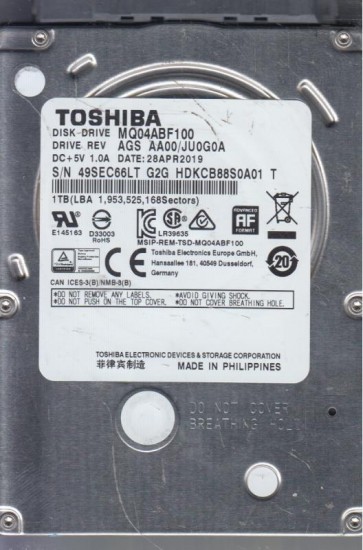
The Toshiba MQ04ABF100 is a 2.5-inch, 5400 RPM, 1TB SATA hard disk drive (HDD) utilizing SMR (Shingled Magnetic Recording) technology. This drive is commonly found in mainstream laptops, external enclosures, and all-in-one PCs. SMR drives write data by overlapping tracks like roof shingles, which significantly increases storage density but introduces a unique failure dynamic: the drive’s internal firmware relies heavily on a large, fast NAND flash buffer to manage the complex rewrite process. If the flash cache or its controller degrades, the drive can exhibit performance issues even if the platters and heads are physically sound. The MQ04ABF100 is generally considered an entry-level to mid-range HDD. It is not designed for 24/7 enterprise use but for consumer workloads with periodic power cycles. Understanding that it is a low-power, slim design (7mm height) means it has less physical robustness against shock compared to thicker, 15mm drives.
Identifying Common Failure Types
1. Firmware Corruption (SMR Management Table Failure)
SMR drives maintain a sophisticated internal translation table that maps logical block addresses to physical shingled tracks. A sudden power loss, a bad sector on the system area (typically near zone 0), or a failing flash cache chip can corrupt this table. Symptoms: The drive powers up, spins, and is detected in BIOS but takes an extremely long time (minutes to hours) to be recognized by the OS. Once recognized, file access is glacial, or the drive may appear as “RAW” or “uninitialized.” The drive may click softly (not a head crash) as it repeatedly retries reading the translation table. This is a software-level failure, but the root cause can be marginal hardware.
2. Head Degradation / Stiction
Due to its slim 2-platter design, the MQ04ABF100 is susceptible to head contamination over time, especially in dusty environments or after a drop. Symptoms: The drive starts making a chirping or scraping sound during spin-up or reading. You may hear multiple faint clicks (seeking) then silence. In extreme cases, the heads stick to the platters (stiction), causing the motor to struggle and emit a whine or a single loud click as it fails to spin up. Data recovery from this state requires opening the drive in a cleanroom. Do not attempt to spin a stictioned drive by tapping or freezing it.
3. Bad Sectors / Media Degradation (SMR Write Amplification)
The SMR architecture means that rewriting a single sector often requires reading an entire band of tracks, modifying it in cache, and rewriting the entire band (write amplification). If the platter surface has even a few unstable sectors, this process can fail repeatedly. Symptoms: The drive slows to a crawl when writing or reading specific files. The OS reports cyclic redundancy check (CRC) errors. SMART data will show high values for Reallocated Sector Count, Current Pending Sector Count, and Uncorrectable Sector Count. Unlike simple PMR drives, a few bad sectors on an SMR drive can cause the entire drive to freeze or offline during background media maintenance tasks.
Potential Recovery Paths
Professional Services (Recommended for Hardware & Complex Firmware Failures)
For the MQ04ABF100, professional recovery is often required if: head stiction is present, the drive emits scraping sounds, the BIOS does not identify the drive correctly, or the drive is completely dead (no spin). A professional lab will have: a matching donor drive to swap heads or platters, specialized tools like PC-3000 or DeepSpar to access the SMR firmware layer and rebuild the translation table, and a Class 100 clean bench. Costs typically range from $500 to $3000+ depending on complexity. Do not send the drive to a service that quotes a flat rate without diagnosis; SMR recovery can be very tricky. Look for labs that explicitly state experience with Toshiba SMR drives.
DIY Methods (For Logical/Software Issues Only)
DIY recovery is only safe if the drive is fully detected by the system, makes no abnormal sounds, and is not failing rapidly. Steps: 1. Image the drive using a tool like ddrescue (Linux) or HDDSuperClone. These tools handle bad sectors by skipping them and retrying later, preventing further damage. 2. Do not attempt to “repair” the drive with chkdsk or fsck on the original drive. 3. If the drive is extremely slow due to SMR cache failure, try connecting it via a direct SATA port (not USB bridge) and ensuring the system is idle to allow the drive’s own internal garbage collection to complete. This can take 24-48 hours. 4. Use a software tool like R-Studio or Reclaime to recover files from the cloned image. The SMR write behavior means a full clone may take 3-5 times longer than a standard PMR drive of the same capacity. Have patience.
What Not to Do
Never freeze the MQ04ABF100. This is a myth that can cause condensation inside the sealed head-disk assembly, leading to immediate head crash. Do not run chkdsk /f or any repair utility directly on a failing drive. This forces the heads to stress over bad areas and can corrupt the SMR translation table, making recovery near impossible. Do not tap or shake the drive if it is not spinning. The MQ04ABF100’s thin platters are fragile and easily scratched by a misaligned head. Do not disassemble the drive to try and swap the circuit board. The board is paired with the drive’s firmware (adaptive data). Swapping boards without transferring the ROM chip will result in a “buzz of death” or no detection. Do not attempt to write zeros or format the drive, even if it appears to work. This overwrites the data and cannot be undone at a consumer level.
Summary
The Toshiba MQ04ABF100 is a performance-sensitive SMR drive that can fail due to firmware translation table corruption, head degradation, or sector-related write amplification. Professional recovery is mandatory for any audible issues, electrical death, or BIOS non-detection. DIY cloning is only viable for slow or error-prone drives without abnormal sounds, and must be done with specialized imaging tools that handle SMR complexity. The primary risk is further damaging the delicate SMR firmware and media. Always create a full clone before any repair attempt. If the drive is important, consult a specialist familiar with Toshiba’s SMR architecture. Data is only as safe as the last verified backup.