
Data recovery on vintage hard drives like the Samsung SP1654N starts with identifying the failure type – electronic, firmware, or mechanical. Each requires a different approach, and misdiagnosis can make things worse. Here’s a quick guide to help you assess your situation and decide on the next step.
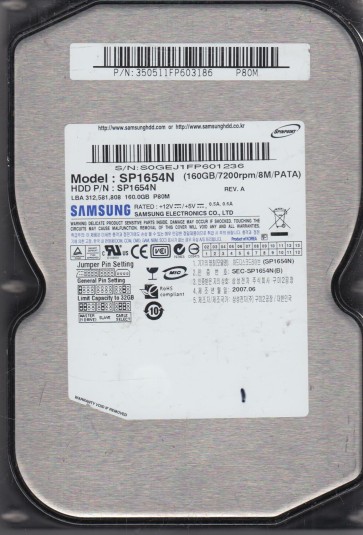
The Samsung SP1654N is a 3.5-inch PATA (Parallel ATA) hard disk drive from the early 2000s, typically with a capacity of 160 GB and a rotational speed of 7200 RPM. It utilizes a single-platter design and is known for its relatively quiet operation compared to its contemporaries. The drive employs a Samsung proprietary controller board and uses a standard IDE interface. As a legacy drive, its internal components include voice coil motor (VCM) actuator, read/write heads, a spindle motor, and magnetic platters. Due to its age, common failure points include degraded spindle motor bearings, weakened magnetic domains on the platters, and failure of electrolytic capacitors on the PCB (Printed Circuit Board). Understanding its parallel ATA nature is crucial because modern systems may require a specific IDE controller or a compatible USB-to-IDE adapter for external access.
Identifying Common Failure Types
1. Logical / Soft Failure (File System Corruption)
The drive spins up and is detected by the BIOS (Basic Input/Output System) but shows errors such as “Drive not formatted,” “File system is RAW,” or “Invalid media type.” The cause is often due to a corrupted master boot record (MBR), partition table, or file system structures (e.g., FAT32 or NTFS) resulting from improper shutdowns, virus attacks, or bad sectors in the system area. SMART (Self-Monitoring, Analysis, and Reporting Technology) data may show reallocated sectors but the drive mechanically operates normally.
2. Mechanical Head Crash / Stiction
The drive powers on but produces audible clicking, scraping, or grinding sounds. The BIOS may not detect the drive, or if detected, the capacity reads incorrectly (e.g., 0 GB or a very small value). This indicates the read/write head has physically contacted the platter surface (head crash) or the head slider is stuck to the platter (stiction). Data is at extreme risk as the platter coating may be physically damaged.
3. Electronic / PCB Failure
The drive does not spin up or spin up only momentarily (e.g., a single whir then stop). No unusual mechanical noises are present. The cause is often a failed surface-mount component on the PCB, such as a blown TVS (Transient Voltage Suppression) diode, failed motor driver chip, or swollen capacitors. This can result from a power surge or age-related component degradation.
4. Bad Sector / Media Degradation
The drive operates but experiences extremely slow read/write speeds, frequent freezing, and operating system errors during file access. SMART data will show a high count of reallocated, pending, or uncorrectable sectors. This is a progressive physical failure where the magnetic coating on the platters is deteriorating.
Potential Recovery Paths
Professional Data Recovery Services
For mechanical failures (head crash, stiction) or severe electronic damage (burnt PCB beyond simple component replacement), immediate professional intervention is required. A reputable lab will perform a cleanroom (Class 10 or better) head transplant or platter transfer to a donor drive of the exact same model and firmware version. For logical failures with significant physical damage, professional tools such as PC-3000 or DeepSpar can create a sector-by-sector image while bypassing bad regions. This is the only safe path for valuable or irreplaceable data.
DIY Recovery Paths
For Logical Failures: Use a write-blocker and connect the drive to a healthy computer. Scan with data recovery software like R-Studio, GetDataBack, or DMDE. Do not write any new data to the drive. Attempt to recover the file system from a RAW volume. If the drive has a few bad sectors, a tool like ddrescue (Linux) or HDDSuperClone can clone the drive with bad sector handling, though this process is very slow and may stress the drive.
For Simple PCB Failure: If the motor does not spin but no burnt smells are present, inspect the PCB for damaged TVS diodes. If you have a multimeter and soldering skills, a TVS diode can be removed (the circuit will continue to function). A more advanced DIY step is a PCB swap with an identical donor board from the exact same model and revision. However, this often requires transferring the original firmware ROM (U12 chip in some models) from the old PCB to the donor board. This is a delicate surface-mount soldering task and can damage the ROM if done incorrectly. If the firmware is not transferred, the drive will not calibrate correctly.
Important Note on DIY
DIY is only advisable for simple logical recoveries where you have a backup of the data or the data is not highly critical. Any physical repair attempt (opening the drive, swapping heads) performed in a non-cleanroom environment will almost certainly result in irreversible data loss due to dust contamination.
What Not to Do
1. Never open the hard drive enclosure. The internal platters are highly sensitive to microscopic dust particles. Even a single speck of dust can destroy the data surface if the drive is powered on.
2. Do not attempt to “freeze” the drive. This is an outdated myth that can cause condensation inside the drive, leading to head stiction and corrosion.
3. Do not use file system repair tools (e.g., chkdsk /f in Windows or fsck on Linux) on a drive you want to recover data from. These tools write to the drive aggressively and can overwrite critical file system structures, making recovery much harder or impossible.
4. Do not repeatedly power-cycle the drive if it makes unusual noises (clicking, grinding). Each cycle risks further head or platter damage.
5. Do not tap or shake the drive. This can misalign the heads or cause the spindle to seize.
6. Do not attempt to re-solder components on the PCB unless you are experienced with surface-mount soldering and can identify the correct component. Improper soldering can short pins on the main controller IC.
Summary
The Samsung SP1654N is a legacy PATA drive prone to both logical and physical failures. The first step is a careful diagnosis: spin-up sound, BIOS detection, and SMART health. For clicking or grinding sounds, immediately power off and seek professional cleanroom recovery. For no spin-up with no noise, a common DIY fix involves replacing a blown TVS diode or swapping the PCB (with firmware transfer). For logical issues like RAW file systems, use image-based recovery software on a write-blocker. The worst action you can take is to ignore mechanical warning signs or perform invasive repairs without proper equipment and environment. Prioritize professional assistance for any data you cannot afford to lose. Always back up critical data on functional drives to prevent future loss.