
Data recovery on vintage hard drives like the Seagate ST3120213A starts with identifying the failure type – electronic, firmware, or mechanical. Each requires a different approach, and misdiagnosis can make things worse. Here’s a quick guide to help you assess your situation and decide on the next step.
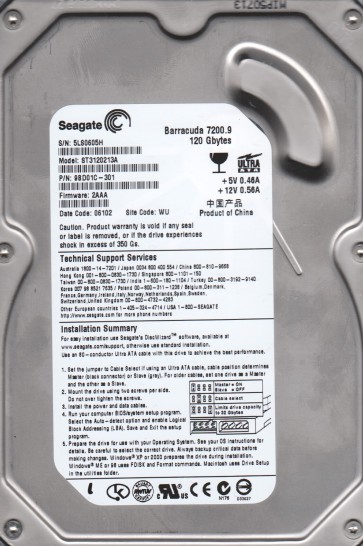
The Seagate ST3120213A is a 3.5-inch Parallel ATA (PATA) hard disk drive with a formatted capacity of 120GB. It features a spindle speed of 7200 RPM and a 2MB cache buffer. As a product of its era (early- to mid-2000s), it utilizes an older recording technology and is particularly susceptible to specific firmware and mechanical issues. The drive uses a Seagate-designed controller board and is known for having a relatively fragile SATA-to-IDE bridge mechanism if adapted. Understanding its age and technology is critical before any recovery attempt.
Identifying Common Failure Types
1. Clicking or Ticking Sounds (Head Crash / Stiction)
A repeated clicking or ticking noise, often followed by the drive spinning down, is a classic sign of a head crash or actuator arm failure. The drive heads are physically contacting the platters or are stuck to the platter surface (stiction). This is a mechanical failure and is the most common failure mode for this generation of drives. Data is likely not recoverable through software means.
2. Drive Not Spinning Up (Motor or PCB Failure)
If you apply power and the drive remains completely silent (no spin-up whir), the spindle motor may have seized, or the printed circuit board (PCB) controller may be dead. Motor failure (often due to seized bearings) is less common, while PCB failure (from a power surge or component age) is very frequent. A dead PCB often shows no signs of life and no motor spin.
3. Drive Detected but Unresponsive / SMART Errors
The drive is recognized in BIOS or Windows but hangs the system, causes long delays, or shows severe SMART (Self-Monitoring, Analysis, and Reporting Technology) errors such as ‘Reallocated Sector Count’ or ‘Current Pending Sector Count’ at critical levels. This is often a combination of a developing media defect (bad sectors) and firmware issues. Seagate drives from this era have known firmware bugs that can cause the drive to hang during read operations. This is a logical and partial mechanical failure.
4. Detected with Wrong Capacity (Firmware Corruption)
The drive is recognized but shows a drastically incorrect capacity (e.g., 0MB or 4GB instead of 120GB). This almost always points to corrupted firmware modules, specifically the ‘SA’ (Servo or System Area) zone. This is a common logical failure for the ST3120213A and often requires specialized firmware tools to reload or repair the firmware tables.
Potential Recovery Paths
DIY Methods (Proceed with Extreme Caution)
Only attempt DIY for logical failures. For physical issues, DIY attempts will almost certainly destroy all remaining data.
For Firmware Issues (Wrong Capacity or High SMART Errors): You can attempt to use free tools like Victoria or HDD Regenerator (trial) to perform a low-level scan and attempt to disable bad sectors. However, these tools can be dangerous as they force the drive to reallocate weak sectors, potentially causing further firmware corruption. A better DIY approach is to use a bootable Linux live USB (like Ubuntu) and use the `ddrescue` command to create a forensic image of the drive, skipping bad sectors with a log file. Example: `sudo ddrescue -d -f -r3 /dev/sda /media/user/safedrive/backup.img /media/user/safedrive/rescue.log`. This does not repair the drive but safely extracts readable data.
For a Dead PCB (No Spin): You can attempt a PCB swap. You must find a donor drive with an identical model (ST3120213A) and a matching firmware revision (printed on the PCB). Simply swapping the PCB will NOT work because the drive’s unique adaptive parameters are stored on the PCB’s ROM chip. You must desolder the 8-pin serial flash ROM chip from the original PCB and transplant it to the donor PCB. This requires advanced soldering skills and a hot air station. Warning: Using a donor PCB without transferring the ROM chip will result in the drive being permanently damaged by over-driving the heads.
Professional Services (Recommended for Physical or Complex Failures)
For Clicking / Stiction: Professional recovery labs use cleanroom (Class 100 or better) environments to disassemble the drive and replace the damaged read/write heads with donor heads from a matching drive. This is a micro-surgical operation requiring specialized tools like a head stack manipulator. Cost: $500 – $2000+ USA.
For Seized Motor: A cleanroom specialist can carefully unseize the motor by applying a controlled torque or by performing a platter transplant (moving the platters to a donor motor assembly).
For Firmware Corruption: Professionals use tools like PC-3000 or MRT to access the drive’s native firmware interface, read the corrupted module data, and rewrite it with a known-good backup. This often resolves wrong capacity and unresponsive behavior without hardware intervention. Cost: $200 – $600+.
For Bad Sectors (Heavy Data Recovery): Professionals use specialized imaging software (e.g., DeepSpar Disk Imager) which uses muscle reading techniques and dynamic head retry algorithms to extract data from failing media. This is far more effective than any DIY software.
What Not to Do
- Do Not Open the Drive: Do not, under any circumstances, open the drive enclosure in a normal room. The internal platters are sealed in a cleanroom environment. Even a single speck of dust will cause a head crash and permanently destroy the platter surfaces.
- Do Not Apply Power if Clicking: If the drive is making clicking sounds, do not cycle power on and off. Each spin-up risks further damage to the platters and heads. The longer power is applied, the more data is destroyed.
- Do Not Run CHKDSK or Format: Do not run any operating system utilities like CHKDSK (Check Disk), ScanDisk, or a format command. These tools attempt to repair the file system, which can overwrite your data and cause irreversible corruption. A bad sector will cause the utility to freeze and retry endlessly, damaging the heads.
- Do Not Freeze the Drive: The old myth of freezing a hard drive to fix a seized motor or actuator is dangerous. It can cause condensation, leading to corrosion and stiction. It is almost never effective for modern drives and can cause permanent platter damage.
- Do Not Use Strong Magnets: Do not attempt to use a strong magnet to “demagnetize” or “fix” the drive. Magnets can erase the servo tracks written on the platters, making the drive unrecognizable and unrecoverable even by professionals.
Summary
The Seagate ST3120213A is a legacy PATA drive with a high likelihood of mechanical (head crash, motor) and firmware-related failures. The absolute first step is to identify the failure type: clicking (mechanical), no spin (PCB or motor), or wrong capacity/logical errors. For any physical noise or complete silence, immediately stop all DIY attempts and contact a professional data recovery service with a cleanroom. For firmware or bad sector issues, a careful DIY `ddrescue` image is the safest approach. The most critical rule is to never open the drive or run standard ‘repair’ software. Prioritize creating a byte-level image over attempting to fix the drive. The cost of professional recovery is high due to the complexity, but it is often the only path for 100% data retrieval from a physically failing ST3120213A.