
Data recovery on vintage hard drives like the Seagate ST3160316AS starts with identifying the failure type – electronic, firmware, or mechanical. Each requires a different approach, and misdiagnosis can make things worse. Here’s a quick guide to help you assess your situation and decide on the next step.
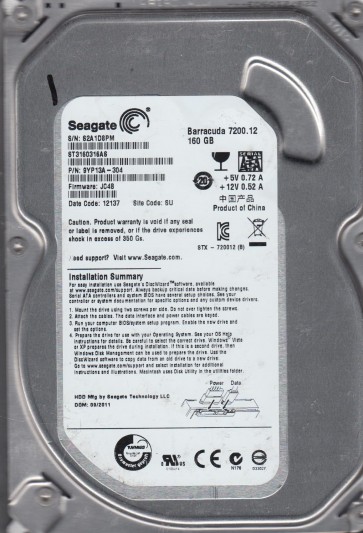
The Seagate ST3160316AS is a 160GB 3.5-inch SATA hard drive from the Barracuda 7200.12 family. It uses perpendicular recording technology with a 7200 RPM spindle speed and a 16MB cache. This model is known for its high areal density and is common in desktop PCs from the late 2000s to early 2010s. The drive employs a LSI (now Seagate) controller chip and typically uses a single platter design. Understanding its specific firmware architecture is critical, as many failures are firmware-related rather than purely mechanical. The drive has a native SATA 3.0Gb/s interface and supports Advanced Format (4K sector emulation) in later revisions, though early models use 512-byte sectors.
Identifying Common Failure Types
1. Firmware Corruption (Media Cache or SA Failure)
This is the most frequent failure on the ST3160316AS. Symptoms include the drive being detected with the correct model name but reporting a capacity of 0GB, the drive clicking a few times then going idle, or the system hanging during POST. The firmware modules stored in the system area (SA) on the platter become corrupted, often due to a weak head or bad sectors in the SA zone. A common symptom is the “BSY” (Busy) state on the SATA interface where the drive never completes its initialization. This is a soft failure and often reversible with proper tools.
2. Failed Read/Write Head (Mechanical Degradation)
Physical head failure presents as repetitive clicking or tapping sounds (head slap), complete silence on power-up (no spindle spin), or the drive being detected but with extremely slow response and CRC errors. The ST3160316AS uses a single head assembly. If the head crashes onto the platter, you may hear scratching sounds. A head failure is a hardware issue that requires a clean room environment to repair. Pre-failure indicators include increasing numbers of reallocated sectors, pending sectors, and high “Raw Read Error Rate” SMART attributes.
3. Stuck Spindle Motor (Bearing Failure)
A motor that fails to spin up results in the drive making no sound or a single faint hum followed by silence. This can be caused by a seized bearing due to age, heat, or physical shock. The platter may be stuck to the parking ramp if the drive was not parked properly. Unlike head failures, a stuck motor may sometimes be freed with gentle mechanical intervention, but the data is usually recoverable by transplanting the platters into a donor drive with a working motor. This is a pure hardware mechanical failure.
Potential Recovery Paths
Professional Recovery Services
For the ST3160316AS, especially with mechanical failures (head crash, stuck motor, or severe firmware corruption), professional recovery is strongly recommended. A reputable lab will: (1) Diagnose the exact failure in a Class 10 clean room. (2) For firmware issues, use tools like PC-3000 or MRT to rebuild the module tables, repair translator, or perform a virtual head map change. (3) For head failure, they will swap the head stack assembly (HSA) from a matched donor drive of the exact same model, firmware version, and date code. (4) For motor seizures, they may perform a platter transplant into a donor chassis. Professional recovery for this model typically costs $300 to $1500+ depending on severity. Ensure the lab offers a “no data, no fee” policy.
DIY Recovery Attempts (Only for Specific Software Cases)
DIY is only viable for pure logical failures like accidental deletion, formatting, or partition loss, and possibly for simple firmware issues if you have advanced tools. For the ST3160316AS, affected by firmware corruption, a DIY solution using a terminal cable (USB-TTL adapter) and software like Seagate Tools (STCom) or MRT can sometimes work. Steps: (1) Connect a terminal to the drive’s serial port (J1 header ¨C TX/RX/GND). (2) Power on the drive and monitor terminal output. (3) If the drive enters a “T>” prompt, commands like “/2” (to System Area), “i,,22” (to disable media cache), and “m0,2,2,,,,,22” (to force firmware loading) may bring the drive online. (4) Then use data recovery software like R-Studio or DMDE to image the drive sector-by-sector. Warning: These commands are highly model-specific and a wrong command can permanently brick the drive or make recovery impossible. Do not attempt if you hear any mechanical noise or if the drive has physical damage. For stuck motors, a “spin start” technique (applying a 5V pulse to the PCB while rotating the platter) is a last-resort gamble and almost always causes platter damage. Do not attempt this.
What Not to Do
- Never open the drive enclosure. The ST3160316AS platters are extremely sensitive to dust and contamination. Even a microscopic particle landing on the platter surface can destroy data. Opening the drive voids any chance of professional recovery without clean room tools.
- Do not apply power repeatedly if the drive is clicking or making unusual sounds. Each additional spin-up with a damaged head can grind the head against the platter, permanently scraping off the magnetic coating and making data unrecoverable.
- Avoid using generic data recovery software on a failing drive. Running ScanDisk, CHKDSK, or any data recovery tool that writes to the drive (like trying to repair file system errors) can overwrite critical data and make recovery impossible. Use only sector-by-sector imaging tools that read without writing.
- Do not freeze the drive. This is an outdated myth that can cause condensation inside the drive, leading to corrosion and further damage. It does not help with modern drives like the ST3160316AS.
- Do not swap the PCB (Printed Circuit Board) from another drive without verifying ROM compatibility. The ST3160316AS stores unique calibration data and adaptive parameters in a serial EEPROM on the PCB. Swapping the PCB without first transferring the ROM chip (or programming the ROM to the donor board) will cause the drive to fail to spin up or misalign the heads. Many users mistakenly believe a simple swap will work.
Summary
The Seagate ST3160316AS is a well-known model with a high susceptibility to firmware corruption, which is often a recoverable soft failure. However, head crashes and motor seizures are common with age and require professional intervention. The most cost-effective path is to first correctly diagnose the failure type. If the drive is detected but shows 0GB or strange behavior, a firmware repair may be achievable with specialized tools (DIY or professional). If you hear mechanical noises or the drive is silent, stop all attempts and seek a professional lab immediately. Always prioritize creating a sector-by-sector image to a healthy drive before any data recovery attempts. Remember: the risk of permanent data loss increases with every minute the drive is powered on in a failing state. Do not proceed unless you are absolutely sure of the failure type and have the correct tools.