
Data recovery on vintage hard drives like the Seagate ST318404LC starts with identifying the failure type – electronic, firmware, or mechanical. Each requires a different approach, and misdiagnosis can make things worse. Here’s a quick guide to help you assess your situation and decide on the next step.
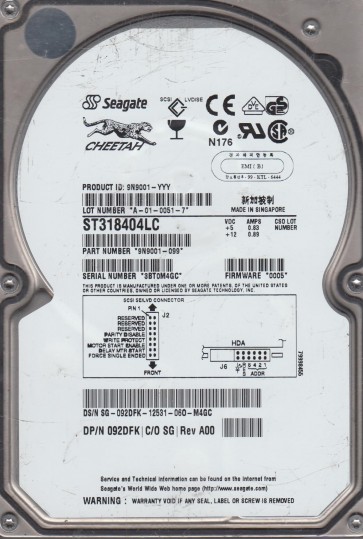
The Seagate ST318404LC is a legacy 18.4 GB SCSI (Ultra 320) 3.5-inch enterprise hard drive with a rotational speed of 10,000 RPM. It utilizes a 16-bit SCSI interface and a spindle motor designed for high duty cycles typical of server environments. This drive model features an aluminum chassis and a single glass or ceramic platter. Due to its age, electronic component degradation, firmware aging, and mechanical wear are common failure vectors. The drive uses a dedicated system area on the platters for adaptive data, microcode, and defect management tables (P-list and G-list). If this region becomes corrupted, the drive will fail to spin up or become inaccessible.
Identifying Common Failure Types
1. Electronic Failure (PCB Issue)
Symptoms include no spin-up, no sound from the spindle motor, or the drive clicking immediately from power on without a full rotation. The most common culprit is a failed preamplifier or motor controller chip on the printed circuit board (PCB). The ST318404LC often suffers from surge damage through the SCSI terminator or power connector. Unlike modern drives, the PCB may have a failed SCSI controller chip that cannot see the drive’s internal ROM. A blown TVS diode on the 5V or 12V rail is also common.
2. Mechanical Failure (Head Crash)
Audio indicators include a repetitive clicking noise (head stacking on the ramp or slapping against the platter) or a high-pitched whine followed by a stop. This is often caused by degradation of the spindle motor bearings (seizing) or a head that has physically failed and contacted the platter surface. On the ST318404LC, the head assembly (HSA) is delicate, and shock damage during transit is a primary cause. The drive may spin down immediately after initial rotation due to a failed magnetic preamp.
3. Firmware Corruption (Logical/System Area Failure)
The drive spins up normally but is not recognized by the SCSI controller, reports incorrect capacity (e.g., 4 MB or no LUN), or gets stuck in a “busy” state. This is due to corruption of the firmware modules stored on the platters. Common causes include sudden power loss during a write operation or a failing SA (Servo Area). The drive may also exhibit a “click of death” pattern even with good electronics because it cannot read the microcode from the platters.
4. Degraded SCSI Termination or Cable Issues
This is a software/configuration problem mimicking hardware failure. The drive spins up and is detected inconsistently, with frequent “SCSI parity errors” or “Selection Timeout” in the system logs. This is caused by incorrect termination (active terminator missing or set to passive), faulty SCSI cables, or a bad SCSI controller host adapter.
Potential Recovery Paths
Professional Data Recovery Service
This is the only safe option for any clicking, scraping, or mechanical failure. A certified recovery lab will perform a clean-room class 100 environment to replace the damaged heads or transplant the platters into a donor drive. For electronic failure, they can perform a PCB swap with microcode transfer (NVRAM/EEPROM must be exchanged, otherwise the drive will not work). Costs range from $300 to $1500+ depending on damage severity. This is strongly recommended for any drive with physical damage or critically important data.
DIY Recovery Paths (Only for experienced users with low data value)
Electronic Failure: If the drive is completely silent with no spin, DO NOT open it. Check the PCB for visible burning. You can attempt a same-version PCB donor swap (match the exact PCB suffix, e.g., “Rev A” and “ST318404LC” SCSI ID). However, you MUST transfer the 8-pin serial flash (usually 25F64 or similar) from the bad PCB to the donor PCB. A simple swap without microcode transfer will result in a “no spin” or “locked” state. This requires a hot air station and soldering skills. Warning: Use ESD protection!
Firmware Corruption: If the drive spins and is detected by the SCSI BIOS with incorrect capacity, a firmware repair tool like PC-3000 SCSI or Atola Insight/Pro is required. The user can read the ROM and run a module re-generator. This is complex and requires specific hardware and software licenses. Do not attempt to write to the SA without a backup. Warning: Incorrect firmware writes can render the drive permanently unrecoverable.
Termination/Configuration Issues: This is the only safe and easy DIY path. Ensure active termination is enabled on the last device on the SCSI bus. Verify cable connections are secure and not damaged. Check the SCSI controller settings in the BIOS (termination power, bus speed). Use a known good 68-pin to 80-pin adapter if necessary.
What Not to Do
- Never open the hard drive enclosure or remove the cover. The actuator arm and platters are extremely sensitive to dust and fingerprints. Even a speck of dust can destroy data resident platters.
- Do not apply power if the drive makes a scraping or clicking sound. This can cause the heads to carve deeper into the platter, making recovery impossible.
- Do not freeze the drive. This is a persistent myth. Ice crystals can form inside the headstack, causing further mechanical damage and corrosion.
- Do not use software utilities to “fix” bad sectors with a mechanical failure. All tools that cause head movement will worsen the damage.
- Do not attempt a PCB swap by buying a random identical model on eBay without verifying the firmware version and DCM (Drive Config Module) number. Incompatible firmware will brick the drive.
- Do not use non-lab level SCSI terminators. A cheap passive terminator can cause data corruption on the bus and may damage the controller electronics.
Summary
The Seagate ST318404LC is a vintage enterprise SCSI drive that should be handled with extreme care due to its age and sensitivity. Three primary failure modes are electronic (PCB), mechanical (head crash), and logical (firmware). For a clicking or physically damaged drive, professional recovery is mandatory. For a silent no-spin case, a careful PCB swap with microcode transplant is possible for skilled users. For firmware issues, specialist tools are required. The most common avoidable mistake is opening the drive or using destructive DIY software. Always prioritize placing the drive in a static-free bag and seeking professional evaluation if data value exceeds $500. The drive is not a desktop modern SATA unit; its SCSI interface and older architecture require specific knowledge. Do not proceed past basic diagnostics if any physical damage is suspected.