
Data recovery on vintage hard drives like the Seagate ST3250824AS starts with identifying the failure type – electronic, firmware, or mechanical. Each requires a different approach, and misdiagnosis can make things worse. Here’s a quick guide to help you assess your situation and decide on the next step.
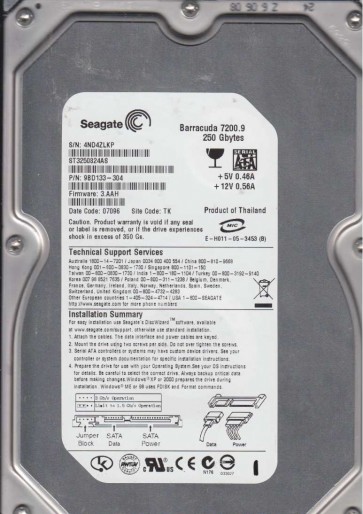
The Seagate ST3250824AS is a 3.5-inch, 250GB SATA hard disk drive from the Barracuda 7200.9 family, utilizing perpendicular recording technology with a 16MB cache. It spins at 7200 RPM and features an 80GB platter design. This drive is known for its age (mid-2000s) and common failure modes related to its controller board (PCB), preamplifier, and head stack assembly. The ST3250824AS uses an Agere LSI controller IC, which is sensitive to voltage spikes and thermal stress. Understanding its specific architecture is crucial for targeted recovery.
Identifying Common Failure Types
This model exhibits three predominant failure categories:
1. PCB (Printed Circuit Board) Failure (Electronic Failure): The drive may power on but not spin up, or click once and stop. Visible signs include a burning smell, blown TVS diodes (near the power connector), or damaged SATA connector pins. The Agere controller chip can fail due to a shorted power supply. A simple PCB swap is often not enough because the unique firmware on the original PCB’s ROM chip must be transferred.
2. Head and Media Failure (Mechanical Failure): The drive emits repetitive clicking sounds (head crash) or a grinding noise. The internal heads may have contacted the platter surface, causing media damage. This can be preceded by bad sectors, slow performance, or a clicking noise in the days before failure. If heads are damaged, data recovery requires opening the drive in a cleanroom and swapping the head stack assembly (HSA) from a donor drive with identical firmware revisions.
3. Firmware Corruption (Logical Failure): The drive spins up normally, may be detected by BIOS, but appears with an incorrect capacity (e.g., 0GB, 500GB), or the operating system cannot access it. This often results from damaged translator or SMART data corruption. On the ST3250824AS, this is commonly due to a bad sector in the system area (Service Area) that becomes inaccessible. This is a software/firmware issue and may be recoverable via advanced terminal commands or dedicated firmware tools without physical intervention.
Potential Recovery Paths
Professional Service (Recommended for Mechanical or Complex Failures): For any clicking, grinding, or burning smells, immediately seek a certified data recovery lab that handles Seagate F3 architecture. They possess cleanrooms (Class 10 or better), specialized head changers, and PC-3000 or DeepSpar tools to isolate heads, create disk images, and repair firmware. Expect costs from $500 to $3000+ depending on damage severity. This is the only option for head/platter damage.
DIY Path (Only for Firmware or Simple PCB Issues): If the drive is dead with no noise (no spin), check for a blown TVS diode. Using a multimeter, test the 5V and 12V lines on the SATA power connector. If shorted, you can carefully remove the shorted diode with tweezers (DO NOT short the pads). Next, for a PCB swap, purchase an exact matching donor board (same model and PCB revision, e.g., 100376729). BUT you must swap the original PCB’s 8-pin serial flash EEPROM (U12, often a 25p10xx) over to the donor board. Use a hot air station at 250¡ãC. This retains the unique adaptive data. Do not apply power to a donor board without swapping the ROM, as it may cause additional compatibility issues.
DIY Path for Firmware Issues (Using Terminal): If the drive spins up and clicks but is recognized incorrectly, connect a TTL-USB adapter to the drive’s terminal port (pins near the SATA connector). Open a serial terminal (115200 baud). Power on the drive. If you see F3 T> prompt, you can try commands like m0,6,2,,,,,22 to force a firmware retrain, or use the /T command to check for bad sectors in the SA. Advanced users can use the M0,2,1,1,2,3,0,0 command to attempt a head mapping. This is advanced and carries risk of bricking the drive if done incorrectly.
What Not to Do
- Do NOT power on the drive if it emits a burning smell or if you see physical damage to the PCB. This can short the SATA port or destroy the preamplifier.
- Do NOT apply normal power to a drive with a blown TVS diode. Even if the diode is removed, the underlying fault (e.g., PCB short) may still exist. Always test for shorts.
- Do NOT open the drive enclosure. Exposing the platters to dust, even a single fingerprint, will likely cause irreversible damage to the media and make professional recovery much harder or impossible.
- Do NOT use software like chkdsk or Disk Utility on a failing drive. This forces the heads to read bad sectors, causing more damage and potentially causing a head crash.
- Do NOT freeze the drive. Temperature changes can cause condensation inside the sealed chamber, corroding the platters and damaging the spindle bearing.
Summary
The Seagate ST3250824AS is a legacy drive with common failure modes: PCB electrical failure, head/media mechanical failure, and firmware logical failure. The first step is diagnosing the symptom: does it spin, click, burn, or appear incorrectly? For any mechanical (clicking/grinding) or PCB damage with a burning smell, professional recovery is the only safe route. For a dead PCB with no signs of burning, a careful ROM chip swap onto a matching donor board might work for experienced DIYers. For firmware issues, terminal access can bypass some problems, but it is not a guaranteed fix. Always prioritize data safety over cost by halting further access when symptoms first appear.