
Data recovery on vintage hard drives like the Western Digital WD10EADX starts with identifying the failure type – electronic, firmware, or mechanical. Each requires a different approach, and misdiagnosis can make things worse. Here’s a quick guide to help you assess your situation and decide on the next step.
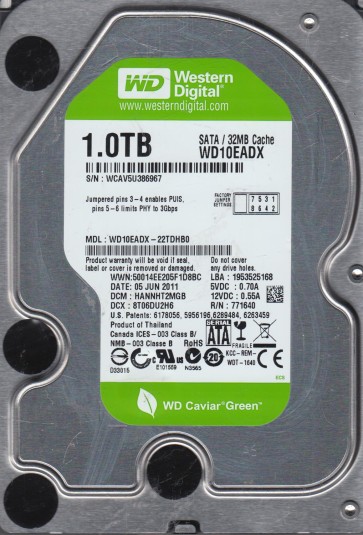
The Western Digital WD10EADX is a 1TB 3.5-inch SATA hard drive from the Green power family. It is characterized by its use of Advanced Format (AF) 4K sectors, an IntelliPower feature that adjusts spin speed for power efficiency, and a variable rotational speed typically operating around 5400-7200 RPM. This drive is designed for low power consumption and quiet operation, making it suitable for external storage and media archiving. Its firmware is heavily tuned for power management, which can lead to specific failure modes related to head parking and spin-up/down cycles.
Common Failure Types
1. Mechanical Head Failure (Physical Crash)
Symptoms: Clicking or ticking sounds (often referred to as the “click of death”), grinding noises, drive not spinning up, or drive detected by BIOS but with zero capacity. Cause: Physical contact between the read/write head and the platter surface due to shock, contamination, or wear. The WD10EADX’s high-density platters are particularly vulnerable to even minor contamination.
2. Firmware Corruption (S.M.A.R.T. Failure & Load/Unload Cycle Issues)
Symptoms: Drive is recognized but hangs the system, reports incorrect capacity, or shows a “SMART status bad” error. Frequent clicking without platter spin is also common. Cause: The Green series firmware is aggressive in parking the heads. Excessive load/unload cycles can corrupt the firmware modules (particularly the System Area modules SA) stored on the platters. A failed firmware upgrade or a power loss during a specific operation can also trigger this.
3. Logical Damage (File System Corruption & Bad Sectors)
Symptoms: Drive is detected but shows as unallocated, RAW, or prompts to format. Files appear corrupted, folders are empty, or the system freezes when accessing specific files. Cause: The AF 4K sector layout mismatch with older operating systems, sudden power loss during writes, or the development of non-physical “pseudo” bad sectors due to weak servo patterns or degraded magnetic domains. The WD10EADX’s low power design can exacerbate write caching issues.
4. Preamp / PCB Electronic Failure (Power Surge & Component Degradation)
Symptoms: Drive is completely dead with no spin, no sound, and no detection. A burning smell may be present. Cause: Failure of the TVS (Transient Voltage Suppression) diodes on the printed circuit board (PCB) due to a power surge, or failure of the preamplifier chip inside the drive’s head assembly. Capacitor aging on the PCB is also common in older units.
5. Media Degradation (Magnetic Platter Wear)
Symptoms: Gradual increase in reallocated sectors, increasing read error rates, and the drive becoming slower over time. Cause: The magnetic coating on the platters can degrade over time due to thermal stress or manufacturing defects. The WD10EADX’s low power mechanisms can contribute to inconsistent magnetic domain stability.
Potential Recovery Paths
DIY Methods (For Logical & Simple Firmware Issues Only)
1. For Logical Damage (RAW/Unallocated): Use a read-only data recovery tool like R-Studio, DMDE, or GetDataBack. Perform a sector-by-sector clone to a healthy drive using a tool like ddrescue (Linux) or HDD Raw Copy Tool. Do not write to the original drive. Run a filesystem check (chkdsk /f) only on the clone, never on the original. Warning: chkdsk on a failing drive can worsen physical damage.
2. For S.M.A.R.T. Errors (Firmware Hangs): Connect the drive to a SATA port that supports hot-swapping. Power on the system, wait for it to boot, then power on the drive. This can sometimes bypass a firmware hang during initial spin-up. Immediately create a full sector-by-sector clone. Warning: This method does not guarantee success and can cause further damage if the heads are already weak.
3. For Bad Sectors: Use ddrescue with a log file. Configure it for a slow, careful first pass (direct mode) followed by a retry pass. The goal is to extract as much data as possible without stressing the drive. Warning: Do not force the drive to read a difficult sector. Allow ddrescue to skip and retry later.
Professional Services (For Mechanical, Firmware, & Complex Electronic Failures)
1. Mechanical & Head Failure: Requires a cleanroom (Class 100 or better) to physically open the drive. A donor drive of the exact same model and firmware version is required for head assembly replacement. The recovery engineer must transplant the head stack assembly (HSA) and often needs to calibrate the servo. Cost: $500 – $2500+ depending on severity and turnaround time.
2. Firmware Corruption: Professional tools like PC-3000 or MRT can directly interface with the drive’s firmware. The engineer can read and rewrite corrupted SA modules, rebuild translators, or deactivate defective zones. This bypasses the need for a cleanroom in many cases. Cost: $200 – $800.
3. PCB/Electronic Failure: A professional can perform a PCB swap, but it must be tested and often requires transferring the original drive’s NVRAM (ROM) chip to the donor PCB. Simply purchasing an identical PCB is usually insufficient. They can also repair the original PCB by replacing failed components. Cost: $150 – $500.
What Not to Do
1. Do not run chkdsk or any disk repair utility on the original drive. This can write bad sector markings, overwrite critical file system structures, and cause irreversible data loss.
2. Do not attempt a DIY PCB swap by simply ordering an identical drive. The firmware (ROM) is unique to each drive. A direct swap will often not spin the platters or will cause erratic behavior.
3. Do not open the hard drive enclosure. The internal platters are extremely sensitive to dust and particles. Opening it outside a cleanroom will almost certainly render the drive unrecoverable.
4. Do not freeze the drive. This is an outdated myth that can cause condensation, short circuits, and severe platter damage. It will not fix mechanical or logical failures.
5. Do not repeatedly power-cycle the drive if it is making clicking noises. Each power cycle can physically damage the platter surface and the heads, drastically reducing the chance of a successful recovery.
Summary
The WD10EADX is a power-efficient drive vulnerable to head crashes, firmware corruption from excessive load/unload cycles, and logical damage from its AF 4K sector structure. For logical issues, a sector-by-sector clone with read-only software is the only safe DIY path. For mechanical failure (clicking) or complex firmware problems, immediate professional intervention is critical. Avoid all DIY repair attempts involving physical opening, freezing, or running chkdsk on the original drive. The most important step is to stop using the drive at the first sign of failure to preserve the integrity of the data.