
The restoration function of the Samsung Auto Backup is useful when original data is
damaged/lost due to system malfunction or reinstallation of OS or when copying the
same data to a new system.
Perform the restoration in the following order.
1. Running the AutoBackup Restore Setting Wizard (Download Now)
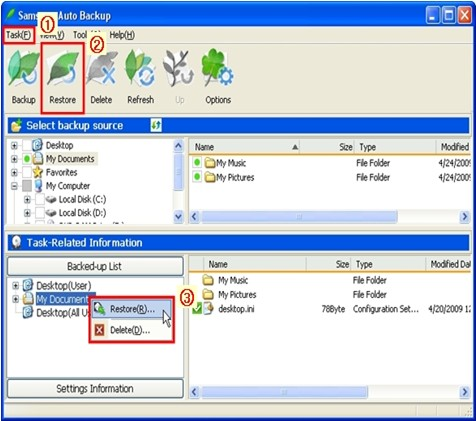
Click Task▶Restore or the ‘Restore’ button or select folders or files to restore.
Right click the mouse as seen in the figure then select ‘Restore’ in the pop up menu displayed.
(After selecting folders or files to restore in the Backed-up List, the ‘Restore’ menu becomes activated.)
2. On the displayed window, select the Restore location then click Next.
Select the ‘Original Location’ or ‘New Location’.
3. After setting the Restore time and process options of Restore duplicate files, click Next.
a) Set Restore time
Select ‘Most recent time of backup’ or ‘Time of backup most close to a specific time’.
b) Restore duplication files
Select ‘Restore only files that are different from source files’ or ‘Restore all files’.
4. After selecting the type of file to restore, click Complete.
Assign File grouping and Extension to either restore or exclude from the restoration.
When ‘Finish’ is clicked without any setting, all types of selected files are restored.
5. The restoration is complete.
(At the beginning of the restoration, the ‘Backup Engine’ window appears then
continues the restoration. If the same files are in the folder to restore, they are
excluded from the restoration.)