
R-Studio Data Recovery Software is a comprehensive, professional-grade data recovery solution designed to retrieve lost, deleted, or inaccessible files from various storage devices, including hard drives, SSDs, USB flash drives, memory cards, and more. Developed by R-Tools Technology Inc., this software is widely recognized as one of the most powerful and versatile data recovery tools available for both individuals and enterprise users.
Data recovery software is non-destructive and read-only, capable of providing safe and accurate retrieval of data from inaccessible, formatted, corrupted, or undetectable storage media. All data including photos, pictures, videos, audio files, music, documents, emails, archives, and other file types lost due to accidental deletion, virus damage, drive corruption, formatting, partition loss, software failure, or system crash can be effectively recovered from all types of storage devices such as internal/external HDDs, SSDs, USB flash drives, pen drives, thumb drives, SD cards, memory sticks, and digital cameras.
R-Studio works with storage devices of all capacities, ranging from small drives to large multi-terabyte drives. The software supports Windows operating systems from Windows 2000 through Windows 11, as well as Windows Server editions. It also offers dedicated versions for Mac and Linux platforms.
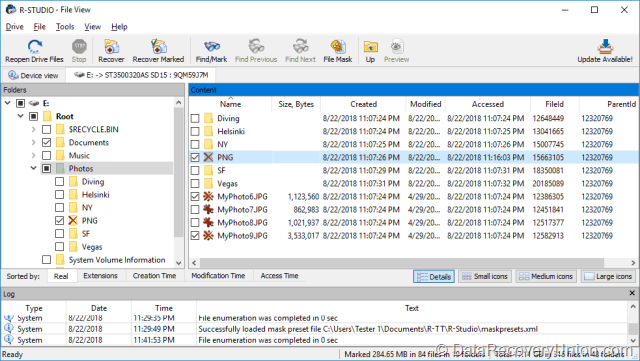
Key Features of R-Studio Data Recovery Software
Here are the key features typically associated with R-Studio Data Recovery:
Comprehensive Device Support
- Storage Devices: Supports HDD, SSD, USB flash drive, memory card (SD, microSD, CompactFlash), external hard drive, digital camera, CD/DVD/Blu-ray, floppy disks, ZIP drives, and magnetic tape devices.
- Disk Interfaces: Compatible with IDE, SATA, SCSI, and USB interfaces.
- Advanced Configurations: Supports dynamic disks, hardware RAIDs, software RAIDs, and virtual machines (VMDK/VHD/VHDX/VDI formats).
Multiple Data Loss Scenarios
- Accidental Deletion: Recovers files deleted without using Recycle Bin or after Recycle Bin has been emptied.
- Formatting Recovery: Retrieves data from drives that have been formatted, even for different file systems.
- Partition Recovery: Scans damaged or deleted partitions and recovers files from them.
- Corrupted Drive Recovery: Extracts data from drives with file system corruption or that appear as RAW.
- Virus Attack Recovery: Recovers files hidden, deleted, or encrypted by malware.
- System Crash Recovery: Creates emergency startup media to recover data from unbootable computers.
- Bad Sector Handling: Creates disk images to isolate and recover data from drives with bad sectors.
Wide File System Compatibility
R-Studio supports an extensive range of file systems across different operating systems:
- Windows: FAT12/16/32, exFAT, NTFS, NTFS5, ReFS/ReFS2+ (Resilient File System)
- macOS: HFS, HFS+, HFSX, APFS
- Linux/UNIX: Ext2/3/4FS, XFS, UFS1/UFS2 (Little and Big Endian variants), UFS BigEndian
- Optical Media: ISO9660
- Magnetic Tape: UStar/Tar/CPIO/Pax (Technician/T80+ versions)
Advanced RAID Recovery Capabilities
One of R-Studio’s standout features is its powerful RAID recovery support:
- RAID Levels Supported: RAID 0, RAID 1, RAID 4, RAID 5, RAID 6, and nested RAIDs
- Automatic RAID Parameter Recognition: Automatically detects block size, order, offsets, and other RAID parameters.
- Custom RAID Configuration: Allows manual specification of RAID parameters for complex or proprietary setups.
- Reverse RAIDs: Decomposes real disk objects into virtual RAIDs, enabling reconstruction of data from missing disks.
- RAID Consistency Check: Verifies valid data parity values for data integrity.
- Support for Various RAID Types: Windows Storage Spaces, Intel Software RAID, Apple software RAIDs, CoreStorage, Fusion Drive, Linux mdadm volumes, Linux LVM/LVM2.
IntelligentScan Technology
R-Studio features a unique IntelligentScan technology that provides real control over data recovery. The scan process is graphically visualized, showing found items including known file types, MFT records, boot records, and more. This advanced algorithm improves recovery quality and speeds up the process significantly.
File Preview Functionality
Allows users to preview recoverable files before initiating the recovery process. The previewer supports a large number of video, audio, graphic, and document file formats. Files can be played back without having their respective applications installed. Picture tiles and first frames of video files are displayed as icons, enabling you to verify file integrity and content before committing to recovery.
Disk Imaging Feature
R-Studio offers a full disk imaging tool, allowing you to create sector-by-sector images of entire drives, logical disks, or selected parts. Supported image formats include:
- Plain images – exact byte-for-byte copies
- R-Drive Image compatible images
- VMDK, VHD, VHDX, VDI formats – for virtual machine compatibility
- E01/(EWF) files – Expert Witness File Format (Technician/T80+ versions)
- AFF files – Advanced Forensic Format (Technician/T80+ versions)
- DMG files – Apple Disk Image (read-only)
Images can be saved locally or on remote computers, and image creation can be stopped and resumed. Most importantly, R-Studio can scan objects while creating their images, saving valuable time when dealing with failing drives.
Bootable Emergency Media
R-Studio Emergency can be run from removable media (USB drive, CD/DVD) when the operating system cannot start due to corrupted or deleted system files. Two versions are available:
- R-Studio Emergency GUI – Graphical user interface for easy operation
- R-Studio Emergency TUI – Text user interface for systems without graphics card support
The emergency media includes all features of the main software, enabling complete data recovery from unbootable systems.
Network Data Recovery
R-Studio supports remote data recovery over TCP/IP networks. R-Studio Agent can be installed on remote computers, and data can be recovered from network computers running Windows, macOS, Linux, and other UNIX operating systems. This feature is invaluable for IT administrators and data recovery professionals managing multiple systems.
Hex Editor and Advanced Data Analysis
Includes a built-in hexadecimal disk and file editor (full editing capabilities available in Technician/T80+ and Corporate versions). Features include:
- NTFS non-resident attribute editing
- Custom patterns (templates) for parsing data according to specific data structures
- Data alteration capabilities for professional users
S.M.A.R.T. Monitoring
Includes S.M.A.R.T. (Self-Monitoring, Analysis, and Reporting Technology) attribute monitoring to track drive health, temperature, and performance. This helps identify potential drive failures before data loss occurs.
Encryption Support
Supports recovery from encrypted drives including:
- BitLocker Drive Encryption – both ToGo and System Drive Encryption methods
- Apple FileVault – for encrypted Mac drives
- APFS encryption – advanced encryption for modern Mac file systems
Save Scan Results
Allows you to save scan results and reload them later, eliminating the need to rescan large drives repeatedly. Scan results can be exported and manually edited, then loaded back with files automatically marked for recovery.
Professional Integration with Hardware Tools
For professional data recovery services, R-Studio integrates with specialized hardware tools:
- DeepSpar Disk Imager – Professional HDD imaging device for drives with hardware issues
- USB Stabilizer – Provides stable operation with unstable and degraded USB storage devices
- RapidSpar – Data recovery hardware for extracting data from problematic hard drives
These integrations provide low-level access to drives with hardware malfunctions, allowing simultaneous disk imaging and analysis.
Supported File Types
R-Studio supports recovery of hundreds of file types across all major categories, including:
| Category | Supported File Extensions |
|---|---|
| Documents | DOC, DOCX, XLS, XLSX, PPT, PPTX, PDF, RTF, TXT, HTML, XML, ODT, ODS, ODP |
| Images & Graphics | JPG, JPEG, PNG, BMP, GIF, TIFF, PSD, CR2, NEF, ORF, RAW, ARW, DNG, HEIC |
| Audio & Video | MP3, WAV, WMA, AAC, FLAC, M4A, AVI, MP4, MOV, WMV, MKV, FLV, 3GP, MTS, M4V, MPEG |
| Archives | ZIP, RAR, 7Z, TAR, GZ, CAB |
| Emails | PST, OST, DBX, EML, MBOX, NSF, MSG |
How to Use R-Studio Data Recovery Software
Follow these steps to recover your lost data using R-Studio:
- Download and Install – Download R-Studio from the official website. Important: Do not install the software on the drive from which you want to recover data, as this may overwrite lost files. Install it on your local hard drive or another safe location.
- Launch and Select the Drive – Launch R-Studio. The main window displays all physical drives, logical disks, and detected partitions. Select the drive or partition you want to recover data from.
- Scan the Drive – Double-click the selected drive to open the Scan dialog. Choose the appropriate scan type:
- Quick Scan – For recently deleted files and simple recovery scenarios
- Comprehensive Scan – For formatted, corrupted, or severely damaged drives
Configure scan parameters as needed, including known file types search and scan area selection.
- Review Scan Results – During scanning, R-Studio visualizes found items including files, MFT records, and boot records. After scanning, you can browse found files by file system structure or by file type.
- Preview Files – Double-click any file to preview its contents. This allows you to verify file integrity and determine if the file can be properly recovered.
- Recover Files – Mark the files or folders you wish to recover, then click the Recover button. Select a destination location on a different drive to avoid data overwriting.
Editions and Pricing
R-Studio offers multiple editions to accommodate different user needs and budgets. All licenses are permanent (one-time payment):
| Edition | Price | Description |
|---|---|---|
| Free Demo Version | Free | Allows scanning and previewing of recoverable files. Demo mode limitation: cannot recover files larger than 1024KB (1MB). |
| R-Studio FAT | $49.99 (one-time) | Recovery from FAT/exFAT file systems only. For Windows. |
| R-Studio NTFS | $59.99 (one-time) | Recovery from NTFS/ReFS file systems only. For Windows. |
| R-Studio Standard | $79.99 (one-time) | Full support for FAT, exFAT, NTFS, ReFS, HFS+, APFS, Ext2/3/4, UFS, and XFS. Best for most users. |
| R-Studio T80+ | $80.00 (one-time) | Time-limited license (80 days). Includes Reverse RAIDs, Hex Editor, Runtime Imaging. |
| R-Studio Network | $179.99 (one-time) | Includes network recovery capabilities. For Windows. |
| R-Studio Technician | $899.00 (one-time) | Professional toolkit with advanced features: USB activation, Show Files (Advanced) for problematic drives, multitasking, hidden devices, Drive Copy Wizard, multi-pass imaging, Reverse RAIDs, magnetic tape support, third-party hardware integration. Cross-platform (Windows/Mac/Linux). |
| R-Studio Corporate | Contact Sales | For enterprise use with custom licensing options. |
Note: R-Studio runs in demo mode with the only limitation being that files larger than 1024KB cannot be recovered. You can preview any file regardless of size to evaluate recovery quality before purchasing. All versions are registered on-the-fly and require no reinstallation.
System Requirements
Before installing R-Studio, ensure your system meets the following requirements:
- Processor: Intel-compatible platform
- RAM: 256MB minimum (more recommended for better performance)
- Hard Disk Space: Sufficient space for recovered files and disk images
- Supported Operating Systems:
- Windows 11/10/8.1/8/7/Vista/XP/2000
- Windows Server 2025/2022/2019/2016/2012/2008/2003
- Permissions: Administrative privileges required to install and run R-Studio
- Network: Network connection required for remote data recovery (optional)
Known Limitations
While R-Studio offers powerful and comprehensive recovery features, users should be aware of the following limitations:
- Demo Mode File Size Limit: The free demo version cannot recover files larger than 1024KB (1MB). However, you can preview any size file to evaluate recovery quality.
- Steep Learning Curve: R-Studio is a professional-grade tool with extensive features. Beginners may find the interface complex compared to simpler consumer-oriented tools.
- Price Point: Compared to some consumer-level data recovery software, R-Studio’s Standard edition ($79.99) and Technician edition ($899) are more expensive, though the price reflects professional-grade capabilities.
- File System-Specific Editions: The lower-priced FAT and NTFS editions are limited to specific file systems, which may confuse some users when purchasing.
- HFS Deleted File Recovery: When files are deleted on HFS, HFS+, HFSX file systems (Mac), the system completely removes all system information, making recovery possible only through the Extra Search for Known File Types option.
- Physical Damage Not Covered: Cannot recover data from physically damaged drives without hardware repair first, though integration with professional tools like DeepSpar helps.
- Overwritten Data Cannot Be Recovered: If lost files have been overwritten by new data, recovery becomes impossible regardless of software quality.
- USB Activation for Technician Version: The Technician version requires USB activation, which may be inconvenient for some users.
Comparison at a Glance
| Feature | R-Studio Standard | Typical Consumer Competitors |
|---|---|---|
| Free Tier | 1MB file recovery limit (unlimited preview) | Often 1GB-2GB recovery limit |
| Lifetime License | ✓ All editions are permanent | Often subscription-only |
| RAID Recovery | ✓ Full RAID 0/4/5/6 support | Rarely available or limited |
| Network Recovery | ✓ Network version available | Not typically available |
| File Preview | ✓ Extensive preview (video/audio/image/document) | Limited preview |
| Bootable Media | ✓ GUI and TUI versions | Often available in premium versions |
| File Systems Supported | 15+ file systems (Windows/Mac/Linux/UNIX) | Typically Windows only (FAT/NTFS/exFAT) |
| Hex Editor | ✓ Built-in | Not typically available |
| Platforms | Windows, Mac, Linux (separate versions) | Often Windows only |
Common Data Loss Scenarios Where R-Studio Excels
- Accidental Deletion: Files deleted without using Recycle Bin or after Recycle Bin has been emptied – R-Studio can recover them if not overwritten.
- Formatting: Whether quick format or full format, even when formatted to a different file system type, R-Studio can retrieve data.
- Corrupted or RAW Drive: When Windows says “You need to format the disk,” R-Studio can bypass corruption and extract files.
- Lost Partition: After partition deletion or MBR corruption, R-Studio scans the entire physical drive to find and recover lost partitions.
- RAID Failure: When a RAID array fails, R-Studio can virtually reconstruct the array and recover data even if multiple drives are damaged.
- System Crash: When Windows won’t boot, use R-Studio Emergency bootable media to recover data from the unbootable system.
- Cross-Platform Recovery: Recover files from Mac drives (HFS/APFS) or Linux drives (Ext/XFS) using the Windows version.
- Failing Drive with Bad Sectors: Create a disk image first to stabilize the failing drive, then recover from the image without further stressing the hardware.
- Network Computer Recovery: Remotely recover data from network computers without physical access.
- BitLocker/FileVault Encrypted Drives: Recover data from encrypted drives when you have the decryption key.
Support and Customer Service
R-Tools Technology Inc. offers comprehensive customer support options:
- Email Support: Available through the website contact form
- Knowledge Base: Comprehensive online documentation covering all features and common issues
- Help Files: Built-in detailed help system
- Forum: User community discussions and troubleshooting
- Registered Users: Access to Client Portal for license management and updates
Final Verdict: Is R-Studio Data Recovery Right for You?
R-Studio Data Recovery is widely recognized as one of the most powerful and comprehensive data recovery solutions available. Its advanced features, extensive file system support, and professional-grade RAID recovery capabilities set it apart from consumer-focused alternatives.
This software is ideal for:
- IT Professionals and System Administrators: Network recovery, remote agent deployment, and extensive file system support make it an essential toolkit.
- Data Recovery Specialists: The Technician edition with hardware integration, reverse RAIDs, and professional imaging features is industry-standard.
- Enterprise Users: Corporate edition with custom licensing and RAID recovery capabilities for business-critical data.
- Advanced Home Users: Users comfortable with professional tools who need more than basic consumer recovery.
- Cross-Platform Environments: Organizations working with Windows, Mac, and Linux systems need a single solution for all platforms.
- RAID Array Owners: Those using RAID 0, 1, 4, 5, 6 configurations need specialized recovery tools.
Consider alternatives if:
- You need a simple, beginner-friendly interface with consumer-focused pricing – consumer tools like EaseUS or Stellar may be more approachable.
- You primarily recover small amounts of data from Windows drives only – the free version’s 1MB limit may be restrictive.
- Your recovery needs are occasional and very basic – simpler, lower-cost tools may suffice.
- You never work with RAIDs or cross-platform file systems – you may not need R-Studio’s advanced features.
Pro Tip: After data loss, stop using the affected drive immediately. Do not add new files, run disk repair tools like CHKDSK, or attempt to format the drive. For drives with bad sectors, create a disk image first before attempting recovery. Always save recovered files to a different drive than the one you’re recovering from. R-Studio’s demo mode allows you to preview all files before purchasing – use this to verify recovery quality first.
Official Website: www.r-studio.com
Disclaimer: Recovery success depends on multiple factors, including how long ago data was lost, whether the drive has been used since the loss, and the extent of corruption or physical damage. No data recovery software can guarantee 100% recovery in all situations. This article is for informational purposes only. All product names, logos, and brands are property of their respective owners.