
Data recovery on vintage hard drives like the Samsung HD161GJ starts with identifying the failure type – electronic, firmware, or mechanical. Each requires a different approach, and misdiagnosis can make things worse. Here’s a quick guide to help you assess your situation and decide on the next step.
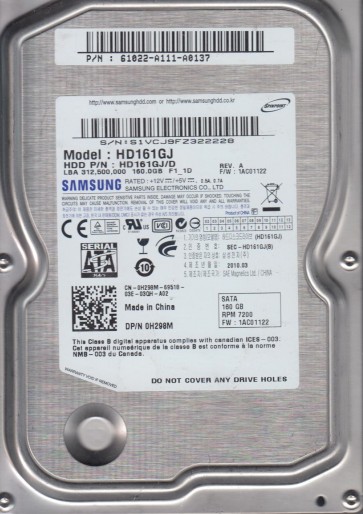
The Samsung HD161GJ is a 3.5-inch SATA hard drive from Samsung’s SpinPoint P120 series, typically manufactured between 2006 and 2009. It features a 160GB capacity, a 7200 RPM spindle speed, and an 8MB cache. This drive utilizes perpendicular magnetic recording technology and an integrated controller chip (often a Marvell-based design). Key components vulnerable to failure include the spindle motor, read/write heads, preamplifier (preamp) chip, and the printed circuit board (PCB). The drive’s firmware is stored on a serial flash chip, and its adaptive data (including head maps and defect lists) is stored in service areas (SA) on the platters. Understanding that the HD161GJ is a mature drive with high areal density means that head contamination and platter degradation are common failure accelerators.
Identifying Common Failure Types
1. Electrical Failure (PCB / Component Burnout)
The most common failure is a dead or unresponsive PCB. A typical symptom is the drive receiving power (no spinning, no sound at all) despite being connected. This often results from a shorted TVS diode or a blown zero-ohm resistor on the power input line, frequently caused by a faulty power supply or surge. More advanced issues include a failed motor controller (often the Smooth LSI or Texas Instruments chip) or a damaged preamp circuit. A less common but critical issue is the failure of the firmware flash chip, which renders the drive completely unresponsive without reprogramming.
2. Mechanical Failure (Head Crash / Stiction)
Mechanical failure is severe and often destructive. The HD161GJ is susceptible to head stack assembly (HSA) degradation due to wear or contamination from degraded internal lubricants. Symptoms include clicking, scratching, or whining noises, and the drive failing to spin up (or spinning up then stopping). Stiction occurs when the heads stick to the platter surface, often due to high humidity or physical shock. A head crash results in the heads physically contacting the platter, creating white or black debris and irreparable damage to the data area. Such drives usually require a cleanroom environment for platter extraction.
3. Firmware Corruption (Logical / System Area Failure)
This is a logical failure that manifests as the drive being detected incorrectly (e.g., as 0GB, or with a wrong model name) or being slow to respond. The HD161GJ’s firmware resides in the service area (SA), and corruption can occur due to a bad sector on the SA, a power loss during a firmware update, or a failing preamp causing read errors. Common modules like “MODEL” and “SMART” can become damaged. The drive may click normally but fail to initialize. Symptoms include the drive being detected but not accessible in Disk Management, or causing the host computer to hang on boot. This is often reversible with specialized firmware tools, but DIY is extremely risky.
4. Bad Sectors / Media Degradation
Over time, magnetic medium degradation leads to the development of reallocated sectors. While the drive’s internal SMART monitoring will log pending or reallocated sectors, heavy degradation can cause the drive to become extremely slow or to fail completely as it repeatedly tries to re-read weak magnetic signals. Head positioning errors (due to worn voice coil) can also induce bad sectors. Indicators include frequent freezing during file access, corrupted files, and the Windows chkdsk output showing numerous bad clusters. Prolonged use of a drive with severe bad sectors can escalate to a head crash.
Potential Recovery Paths
Professional Data Recovery Services (Recommended for Mechanical / Complex Firmware)
For any mechanical failure (clicking, grinding, or no spin), or for a drive with severe bad sectors or corrupted firmware that a DIY approach cannot fix, a professional service is essential. A recovery engineer will typically: (1) Cleanroom open the drive (Class 100 or better) for head swap or platter transplant. (2) Use specialized equipment like a PC-3000, DeepSpar Disk Imager, or MRT Pro to read the firmware modules directly and bypass damaged areas. (3) Perform a head-level image or a firmware rebuilding procedure. (4) For PCB failure, they will either replace the PCB and reprogram the flash chip with the correct ROM, or repair the PCB component-level (soldering new diodes/controllers). Expect costs between $300 and $2000+ depending on damage and urgency.
DIY Recovery Paths (Only for Electrical or Logical Failure)
For Electrical Failure (No Spin / No Life): The only safe DIY approach for the HD161GJ is to inspect the PCB for visibly damaged components (burnt TVS diodes, blown resistors). You can test the power supply with a multimeter. A direct PCB swap is almost never successful without transferring the U12 flash chip (an 8-pin SOIC) from the old board to the new donor board. This requires desoldering and programming skills. Simply buying a used identical PCB will not work due to drive-specific firmware. If you lack micro-soldering experience, do not attempt this.
For Logical Failure (Bad Sectors / Slow Access): If the drive is detected and spinning normally (no unusual noises), you can attempt a software-based image. Use tools like DDRescue (Linux) or HDDSuperClone (Windows bootable). Create a disk-to-disk image to a healthy drive. Always work in read-only mode (the default for these tools). Never run chkdsk /f, scandisk, or a filesystem repair on a drive with physical bad sectors; it will corrupt the directory structure. For simple file recovery, R-Studio or Recuva can recover deleted files if the drive is completely healthy logically, but not if bad sectors are present.
For Firmware Corruption: DIY recovery of firmware modules on the HD161GJ is extremely advanced and requires a direct terminal connection (TTL UART) and specific commands to access the service area. Do not attempt without deep knowledge of the Samsung ROM structure and risk of rendering the drive completely useless. A wrong command can brick the drive.
What Not to Do
- Never open the drive lid outside of a cleanroom. Even a tiny speck of dust can permanently damage the platters and destroy all data. The gap between the head and platter is nanometers.
- Do not apply power repeatedly to a clicking or grinding drive. Each power cycle can physically damage the sliders and heads, digging deeper into the platters.
- Do not run any filesystem repair tools (chkdsk /f, fsck, Disk Utility First Aid) on a drive that is making mechanical noise or has known bad sectors. These tools generate intense read/write activity that can kill a failing drive.
- Avoid freezing the drive. That home remedy is obsolete and dangerous. Ice can cause condensation, which leads to short circuits and corrosion absolutely fatal to data.
- Do not try to swap the PCB without also transferring the unique U12 flash chip from the original board. Even identical boards from the same batch have different adaptive data.
- Never use strong magnets near the drive (e.g., for degaussing or checking motors). This can destroy the servo tracks on the platters permanently.
Summary
Recovering data from a Samsung HD161GJ requires careful diagnosis. The most common failures are electrical (blown PCB component) and mechanical (head crash / stiction). Software or logical failures (firmware corruption, bad sectors) are possible but less destructive. For mechanical or complex firmware issues, professional help is mandatory. The only safe DIY options are software-based imaging for logical bad sectors (using DDRescue/HDDSuperClone) and very careful PCB component-level repair for electrical failure (if you have micro-soldering ability). Never open the drive, run chkdsk, apply power to a clicking drive, or approach a firmware repair without specialized tools and deep knowledge. Prioritize immediate professional evaluation for any physical symptom to maximize the chance of a full recovery.

