
Data recovery on vintage hard drives like the Samsung HM160HC starts with identifying the failure type – electronic, firmware, or mechanical. Each requires a different approach, and misdiagnosis can make things worse. Here’s a quick guide to help you assess your situation and decide on the next step.
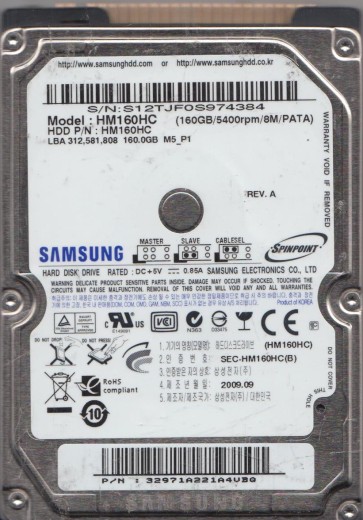
The Samsung HM160HC is a 160GB 2.5-inch PATA (Parallel ATA) hard drive, typically found in older laptops and external enclosures from the late 2000s. It operates at 5400 RPM and uses a single 160GB platter with an areal density common for its era. This drive is prone to specific failure modes related to its aging mechanical components, particularly the spindle motor bearings and the read/write head assembly. Understanding that this is a mature, mechanical device is critical; its failure behavior is distinct from modern SSDs or even newer HDDs. The drive’s PATA interface, while robust, can also suffer from connectivity issues that mimic more serious internal faults.
Identifying Common Failure Types
1. Mechanical Head Crash or Stiction
This is a prevalent failure. Symptoms include the drive making a clicking, scraping, or repetitive “tick-tick-tick” sound when powered on. The drive may spin up but fail to be recognized by the BIOS or OS. This can be caused by physical shock (dropping the laptop), aging of the lubricants on the ramp or platter surface, or a degraded head preamplifier. Stiction (static friction) can prevent the heads from disengaging from the landing zone, causing the motor to struggle or fail to spin the platters.
2. Logical Corruption & Bad Sector Growth
While the drive may appear physically functional (spins up, is detected), the user might experience extreme slowness, frequent file system errors (e.g., “The file or directory is corrupted and unreadable”), or the drive becoming RAW in Windows Disk Management. This is often due to a growing number of reallocated or pending sectors (SMART attributes like 05, C5, C6). The HM160HC’s older firmware can have trouble managing sector defects effectively over time, leading to cascading read errors.
3. Firmware Corruption or Service Area Damage
The drive may spin up but fail to identify itself or produce a “drive not detected” error in the BIOS. It might also vibrate or hum in a particular pattern without accessing the platters. The HM160HC stores its adaptive data (translator, firmware modules) on the platter’s service area. A weak head or a head that has crashed in the service area can cause the firmware to fail to load. Symptoms include a “busy” status that never clears, or the drive locking up. This is a serious hybrid failure that often requires specialized tools to bypass or repair the firmware modules.
4. PCB (Printed Circuit Board) Failure
The drive shows no signs of life (no spin-up, no sound) when powered. This could be a failed preamplifier, a blown TVS diode (Transient Voltage Suppression) from a power surge, or a defective spindle motor controller chip. On the HM160HC, the TVS diode pair (for 5V and 12V lines) is a known weak point. A short circuit in the motor can also kill the controller. The drive’s platters and heads may still be in perfect condition if the PCB alone is damaged.
Potential Recovery Paths
DIY Methods (Proceed with Extreme Caution)
For PCB Failure (Component Level): If the drive is dead (no spin) and you suspect a power surge, you can inspect the PCB for visibly burnt components (especially small black diodes near the SATA power connector). A multimeter can check the TVS diodes for a short. Advanced DIY users can replace a blown TVS diode with a suitable equivalent (e.g., a 5V or 12V Zener diode). If the motor controller is dead, a donor PCB is needed, but it must have its original firmware ROM chip (a 8-pin serial flash) transplanted from the patient PCB, or the drive will not spin up or will translate data incorrectly. This is a delicate hot-air soldering task.
For Logical Corruption: Use imaging tools like ddrescue (Linux) or HDDSuperClone (bootable CD) to create a byte-for-byte image of the drive to a healthy disk. Do this only if the drive makes normal, consistent sounds (no clicks or scraping). Stop the process immediately if the drive begins to click. For bad sectors, use the tool’s retry/pass strategy. Never run chkdsk /f on a failing drive as it can cause further damage.
Professional Data Recovery Services
When to seek a professional: Any audible clicking, scraping, grinding, or repetitive head parking sounds. Drive not detected with a known-good interface cable. Failed DIY attempts, especially any attempt to open the drive’s sealed chamber.
What a professional does for the HM160HC: For head crashes, the cleanroom is essential. A technician will disassemble the drive, replace the entire head stack assembly (HSA) with a matched donor from an identical HM160HC (same date code/firmware revision is critical). For stiction, they can use specialized tools to carefully lubricate or release the heads. For firmware damage, they use tools like PC-3000 to read the service area directly, repair corrupted modules, or rebuild the translator. For platter damage, they may perform a partial head transplant or, in extreme cases, extract the platters and place them into a donor drive with a matched spindle and motor. The cost is typically $300 to $1500+ depending on severity.
What Not to Do
- Do NOT open the hard drive. The platters are incredibly sensitive to dust, moisture, and fingerprints. Even a single speck of dust can destroy the heads and platter surface. A non-cleanroom environment will make professional recovery impossible or vastly more expensive.
- Do NOT continue to power on a clicking drive. Each click is the head crashing onto the platter surface, gouging out magnetic material and creating permanent data loss. Power it off immediately.
- Do NOT use disk utility software like CHKDSK, Disk Utility (First Aid), or SpinRite on a physically failing drive. These tools are designed for logical issues and will cause further physical damage by forcing the drive to retry bad sectors aggressively.
- Do NOT apply excessive force to the drive’s connectors or attempt to “wiggle” the interface cable. This can damage the PATA pins or the PCB’s connector.
- Do NOT freeze the drive. This is a myth. Condensation will form inside the drive, causing short circuits and rapid corrosion, destroying the heads and platters.
- Do NOT attempt to swap the PCB without transplanting the firmware ROM. Using a donor PCB directly from another HM160HC will 99% of the time result in the drive not being accessible, or worse, overwriting critical adaptive data.
Summary
The Samsung HM160HC is a legacy PATA drive susceptible to mechanical failure, firmware corruption, and PCB issues. The most critical distinction is between a physically damaged drive (clicks, scraping, no spin) and a logically corrupt one (slow, RAW, bad sectors but quiet). DIY recovery is only realistically possible for a dead PCB with a visible blown component (like a TVS diode) or for logical file system corruption on a perfectly silent drive. Any audible mechanical distress, including clicking, scraping, or grinding, mandates immediate power-off and consultation with a professional data recovery lab. The cost of a professional recovery is justified by the irreplaceable nature of the data and the specialized cleanroom and firmware tools required to safely operate on this vintage drive. Never risk further damage by attempting invasive procedures without the proper equipment and experience.