
Data recovery on vintage hard drives like the Samsung HM500JJ starts with identifying the failure type – electronic, firmware, or mechanical. Each requires a different approach, and misdiagnosis can make things worse. Here’s a quick guide to help you assess your situation and decide on the next step.
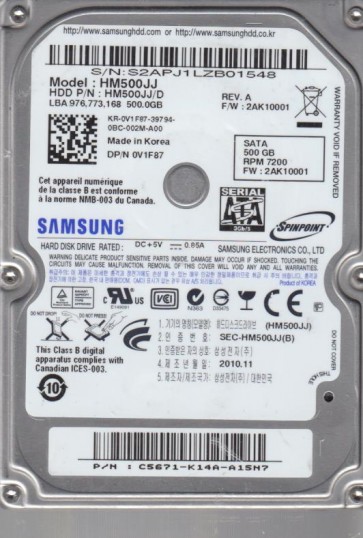
The Samsung HM500JJ is a 2.5-inch internal hard disk drive (HDD) belonging to Samsung’s older Spinpoint series, typically manufactured between 2008 and 2011. It operates at a rotational speed of 5400 RPM and features a perpendicular magnetic recording (PMR) technology with a storage capacity often found in 500GB configurations. This drive uses a standard SATA II (3.0 Gb/s) interface and a controller from Samsung’s in-house family, often paired with a proprietary firmware stack. The HM500JJ is known for its relatively quiet operation but is prone to specific mechanical and electronic failures as it ages, particularly due to wear on the spindle motor bearings and degradation of the preamplifier on the head assembly. Common usage environments include older laptops, external enclosures, and as secondary storage. Recognizing the drive’s age is critical: capacitors on the printed circuit board (PCB) may leak, and the magnetic platters can develop weak spots over time.
Identifying Common Failure Types
1. Mechanical Head Crash or Stiction
This is a hardware failure where the read/write heads physically contact the platter surface, often causing a repetitive clicking or grinding noise. Over time, the drive’s heads degrade or the lubricant on the platters dries out, leading to stiction. The drive may power on, spin up briefly, then stop with a series of clicks. Data recovery from a head crash requires a cleanroom environment and is not a DIY task.
2. PCB / Electronic Failure (e.g., Burned TVS Diode)
This is a common software-accessible hardware failure. A power surge or faulty external enclosure can destroy a tiny component on the PCB, typically a transient voltage suppression (TVS) diode or a blown capacitor. The symptom is a completely dead drive:no spin, no sound, and not detected by the BIOS. This is often recoverable by replacing or repairing the PCB, but the firmware must be compatible. A DIY enthusiast with soldering skills can sometimes remove the damaged component, but a full board swap requires transferring the original firmware chip.
3. Firmware Corruption or Bad Sector (Logical Failure)
This is a software-level issue. The drive may spin up normally but is detected with incorrect capacity, shows a “SMART status bad” warning, or becomes extremely slow. The drive may click intermittently while reading specific areas. This can stem from a corrupted translation layer (e.g., from a sudden power loss) or a large number of reallocated sectors. While some firmware issues can be fixed with professional tools (like PC-3000), DIY software tools may worsen the condition if the firmware is severely damaged. Bad sectors are recoverable via cloning, but aggressive scanning can further stress failing heads.
Potential Recovery Paths
Professional Data Recovery Services
Recommended for: Any mechanical failure (clicking, grinding), severe electronic damage (burnt PCB), or complex firmware corruption. A professional lab uses a class 100 cleanroom, specialized tools (e.g., PC-3000, DeepSpar Disk Imager), and donor parts. Expect costs ranging from $300 to $1500+ depending on severity. Success rates for head swaps are high (over 80%) for the HM500JJ if platters are undamaged. Service providers typically offer a no-data-no-fee policy. Ensure the lab has experience with Samsung 2.5-inch drives, specifically the HM500JJ’s firmware structure.
DIY Recovery Options (Proceed with Extreme Caution)
1. PCB Replacement for Electronic Failure: If the drive is completely dead with no noise, the issue may be on the PCB. You can attempt to source an identical HM500JJ PCB (exact model and firmware revision, e.g., Rev 0.1 or Rev 0.2). Remove the original PCB, locate the 8-pin BIOS chip (typically an SPI flash). You must desolder this chip from the original board and resolder it onto the donor board. This is a delicate surface-mount task requiring a hot air rework station. Even with a new PCB, the drive may not work if the heads are also bad.
2. Cloning via Disk Imaging Software (for Bad Sectors): If the drive spins normally but has bad sectors or is detected, use a tool like DDRescue (Linux) or HDD Raw Copy Tool (Windows) to create a sector-by-sector image to a healthy drive. Critical: Do not use chkdsk or fsck. Run the software in read-only mode, and set the tool to retry phases to a minimum (e.g., 1 retry) to avoid stressing the heads. Stop if the drive starts clicking. This is a last-resort DIY attempt only for logical failures.
What Not to Do
- DO NOT open the drive enclosure. The HM500JJ’s platters are extremely sensitive to dust and contamination. Even a single particle can destroy the surface. Opening the drive voids any potential recovery by a professional (unless the lab can still use the platters).
- DO NOT apply power to a drive that smells burnt or has visible damage on the PCB. This can short-circuit and damage the preamplifier on the head stack, making recovery much harder.
- DO NOT run data recovery software directly from the failing drive. Never install software or try to copy files while running the OS from the same drive. Always use a separate bootable media (USB) and connect the failing drive as a secondary device.
- DO NOT freeze the drive. This is an obsolete and dangerous myth for modern HDDs. Condensation can cause further electrical shorts and mechanical binding.
- DO NOT attempt to reinitialize or format the drive. Under no circumstances should you use Windows Disk Management or similar tools to “initialize” the disk. This can destroy the partition table and file system data, making recovery more complex.
Summary
The Samsung HM500JJ is an aging 2.5-inch HDD prone to mechanical head crashes, PCB electronic failures, and firmware corruption. For any clicking, grinding, or complete non-detection, professional data recovery is the only reliable path, especially for hardware issues. DIY attempts should be strictly limited to logical failures (bad sectors) using disk imaging software, and never involve opening the drive. The most common mistake is attempting to power-cycle a drive with a blown PCB or ignoring clicking sounds. The safest first step is to assess the failure type: listen for noises, check for burnt smells, and verify if the BIOS detects it. If in doubt, power down immediately and consult a professional lab with Samsung-specific experience. The HM500JJ’s data is recoverable, but the cost of missteps could be total data loss.