
Data recovery on vintage hard drives like the Western Digital WD3200AVJS starts with identifying the failure type – electronic, firmware, or mechanical. Each requires a different approach, and misdiagnosis can make things worse. Here’s a quick guide to help you assess your situation and decide on the next step.
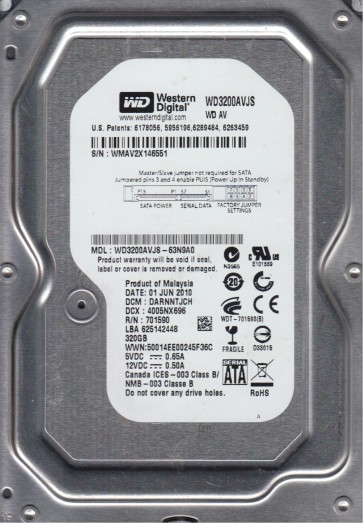
The Western Digital WD3200AVJS is a 320GB 3.5-inch SATA hard drive from the AV-GP series, designed for audio-visual streaming and surveillance applications. It features a 5400-7200 RPM variable spindle speed, a 16MB cache, and an IntelliSeek technology that optimizes seek times to reduce noise and power consumption. This drive is known for its reliability in continuous write environments but is susceptible to specific failure modes due to its age and mechanical nature.
Common Failure Types
1. Mechanical Head Crash:Physical contact between the read/write heads and the platter surface. Symptoms include loud clicking, scraping, or grinding noises, immediate system freezing, and a complete inability to detect the drive. Common causes include sudden shock, drive wear, or contamination from particle ingress.
2. Media Degradation & Bad Sectors:Gradual deterioration of the magnetic coating on platters, leading to unreadable sectors. Symptoms include slow read/write speeds, frequent CRC errors, file corruption, and reallocated sector counts visible in S.M.A.R.T. data. This is often an age-related phenomenon accelerated by thermal stress.
3. Firmware Corruption:Damage to the drive’s internal firmware stored on the system area of the platters. Symptoms include the drive being detected with a wrong model number or capacity (e.g., 0GB, 8MB), spinning but not responding, or being stuck in a busy state (BSY). This can result from power surges, improper shutdowns, or a failing preamp on the head stack assembly.
4. PCB (Printed Circuit Board) & Electronic Failure:Failure of the drive’s logic board components, such as the motor controller, preamplifier, or TVS diodes. Symptoms include the drive not spinning up, no electronic activity (no sound), or a burning smell. Common causes include power supply issues, lightning strikes, or component aging.
5. Logical Corruption & File System Damage:Non-physical damage to the file system structure, such as a corrupted Master Boot Record (MBR), File Allocation Table (FAT), or NTFS directory. Symptoms include disk not formatted errors, lost partitions, missing files, or the drive appearing empty. Causes include virus attacks, improper ejection, or software crashes.
Potential Recovery Paths
DIY Methods (For Logical Corruption Only):
- Software Recovery (e.g., R-Studio, DMDE, or TestDisk):For logical issues, attempt a sector-by-sector image of the failing drive onto a healthy drive using a tool like ddrescue (Linux) or HDDSuperClone. Then, scan the image file for lost partitions and recover files. Never write data back to the failing source drive.
- CHKDSK /r (Use with Caution):Only if the drive is fully readable and you have a backup. Running chkdsk on a failing mechanical drive can cause further damage by forcing the heads to read around bad sectors.
Professional Services (For Mechanical & Firmware Issues):
- Cleanroom Head Replacement:For mechanical head crashes or stuck spindles, a certified lab uses a Class 100 cleanroom to open the drive, replace the head stack assembly (HSA) with a donor from an identical model and firmware version, and then extract data using specialized hardware like PC-3000 or DeepSpar.
- Firmware Repair (PC-3000):For firmware issues (e.g., BSY, wrong model), a professional uses a firmware tool to reprogram the drive’s system area, often bypassing damaged translators or rebuilding module tables.
- PCB Swap & ROM Adaptation:For electronic failures, a professional will swap the PCB but must transfer the unique adaptive data from the original drive’s ROM chip to the donor board. A simple PCB swap without ROM transfer will not work.
What Not to Do
- Do Not Open the Drive Outside a Cleanroom:Exposing the platters to normal air will introduce dust particles that can scratch the surface and destroy data. The actuator arm is extremely fragile.
- Do Not Attempt a Freezer Trick:Sub-zero temperatures can cause condensation, leading to corrosion, platter stiction, and preamp damage. This technique is obsolete and destructive.
- Do Not Run Multiple DIY Scans:Repeated scanning or disk repair attempts on a physically failing drive increases the damage. Each pass grinds the heads against damaged media.
- Do Not Use the Drive as a Boot Device:If the drive is failing, do not rely on it as a system disk. Operating system writes and reads will multiply stress and accelerate failure.
- Do Not Apply High Voltage or Spin the Spindle Manually:Forcing a stuck spindle by hand or applying external voltage to the motor pins can damage the spindle motor bearings and preamp.
Summary
The Western Digital WD3200AVJS is a robust AV drive but is vulnerable to mechanical head crashes, bad sectors, firmware corruption, and PCB failures. For logical issues, DIY imaging software with a write-blocker is viable. For physical, electronic, or firmware failures, professional intervention with cleanroom tools and specialized firmware programmers is mandatory. Avoid any mechanical manipulation or repeated scanning to prevent permanent data loss.