
Data recovery on vintage hard drives like the Hitachi HTS545032A7E330 starts with identifying the failure type – electronic, firmware, or mechanical. Each requires a different approach, and misdiagnosis can make things worse. Here’s a quick guide to help you assess your situation and decide on the next step.
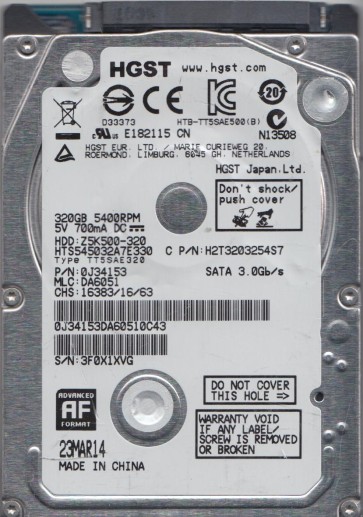
The Hitachi HTS545032A7E330 is a 320GB, 2.5-inch, 5400 RPM SATA hard drive manufactured by HGST (a Western Digital company). It is a single-platter drive commonly found in laptops and external enclosures from the late 2000s and early 2010s. This drive uses perpendicular recording technology and a standard SATA 3.0Gb/s interface. Key components include the printed circuit board (PCB), the head stack assembly (HSA) with read/write heads, the voice coil motor (VCM), the spindle motor, and the platter(s). Understanding these parts is critical because failure modes are often specific to one component. The drive is known for a moderate failure rate typical of consumer-grade 2.5-inch hard drives of its era, with common issues related to head stiction and controller chip degradation.
Identifying Common Failure Types
1. Mechanical Head Crash or Stiction
Symptoms: A repetitive clicking or ticking sound, grinding noise, or the drive spinning up and then immediately stopping. The drive may be detected by the BIOS but with a very slow response or no access to data. This is often caused by the read/write heads contacting the platter surface (crash) or the heads sticking to the platter (stiction) after a period of inactivity. In Hitachi drives, this can be exacerbated by sudden physical shock or drive wear. Physical damage to the platter surface from a head crash is often irreversible for DIY recovery.
2. Electronic PCB Failure
Symptoms: The drive appears completely dead ¨C no spin-up, no sound, and it is not detected by the BIOS or operating system. A common cause is failure of the TVS (Transient Voltage Suppression) diodes or the motor controller chip on the PCB. Overvoltage from a faulty USB enclosure or power supply can blow these components. The SATA connector may also have physical damage or cold solder joints. In some cases, the firmware on the main controller chip becomes corrupted, leading to “No Response” or “Not Ready” error states.
3. Firmware Corruption
Symptoms: The drive spins up normally and is detected by the BIOS, but the operating system fails to read it, showing errors like “The disk structure is corrupted and unreadable” or “You need to format the disk before you can use it”. The drive may also exhibit a specific behavior in Hitachi drives where it reports a model number as “HTS545032A7E330” but shows a capacity of 0GB or a random string. This is often due to corrupted translator modules or defect lists on the system area (SA) of the platter. Logical formatting will not fix this; it requires specialized firmware repair tools.
4. Logical / Software Corruption
Symptoms: The drive spins and is detected correctly, but files are missing, folders appear empty, or the partition cannot be accessed. No abnormal physical sounds. This can be caused by accidental deletion, bad sectors, virus attacks, or file system corruption (NTFS/FAT32). It is the most common and usually the most recoverable type of failure. The data is still present physically but the file system pointers are lost.
Potential Recovery Paths
DIY Recovery (Only for specific cases)
Logical Corruption: If the drive is physically healthy (no strange sounds), use a reliable data recovery software like R-Studio, DMDE, or Recuva. Do NOT use CHKDSK or any repair tool that writes to the drive. Create a full disk image first using a tool like ddrescue (Linux) or HDDSuperClone (bootable USB) to a separate healthy drive. Then scan the image file for recoverable data. This is the safest DIY method.
Bad Sectors (Minor): If the drive produces a faint ticking but still spins, you can attempt imaging with ddrescue using the –no-trim and –retrim options. This will skip sectors that cause the drive to hang. Do not leave the drive running unattended for hours; monitor for new sounds. If the situation worsens, stop immediately.
PCB Swap (Advanced DIY): Only if you are certain the failure is electrical (dead PCB, no spin). You must find an exact donor PCB with the same model and P/N (printed circuit board part number). The swap is not plug-and-play; the Hitachi HTS5450 series often requires transferring the original NAND flash memory chip (which contains unique drive tuning data) to the donor PCB. This requires hot air soldering equipment and experience. Without this transfer, the drive will likely fail to initialize or corrupt firmware. This is not recommended for beginners.
Professional Recovery Services
For ANY mechanical failure (head crash, stiction, grinding), clicking sounds, or firmware corruption, a professional cleanroom service is mandatory. A typical service cost for this Hitachi model ranges from $300 to $1500+ depending on severity and media damage. The process involves:
- Diagnosis in a cleanroom (Class 10 or better).
- For head failure: Opening the drive, replacing the head stack assembly with a matched donor HSA, and then using specialized firmware tools to calibrate the heads.
- For firmware: Using tools like PC-3000 or MRT to read the system area, fix damaged modules, and rebuild the translator.
- For severe media damage: Using advanced techniques like replacing the platters into a new donor base (extremely rare and expensive).
Professionals also have the ability to handle encrypted drives (if BitLocker or similar was used) if the recovery key or password is provided.
What Not to Do
- Do NOT open the drive cover. The internal platter surface is extremely sensitive to dust and particles. Even a single speck of dust can destroy data when the heads spin up outside a cleanroom.
- Do NOT force the drive to spin if it is making a clicking noise. Continuing to power cycle will grind the heads into the platter, turning a recoverable head problem into permanent media damage.
- Do NOT run defragmentation, CHKDSK /F, or any disk repair tools on a failing drive. These tools write data to the drive, potentially overwriting your files or making the file system inconsistencies permanent.
- Do NOT freeze the drive. This is a dangerous myth. Condensation will cause internal corrosion, and the thermal stress can crack the platters or dislodge the heads, making recovery impossible.
- Do NOT try to “slap” or drop the drive to unstick a head. This will almost certainly cause severe media damage.
- Do NOT connect the drive to multiple computers or different power supplies if it is not detected. This can introduce voltage surges that may further damage the electronics.
Summary
The Hitachi HTS545032A7E330 is a standard 320GB 2.5-inch laptop drive with common failure modes including mechanical head issues, electronic PCB failure, firmware corruption, and logical errors. For DIY recovery, only attempt logical (software) data recovery using imaging tools if the drive is physically quiet and functioning. For any clicking, grinding, or non-spin conditions, stop all DIY attempts immediately. The data is highly recoverable by professional services if you do not cause additional physical damage. The cost of professional recovery is typically justified by the value of the data. Remember: hardware failures require hardware-level tools and a cleanroom environment. Misdiagnosis and incorrect DIY steps are the primary reason data becomes unrecoverable.