
Data recovery on vintage hard drives like the Seagate ST32000541AS starts with identifying the failure type – electronic, firmware, or mechanical. Each requires a different approach, and misdiagnosis can make things worse. Here’s a quick guide to help you assess your situation and decide on the next step.
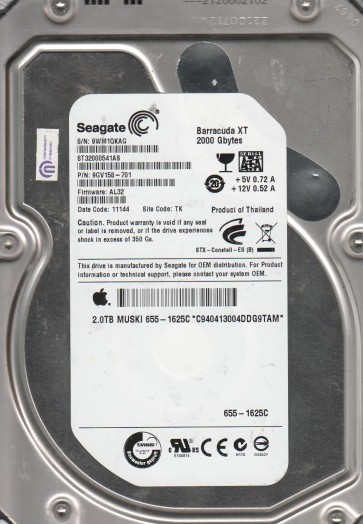
The Seagate ST32000541AS is a 2TB 3.5-inch SATA hard drive from the Barracuda 7200.11 series. It features a 7200 RPM spindle speed and a 32MB cache. This model is known for employing perpendicular recording technology and is built with a single-chip controller (often an Agere or STMicroelectronics based system on chip). It uses a SATA 3.0Gb/s interface. Understanding its specific architecture is crucial because these drives have notorious firmware-related failure mechanisms, particularly the “Busy” or “BSY” state bug, where the drive spins up but does not become ready for communication. The drive relies on a complex series of servo and read/write electronics to translate data from the platters to the host computer.
Identifying Common Failure Types
1. Firmware Corruption (BSY Bug)
This is the most prevalent failure in this specific drive model. Symptoms: The drive powers on, spins up normally (you may hear a gentle whirring), but the computer’s BIOS or operating system never detects it. The drive may appear to be “stuck” and unresponsive. This is often caused by a corrupted translation table or a failed head-map module. The drive electronics are alive but cannot complete their internal initialization routine.
2. Mechanical Head Failure
Symptoms: The drive may emit a repetitive clicking sound (often described as a “click of death”) or a scraping/grinding noise. This indicates a physical failure of the read/write heads, where they have crashed onto the platter surface or are unable to properly fly over it. The motor may also be stuck or slow to spin up, though this is less common. This is a pure hardware failure.
3. Bad Sectors & Slow Performance
Symptoms: The drive is detected but operates extremely slowly. File access may hang, the system may freeze during copy operations, or you might see frequent read/write errors. The drive’s self-diagnostic system (S.M.A.R.T.) may report a high Reallocated Sector Count or Current Pending Sector Count. This can be a precursor to mechanical failure or a result of platter surface degradation.
Potential Recovery Paths
Professional Data Recovery Services
Recommendation: For the ST32000541AS, professional recovery is strongly advised if the data is critical, especially for the BSY bug or any mechanical noise. A professional lab (like DriveSavers, Gillware, or local specialists) has the necessary tools: a PC-3000 or similar system to re-flash firmware modules in a controlled manner, a cleanroom (Class 100 or better) for head-disk assembly swaps, and donor drives for matching parts. Expect costs between $300 and $3000+ depending on the complexity. Professional intervention offers the highest chance of a full recovery with no further damage to the platters.
DIY Methods (Risky – Proceed with Extreme Caution)
1. For the BSY Bug (Firmware Issue): Some advanced users have had success using a terminal (e.g., PuTTY via a USB-to-TTL adapter) to communicate with the drive’s serial console. By sending specific commands (like clearing the “BUSY” flag or rebuilding the SMART table), the drive may be brought back online. This requires precise knowledge of the drive’s command set and is not for novices. A single wrong command can render the firmware permanently unrecoverable.
2. For Bad Sectors: If the drive is detected but slow, you can use software like ddrescue (Linux) or HDDSuperClone to create a sector-by-sector image of the drive, skipping bad areas. This can salvage readable data without forcing the drive to re-read failing sectors indefinitely. Always clone the drive; never work directly on the failing original for scanning.
3. Freeze/Spray Method (Temporary): For a drive that clicks (head failure), the infamous “freezer trick” (placing the drive in a sealed bag in a freezer for a few hours) can sometimes temporarily reduce friction and allow a short window of operation. This is a last-ditch effort with a very low success rate. It often causes condensation damage and should only be used if you are prepared for total data loss and cannot afford professional service.
What Not to Do
- Do not open the drive enclosure. The internal platters are extremely delicate and are sealed in a clean environment. Even a single dust particle can scratch the surface and destroy data. Opening the drive outside a cleanroom guarantees permanent damage.
- Do not repeatedly power cycle or stress-test the drive. If it clicks or makes grinding noises, each power-on can cause further head-to-platter contact, scraping away data. For the BSY bug, repeated resets may corrupt the firmware modules further.
- Do not use standard data recovery software (e.g., Recuva, EaseUS) on a failing drive. These tools are designed for logically deleted files, not physically failing hardware. Forcing the drive to read bad sectors under heavy scanning will accelerate its death. Instead, use cloning tools as mentioned.
- Do not tap or bang on the drive. This can misalign the heads or dislodge debris, making professional recovery much harder.
- Do not apply high voltages or attempt to manually spin the platters. This will destroy the spindle motor and servo tracks.
Summary
The Seagate ST32000541AS is prone to specific firmware failures (the BSY bug) and mechanical head crashes. The recommended first step is to identify the failure type: no detection with normal spin (likely firmware) versus clicking noises (likely hardware). For critical data, professional recovery is the safest and most successful path, particularly for mechanical failure. DIY options like terminal repair for firmware issues or ddrescue for bad sectors exist but carry significant risk of permanent data loss. Never open the drive, avoid repeated power cycles, and never use standard file recovery tools on a dying drive. Proceed with caution and prioritize preserving the current state of the drive for a professional evaluation if the data is valuable.