
Data recovery on vintage hard drives like the Hitachi HUC109090CSS600 starts with identifying the failure type – electronic, firmware, or mechanical. Each requires a different approach, and misdiagnosis can make things worse. Here’s a quick guide to help you assess your situation and decide on the next step.
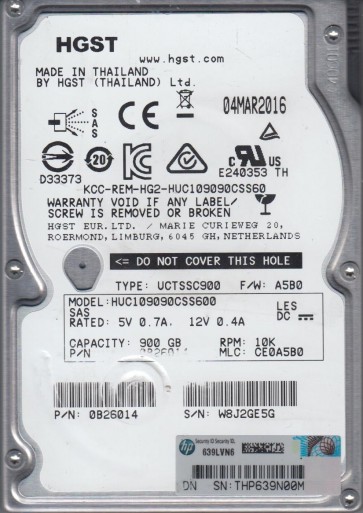
The Hitachi HUC109090CSS600 is a 900GB 10K RPM SAS (Serial Attached SCSI) enterprise hard drive from the Ultrastar C10K900 family. This drive is designed for high-availability environments like servers and storage arrays, featuring a dual-port SAS interface, a 64MB cache, and advanced rotational vibration sensors. It utilizes perpendicular magnetic recording and is built for 24/7 operation with a mean time between failures (MTBF) of over 2 million hours. The drive’s firmware and onboard controller are highly sensitive to power fluctuations and thermal stress. When failing, it often exhibits specific behaviors related to its enterprise-class design, such as SAS link negotiation issues or complex servo patterns.
Identifying Common Failure Types
1. Firmware Corruption / Logical Failure
In this scenario, the drive spins up and passes the initial power-on self-test (POST) but is not recognized by the host system, or reports the wrong capacity (e.g., 0GB or 32GB). The SAS interface may show a ‘drive not ready’ state or repeated link resets. This is often triggered by an unexpected power loss, SCSI bus resets, or a failed firmware update. The drive may emit a soft clicking sound as it retries to load its microcode from the system area. Data on the platters remains physically intact but inaccessible due to corrupted translation tables or G-List defects.
2. Read/Write Head Degradation (Magnetic Failure)
This failure manifests as increasing numbers of bad sectors, slow read/write performance, or repeated SCSI I/O errors. The drive may make a steady, rhythmic noise like a faint scratching or high-pitched whine during seeks. Degraded heads cannot consistently read the weak magnetic signal, leading to P-List relocations. Eventually, the drive may enter a permanent offline state. This is typically caused by mechanical wear over time, high humidity, or contamination from internal particulates. The SAS controller will log ‘Unrecovered Read Error’ or ‘Write Fault’ events.
3. Stiction / Motor Lock (Mechanical Failure)
The drive fails to spin up. When powered, the spindle motor makes a single soft ‘thud’ or click sound, then goes silent. The drive is not detected by any SAS controller. This is caused by the read/write heads parking on the platter surface and creating a micro-weld (stiction), or a seized spindle motor bearing. This is a critical physical barrier. Attempting to force the platters to spin by tapping or rotating the drive can cause permanent platter damage. This failure is often precipitated by a drop or strong vibration while the drive is powered on.
4. SAS Interface / PCB Failure (Electrical Failure)
The drive spins up normally but shows no SAS link activity or does not respond to commands. The LED on a SAS expander may remain off or blink rapidly. This can be due to a damaged SAS connector, blown SATA-SAS bridge components, or a failed voltage regulator on the printed circuit board (PCB). A visual inspection may reveal burnt components or corrosion. A simple PCB swap may work only if the firmware and system area are intact, which is rare on modern Hitachi drives. The drive may respond to a specific SAS analyzer command but fail basic SCSI inquiries.
Potential Recovery Paths
Professional Data Recovery Services
Hardware Repair: For mechanical failures (stiction, head crash) or complex firmware corruption, professional cleanroom intervention is mandatory. A specialist will open the drive in a Class 10 (or better) cleanroom, replace the head stack assembly (HSA) with a donor drive, and use a specialized firmware tool (e.g., PC-3000 SAS or similar) to read the firmware modules. The process for the HUC109090CSS600 often requires matching the firmware revision (e.g., ‘B6H0’) and the media surface code exactly. For PCB failures, a direct donor board swap is rarely successful; the original flash chip containing the adaptive parameters (like preamp calibration) must be transferred.
Logical Recovery: If the firmware is corrupted but the drive spins and identifies, a professional can use SAS-level imaging with hardware write-blockers and custom command sequences to bypass bad sectors. They will create a sector-by-sector (block-level) image, then reconstruct the filesystem using software like R-Studio or UFS Explorer. For a 900GB drive, this can take 24-72 hours depending on health.
DIY Recovery Methods (High Risk)
Note: DIY recovery is only recommended for minor logical issues and when data is non-critical. For any mechanical or firmware failure, DIY will likely cause permanent data loss.
1. Check SAS Controller and Cables: The most common ‘failure’ is a bad cable or controller port. Try a different SAS cable, a different HBA (Host Bus Adapter) port, or a different server entirely. Ensure the SAS connector is fully seated. Use `lsscsi` (Linux) or ‘Disk Management’ (Windows with SAS driver) to check detection. If the drive is detected as a different model (e.g., 600GB), the firmware is severely corrupted.
2. Use a Dedicated Imaging Tool (Linux): If the drive is detected but has read errors, use a tool like `ddrescue` on a Linux system. Do not mount the drive. Execute: `sudo ddrescue -d -r3 /dev/sdX /mnt/recovery/image.img /mnt/recovery/logfile.log`. The `-d` flag performs direct I/O, bypassing the OS cache. The `-r3` retries the last bad 3 times. This will create a log file and image, skipping bad areas. Stop if the drive starts clicking loudly or slowing down significantly.
3. Firmware Reflash (Extreme Risk): Only attempt if the drive is logically dead but spins up, and you have the exact same firmware revision from a donor drive. Under no circumstances use a generic Hitachi firmware tool. The HUC109090CSS600 has a module locking system; corrupting the wrong module can make recovery impossible. This is almost always a professional task.
What Not to Do
- Do not force the drive to spin up by tapping it, dropping it, or using a vacuum cleaner. This can break the heads or platters.
- Do not open the drive outside a cleanroom. The heads fly 3 nanometers above the platter. A single speck of dust is like a boulder. Opening it will destroy the media.
- Do not apply power if you hear a scraping or grinding noise. This indicates a head crash; running it will scrape more magnetic coating off the platters.
- Do not attempt a direct PCB swap (buying a cheap donor board) unless you are prepared to transfer the firmware chip. The HUC109090CSS600 stores unique adaptive data on the PCB’s serial EEPROM. Using a random board will likely cause immediate firmware failure.
- Do not run `chkdsk` or `fsck` on a failing drive. These tools will attempt to fix filesystem errors by writing to the drive, which can overwrite critical data areas and make recovery exponentially harder.
- Do not attempt to freeze the drive. This is a myth for older drives with failing stepper motors and can cause condensation that corrodes the heads.
Summary
The Hitachi HUC109090CSS600 is a robust enterprise drive, but its SAS architecture and complex firmware make it challenging for DIY recovery. The most common failure points are firmware corruption (logical), head degradation (magnetic), spindle stiction (mechanical), and PCB failures (electrical). If the drive is not recognized or makes unusual noises, professional cleanroom intervention is strongly recommended. For simple logical errors on a detected drive, `ddrescue` on Linux is a viable low-risk DIY option, but always prioritize creating a full image before any repairs. Never attempt mechanical or firmware fixes without specialized equipment and experience. The data is likely recoverable, but further experimentation will significantly reduce the success rate. Always consult a professional for high-value data.
