
Data recovery on vintage hard drives like the Fujitsu MHV2040AS starts with identifying the failure type – electronic, firmware, or mechanical. Each requires a different approach, and misdiagnosis can make things worse. Here’s a quick guide to help you assess your situation and decide on the next step.
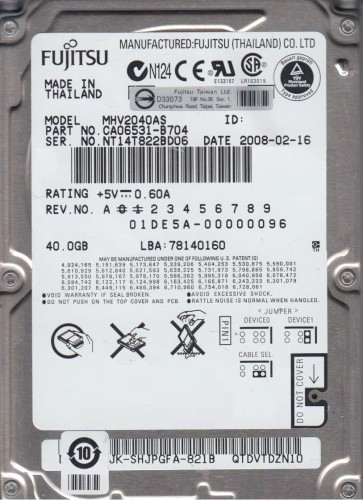
The Fujitsu MHV2040AS is a 2.5-inch, 40GB Parallel ATA (PATA) hard disk drive, typically found in older laptops and external enclosures. It utilizes a single platter spinning at 4200 RPM or 5400 RPM (depending on the specific revision) and features a 2MB buffer. As a product of the mid-2000s, it employs a Marvell or proprietary Fujitsu controller. Understanding its age and interface is critical: it is susceptible to specific failure modes including stiction, preamp failure, and controller chip degradation. This drive is known for being relatively reliable but sensitive to head alignment issues over time due to aging lubricants.
Identifying Common Failure Types
1. Mechanical Head Crash or Stiction
A head crash occurs when the read/write head physically contacts the platter surface, causing scratches and data fragmentation. Stiction (static friction) is more common in older drives: the heads become stuck to the platter after a long period of inactivity. Symptoms include a clicking or grinding noise, or a complete lack of spin-up (only a faint hum). The drive may be detected but with I/O errors. This is a hardware failure requiring clean room intervention.
2. Firmware Corruption / Translation Issues
The MHV2040AS relies on firmware stored on the platters (in a system area). Corruption due to power surges, bad sectors, or age can cause the drive to spin up but fail to initialize. Symptoms include the drive being detected by the BIOS but with a “0GB” capacity, “SMART” errors, or an immediate “Ready” status without accessing data. The drive may make normal sounds but remain inaccessible. This is a logical/firmware issue that can sometimes be addressed via specialized tools (e.g., PC-3000) without hardware replacement.
3. SATA-to-PATA Bridge or PCB Failure
While the drive internally uses PATA, some adapters or enclosures introduce a bridge chip. However, the primary PCB (printed circuit board) failure is common. Symptoms include the drive not spinning up at all (dead), or spinning up but failing to communicate (no detection). Physical inspection may reveal a burnt controller chip (e.g., a blown TVS diode or damaged motor controller). This requires a PCB replacement or a firmware transplant from a donor board of the exact same model and revision (e.g., MHV2040AS with suffix like -AH or -AF).
Potential Recovery Paths
Professional Data Recovery Services
For mechanical failures (head crash, stiction) or complex firmware issues, professional intervention is strongly recommended. A reputable lab will have a cleanroom (Class 100 or better) to swap heads or perform platter transplants. For PCB failure, they can perform a firmware transplant or a direct board swap with flash reprogramming. Costs typically range from $300 to $1500+ depending on the complexity. Look for labs with experience in Fujitsu drives, as they require specific donor firmware.
DIY Recovery Paths (With Warnings)
PCB Swap (Only if firmware is compatible): If the drive is completely dead (no spin) and there is no physical damage, a PCB swap may be attempted. Obtain an exact donor board (same model, same revision, same serial number family). Swap the drive’s original firmware SPI flash ROM to the donor board using a hot air station or soldering iron (this is critical; simply swapping boards without firmware transfer will fail due to unique calibration data). Warning: This requires advanced soldering skills. Incorrect procedure can brick the drive permanently.
Frozen Drive Technique (For Stiction): For a drive that spins but sticks (makes clicking noises), some users place the drive in a sealed anti-static bag and put it in a freezer for 2-4 hours. The sub-zero cold temporarily shrinks the metal platters and lubricants, potentially freeing the heads. Warning: This is a high-risk last resort. Moisture condensation can cause electrical shorts and wrecks the drive upon power-up. Only attempt if professional recovery is unaffordable and data is non-critical.
Software Imaging (For Firmware Issues only): If the drive is detected correctly (correct capacity in BIOS) but has file system errors (e.g., bad sectors, corrupt NTFS/FAT), use tools like ddrescue (Linux) or HDD Raw Copy Tool (Windows). This creates a sector-by-sector image and skips bad blocks. Do not perform chkdsk or fsck on the failing drive as it can cause further data loss.
What Not to Do
- Do not open the drive enclosure in a non-cleanroom environment. Dust particles will contaminate the platters, making professional recovery nearly impossible.
- Do not apply power to a drive that is making grinding or clicking sounds more than once. Continuous power to a crashed drive can shatter the sliders and damage the platters beyond repair.
- Do not freeze the drive if it has been dropped or physically damaged. This can cause thermal shock and crack the platters.
- Do not attempt firmware repair using generic tools (like hddreanimator) without proper knowledge. Incorrect firmware modifications can lead to permanent no-communication state.
- Do not use file system repair tools (e.g., chkdsk, fsck) on the failing drive. They are designed for healthy file systems, not for damaged media, and can corrupt data structures.
Summary
The Fujitsu MHV2040AS is an aging PATA drive with specific failure modes. For data recovery, correctly diagnose the issue: head crashes require cleanroom professionals; PCB failure can be addressed with a firmware-transplanted donor board; firmware corruption may be fixable via specialized tools. DIY attempts are risky and often lead to permanent data loss. If your data is critical, proceed directly to a professional lab rather than experimenting with software or hardware fixes. Prioritize creating a sector-by-sector clone if the drive is electrically functional but has logical errors.