
Data recovery on vintage hard drives like the Seagate ST3500320NS starts with identifying the failure type – electronic, firmware, or mechanical. Each requires a different approach, and misdiagnosis can make things worse. Here’s a quick guide to help you assess your situation and decide on the next step.
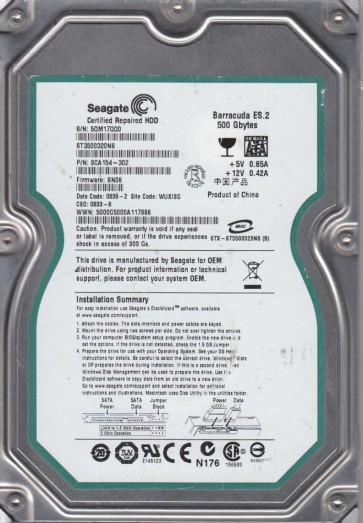
The Seagate ST3500320NS is a 500GB 3.5-inch SATA hard drive from the Barracuda ES.2 series, designed for enterprise near-line storage applications. It operates at 7200 RPM with a 32MB cache. Key technical specifications include a SATA 3.0 Gb/s interface, perpendicular recording technology, and a typical power consumption of around 8 watts during read/write operations. This model is known for its high workload rate, but it suffers from specific firmware and hardware aging issues due to its age (typically manufactured between 2008 and 2010). Understanding the physical layout is crucial: the drive uses a single platter or two platters depending on the revision, with a dedicated head stack assembly. The PCB (Printed Circuit Board) is located on the bottom and houses the main controller, SATA connector, and the TVS (Transient Voltage Suppression) diodes that protect against power surges. The drive’s NV-RAM (Non-Volatile Memory) stores adaptive data specific to the individual unit, including head maps and servo parameters.
Identifying Common Failure Types
1. Failed Heads or Stiction
This is a mechanical failure where the read/write head physically touches the platter surface (head crash) or the head becomes stuck to the platter (stiction). Symptoms include loud clicking or scratching noises, the drive not spinning up at all, or the device being detected with a very small capacity (e.g., 0 bytes). In the ST3500320NS, stiction is common after long periods of inactivity or sudden power loss. Data recovery requires a cleanroom environment to physically replace the head stack assembly.
2. Bad Sectors and Weak Head
Over time, the magnetic coating on the platters degrades, leading to bad sectors. The drive may produce S.M.A.R.T. reallocated sector counts or pending sector errors. In this model, a single weak head is a known pattern, where one side of a platter fails while the other remains functional. Symptoms include frequent read errors, system freezing, or the drive becoming unresponsive during file access. The drive might still be recognized but with degraded performance.
3. Firmware Corruption (BSY or Not Ready)
The ST3500320NS is notorious for firmware issues, particularly after power loss or aging. The drive may power on but fail to become ready, often showing a “BSY” (Busy) state in the terminal. The drive might click briefly and then go silent, or appear as an unknown device in the operating system. This is a logical failure of the firmware modules (such as the service area or translator). Without physical platter damage, this can often be resolved by reflashing or rebuilding the firmware using specialized tools like the Seagate F3 command set. DIY attempts with free firmware tools are risky and can brick the drive.
4. PCB Failure (Electrical)
A common electrical failure in this age of drive is a blown TVS diode or damaged controller chip (e.g., due to a power surge). The drive will not spin up at all, and no activity light is seen. Sometimes a burnt smell is present. If the platters and heads are intact, replacing the PCB with a donor board is a potential solution. However, the NV-RAM must be transplanted from the original PCB to the donor board, as each drive has unique adaptive data. Swapping PCBs without NV-RAM transplant will result in increased head noise and failure to calibrate.
Potential Recovery Paths
Professional Data Recovery Services
For any physical failure (head crash, stiction, PCB damage, or severe firmware damage), professional recovery is strongly recommended due to the complexity and risk of further damage. Expect a cost range of $300 to $2000+ depending on the severity and required cleanroom processes. Look for a reputable lab with ISO Class 5 cleanroom facilities and experience with Seagate F3 drives. They will use advanced tools like PC-3000, DeepSpar, or Seagate-specific firmware tools. For firmware issues, they can reflash the system area using a serial port connection. For head failures, they will perform a head stack replacement in a cleanroom, followed by imaging the platters onto a donor drive. For PCB failures, they will source a donor PCB, transplant the NV-RAM, and verify the drive’s stability.
DIY Recovery (For Specific Cases Only)
When to attempt: Only when the failure is purely logical (e.g., accidental deletion, simple partition loss, or a minor firmware glitch where the drive is still detected) AND the drive shows no physical signs of distress (no clicks, no scratching, no stiction). If the drive makes abnormal noises, stop immediately.
DIY steps for logical issues: 1. Create a block-level image using a tool like ddrescue (Linux) or HDD Raw Copy Tool (Windows) to a healthy destination drive. 2. Do not scan or chkdsk directly on the failing drive. 3. Use file recovery software like R-Studio, ReclaiMe, or PhotoRec to recover files from the image. 4. For firmware issues (crashing after spin-up), some advanced users can use a USB-UART adapter to connect to the drive’s serial port (TX/RX/GND) and issue F3 commands to unlock the flash or patch the firmware. This requires significant technical knowledge and the correct firmware files. A single wrong command can permanently kill the drive.
Warning: PCB replacement without NV-RAM transplant is almost always ineffective and can destroy the heads if the adaptive data is mismatched. Always verify that the donor PCB has the same PCBA number and revision (e.g., 100466330 Rev D).
What Not to Do
1. Do not open the drive enclosure. The internal platter chamber is ultra-clean; even a single dust particle can cause a head crash. Opening it voids any chance of cleanroom recovery. 2. Do not attempt to spin a stuck drive by force (e.g., shaking it, tapping it, or using a freezer). This can damage the platters permanently. 3. Do not run chkdsk (Windows) or fsck (Linux) on a drive with bad sectors. These tools will attempt to repeatedly read failing regions, potentially degrading the platters further. 4. Do not apply power to a physically damaged or burnt PCB without inspection. A shorted component can fry the controller. 5. Do not swap PCBs randomly. As stated, the adaptive data is unique. Swapping without transplant often leads to immediate head damage. 6. Do not use abrasive software (like Disk Drill’s recovery without imaging). Always work from a full disk image.
Summary
The Seagate ST3500320NS is a reliable but aging enterprise drive. Its most common failure modes are physical (head crash, stiction), electrical (PCB/TVS damage), and firmware (BSY state). For physical failures or complex firmware issues, professional data recovery services are the safest and most reliable path, ensuring a controlled environment and specialized tools. DIY recovery is only viable for purely logical failures where the drive is physically healthy. Critical warnings include never opening the drive, avoiding forceful spinning, and never swapping PCBs without NV-RAM transplant. The key to success is immediate cessation of further writes or scans, followed by a professional assessment. Data recovery success depends heavily on the failure type: logical issues are highly recoverable, while head crashes require cleanroom intervention and have moderate to high chances of partial recovery.