
Data recovery on vintage hard drives like the Fujitsu MHV2120BH starts with identifying the failure type – electronic, firmware, or mechanical. Each requires a different approach, and misdiagnosis can make things worse. Here’s a quick guide to help you assess your situation and decide on the next step.
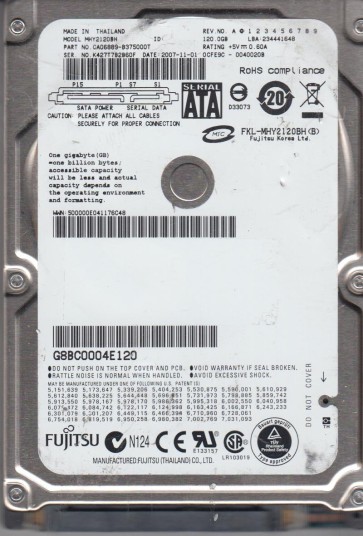
The Fujitsu MHV2120BH is a 2.5-inch, 120GB, 5400 RPM SATA hard disk drive commonly found in older laptop computers. It utilizes perpendicular recording technology and features a typical fluid dynamic bearing (FDB) motor. Known for its moderate performance and reliability in its era, this drive is susceptible to specific age-related and mechanical failures. Understanding its architecture is critical: it houses a single platter, a read/write head assembly on a rotary actuator, a sealed head-disk assembly (HDA), and a printed circuit board (PCB) mounted externally. Data is stored magnetically on the platter surface and accessed by the head flying nanometers above it. The drive’s firmware, stored on both the PCB and the platter’s system area, manages all read/write operations and error handling.
Identifying Common Failure Types
1. PCB (Printed Circuit Board) Failure
This is a common electrical failure. Symptoms include: the drive not spinning up, no sound, or a single quiet click followed by silence. The PCB may have visible damage such as burnt components, blown TVS diodes, or corrosion on the SATA connector pins. The motor controller chip or preamplifier can fail due to power surges or age. This is often a software-accessible repair but requires precise matching of the PCB revision and firmware version.
2. Head Crash or Stiction
A mechanical failure where the read/write head makes contact with the platter surface. Symptoms include: a loud repetitive clicking sound (head slap), scraping noises, or the drive spinning up but being completely unrecognized. Stiction (static friction) occurs when the head sticks to the platter, preventing spin-up. This is a catastrophic physical failure. Data recovery requires a cleanroom environment to replace the head assembly or realign the heads.
3. Bad Sectors and Firmware Corruption
Gradual degradation of the magnetic media leads to bad sectors. Symptoms include: slow read/write performance, file system errors, system freezes, or a clicking sound during access (not as loud as a head crash). Firmware corruption can result from a bad sector in the drive’s system area (SA), causing the drive to be detected as a different model, with zero capacity, or a “click of death” as it loops trying to load firmware. This is a logical/firmware issue but can mimic physical failure.
4. Spindle Motor Failure
The motor that spins the platter can seize or fail. Symptoms include: the drive makes no sound at all (no spin-up) even when powered, or it spins up for a few seconds then stops abruptly. The motor may have a burnt winding or a seized bearing. This is a physical failure often requiring a motor swap or transplant of the platters into a donor drive.
Potential Recovery Paths
Professional Data Recovery Services
Recommended for: Head crashes, stiction, spindle motor failure, severe clicking, or any situation where the drive is physically damaged or makes unusual noises. Professionals have cleanroom facilities (Class 10 or better), specialized tools (e.g., PC-3000, DeepSpar Disk Imager), and donor parts. They can perform head replacements, platter transplants, and advanced firmware repair without further damaging the platters. Costs range from $300 to $2000+ USD depending on the severity. This is the safest path for irreplaceable data.
DIY Recovery (Software/Logical Issues Only)
For bad sectors or simple firmware corruption (non-physical): Use tools like ddrescue (Linux) or HDDSuperClone to create a sector-by-sector image to a healthy drive. For logical file system issues, use TestDisk or PhotoRec to recover partitions or specific file types. If the drive is not detected, try a simple PCB swap: find an identical donor drive (exact model, firmware, and PCB revision, e.g., P/N 100-1234-5678). Swapping the PCB alone may work if the original PCB’s firmware ROM (8-pin serial flash) is transferred to the donor PCB. This requires basic soldering skills. Warning: Never open the HDA seal; doing so in non-cleanroom air will contaminate the platters and destroy data.
What Not to Do
- DO NOT open the hard drive enclosure. The platters are incredibly sensitive to dust and particles. Even a microscopic speck can scratch the surface and permanently destroy data. This is not a DIY task.
- DO NOT apply power to a drive making clicking or scraping noises. Continued operation can destroy the heads and platters, making recovery impossible.
- DO NOT attempt to “freeze” the drive. This outdated trick does not work for modern drives and can cause moisture condensation, leading to corrosion and head damage.
- DO NOT use file system repair tools (like chkdsk /r or fsck) on a failing drive. These tools cause heavy read/write activity and can push a failing drive over the edge, corrupting data further.
- DO NOT shake, tap, or drop the drive. Physical shock can worsen internal damage, especially with head-related failures.
- DO NOT attempt to swap platters between drives without professional equipment and a cleanroom. This is a high-risk procedure requiring precision alignment.
Summary
The Fujitsu MHV2120BH is an older laptop hard drive vulnerable to PCB failure, head crashes, bad sectors, and spindle motor problems. The single most important step is to correctly diagnose the failure type: listen for sounds (clicking = head crash, silence = PCB/motor), check for USB recognition, and monitor SMART data if possible. For any physical failure (noise, no spin), immediately stop all DIY attempts and contact a professional data recovery lab. For logical issues (bad sectors, file system errors), a careful sector-by-sector clone using specialized software is the best DIY path. Always prioritize a professional recovery for high-value data, as any incorrect DIY step risks irreversible data loss. Remember: the best recovery is the one that does not make the problem worse.