
Data recovery on vintage hard drives like the Samsung MP0603H starts with identifying the failure type – electronic, firmware, or mechanical. Each requires a different approach, and misdiagnosis can make things worse. Here’s a quick guide to help you assess your situation and decide on the next step.
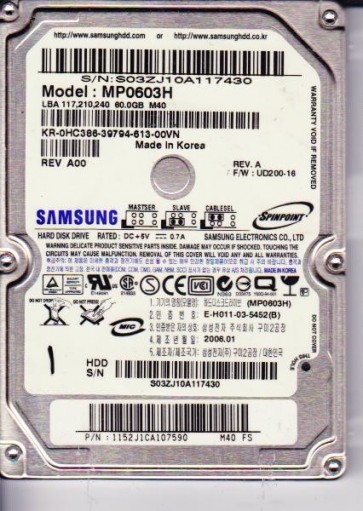
The Samsung MP0603H is a 2.5-inch PATA (Parallel ATA) hard disk drive, typically spinning at 5400 RPM with a storage capacity of 60GB. It belongs to Samsung’s older SpinPoint family, utilizing a single platter and magnetoresistive (MR) heads. These drives are known for their relatively low power consumption and were commonly used in laptops and external enclosures from the mid-2000s. Due to its age, the drive faces unique reliability challenges including degradation of the lubricant in the spindle motor, weakening of the magnetic domains on the platters, and wear on the read/write heads. The controller board, while generally robust, can suffer from component aging such as capacitor leakage or firmware corruption. Understanding that this is a legacy PATA drive is crucial, as modern SATA-only recovery tools and interfaces (like USB adapters) often require specific adapters that can introduce compatibility issues. The drive’s firmware is stored both on the PCB and in a reserved area on the platters, meaning a head failure can render the electronic data inaccessible even if the PCB is perfectly functional.
Identifying Common Failure Types
1. Mechanical Head Failure (Head Crash)
This is the most catastrophic failure for the MP0603H. Symptoms include a loud clicking or scratching noise from the drive, often accompanied by the drive failing to spin up or spinning up and then stopping. The drive may be detected by the BIOS but will report a very small or zero capacity. The cause is usually the read/write head making physical contact with the spinning platter, damaging both the head and the magnetic media. This can result from physical shock, aging of the slider suspension, or contamination from internal debris. Data recovery from a head crash is exceptionally difficult and requires a cleanroom environment to replace the head assembly with a compatible donor part. Any attempt to power on a clicking drive will worsen the damage, carving a groove into the platter and destroying data permanently.
2. Spindle Motor Stiction (Stuck Motor)
The MP0603H is prone to a condition where the spindle motor bearing seizes due to dried, degraded lubricant over time. The primary symptom is that the drive makes no sound at all when powered, or emits a faint hum but the platter does not rotate. The drive may be recognized as a “0 MB” device or not detected at all. This is a physical failure but not necessarily a destruction of data. In some cases, the motor can be manually rotated to break the stiction, but this must be done with extreme care to avoid damaging the platters or the voice coil actuator. Professional recovery involves carefully unlocking the motor and replacing the spindle bearing assembly in a clean environment. A simple DIY “freezer trick” is not recommended as it can cause condensation that will lead to corrosion and rapid head failure upon re-warming.
3. Firmware Corruption (SA Region Issues)
Samsung drives of this era have a known vulnerability where the Service Area (SA) or system tracks on the platters become corrupted. Symptoms include the drive spinning up normally, being detected with the correct model, but then failing to access any data (becoming “busy” or returning a “I/O device error”). The drive may also show as having a raw capacity of 0 bytes or report a different capacity than expected. This is a software/firmware level failure, not a physical head crash. The platters and heads are often physically healthy. Recovery requires specialized tools (like PC-3000 or MRT) that can read the SA directly and repair the damaged modules (like the translator or defect lists). A common DIY mistake is to attempt formatting or scanning the drive with regular software, which can write new data over the critical system areas, making recovery impossible without advanced hardware.
4. PCB Electronic Failure
The printed circuit board (PCB) on the MP0603H can fail due to component aging, particularly leaking or bulging capacitors, or a failed pre-amplifier chip. Symptoms include the drive not spinning up at all, or spinning up but then immediately stopping. The drive may be detected inconsistently. Unlike firmware issues, a PCB failure often presents as a completely dead drive. The data on the platters is safe. A DIY approach involves replacing the PCB with a donor from an identical model. However, this is not a simple swap because the MP0603H often requires transferring a unique ROM chip (usually a tiny 8-pin serial EEPROM) from the original PCB to the donor board. If the donor PCB is used without the original ROM, the drive will run the wrong firmware and may not work or could damage the head. Professional services can solder a new capacitor kit or transfer the ROM with precision.
Potential Recovery Paths
Professional Data Recovery Services (Recommended for mechanical and complex firmware issues)
For a head crash, stuck motor, or severe firmware corruption, a professional lab is the only reliable path. Look for a Class 10 cleanroom facility. The process involves: 1) Diagnosing the exact failure type using specialized diagnostic tools (e.g., PC-3000, DeepSpar). 2) For head crashes: procuring an exact donor drive (same model, same firmware revision), performing head assembly replacement in a cleanroom. 3) For stuck motors: using a mechanical jig to free the spindle and potentially re-lubricating. 4) For firmware: reading the SA at a low level and repairing corrupt modules. 5) Creating a bit-for-bit image of the platters onto a healthy drive. 6) Extracting the file system from the image. This process can cost from $500 to $3000+ depending on the severity and the amount of data. Reputable labs often offer a “no data, no fee” evaluation.
DIY Approach (Only for specific, non-mechanical failures)
Software Issues (File System Corruption): If the drive is detected normally with the correct capacity and does not make any unusual noises, you can attempt software recovery. Use a tool like R-Studio, DMDE, or TestDisk. Immediately stop using the original drive. Connect it via a dedicated PATA-to-USB adapter (avoid cheap unbranded ones). Create a full disk image (using ddrescue in Linux or a tool like HDDSuperClone) onto a healthy hard drive. Scan the image with data recovery software. Do not scan the original drive itself. PCB Replacement (with ROM transfer): If the drive is completely dead and you have confirmed the motor is not seized (no sound), you can try a PCB swap. 1) Identify the exact model number of your drive (e.g., MP0603H and the firmware version). 2) Purchase an identical donor PCB from a reliable source. 3) Use a soldering iron and hot air station to desolder the original 8-pin ROM chip from the bad PCB. 4) Solder that chip onto the donor PCB. 5) Mount the donor PCB to the drive. 6) Power on. If the drive now spins up and is detected, immediately clone it. This requires moderate soldering skills. Failure to transfer the ROM can cause permanent damage.
What Not to Do
- Never continue to power on a clicking, scratching, or grinding drive. Each second of operation destroys data. Immediately disconnect the power.
- Do not open the hard drive enclosure. The internal chamber is class 100 cleanroom environment. Dust, fingerprints, or even breath moisture will settle on the platters and cause the heads to crash. Opening the drive guarantees permanent data loss.
- Avoid freezing the drive. The “freezer trick” is a myth for modern drives. It may temporarily free a sticky motor, but condensation will form inside and cause corrosion. The drive will likely fail again quickly and with more damage.
- Do not use any software “repair” tools like CHKDSK /f or format utilities on a failing drive. These tools attempt to fix file system errors by writing new data, which can overwrite critical recovery information. If the drive has bad sectors, CHKDSK will reallocate them, destroying the original data pattern.
- Never shake or drop the drive. Mechanical shock is the number one cause of head crashes. Handle the drive with extreme care, especially if it is making abnormal sounds.
- Do not assume a PCB swap is a simple plug-and-play. The MP0603H has a stored ROM that is unique to each drive. Swapping boards without transferring the ROM can cause the drive to malfunction or become permanently bricked.
Summary
The Samsung MP0603H is an aging PATA drive susceptible to head crashes, spindle stiction, firmware corruption, and PCB failure. For mechanical failures (noises, stuck motor), immediate professional intervention is mandatory. For firm ware issues or PCB failure, a careful DIY approach is possible only if you understand the risks and have the right tools (soldering iron, ROM programmer, disk cloning software). The golden rule is to stop using the drive at the first sign of trouble. Prioritize creating a bit-for-bit clone (image) onto a healthy drive before attempting any recovery actions. Always transfer the original ROM chip when swapping PCBs. If the data is mission-critical or if the drive makes any unusual sounds, do not hesitate to contact a professional cleanroom recovery service. The cost of professional recovery is a fraction of the value of irreplaceable data.