
Data recovery on vintage hard drives like the Toshiba MQ03ABB200 starts with identifying the failure type – electronic, firmware, or mechanical. Each requires a different approach, and misdiagnosis can make things worse. Here’s a quick guide to help you assess your situation and decide on the next step.
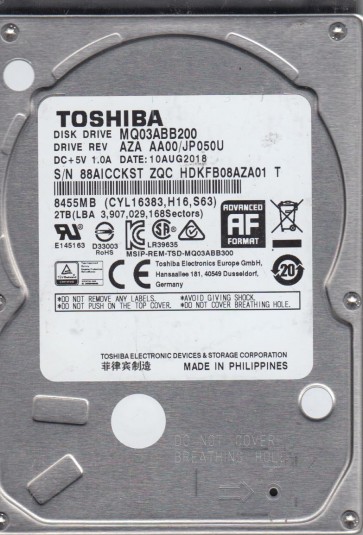
The Toshiba MQ03ABB200 is a 2.5-inch 2TB SATA hard disk drive, typically used in laptops, external enclosures, and some all-in-one systems. It utilizes Perpendicular Magnetic Recording (PMR) technology and features a 5400 RPM spindle speed. As a high-capacity consumer-grade drive, it is common in environments where data density is prioritized over raw access speed. The drive uses a standard SATA III interface and employs a rigid aluminum platter assembly. Understanding its physical construction is critical for recovery scenarios, as the platter and head design determine the types of damage it is susceptible to.
Identifying Common Failure Types
1. Mechanical Head Crash or Stiction
The MQ03ABB200 is particularly prone to head stiction or crash due to its high platter density. Symptoms include a clicking, grinding, or scraping noise, or the drive spinning up and then immediately powering down. This is a physical failure where the read/write heads contact or stick to the platter surface. Data recovery is severely complicated by further use.
2. Firmware Corruption and Bad Sector Reallocation
This model suffers from firmware corruption that can manifest as the drive being detected incorrectly (e.g., as 0GB, 1000GB, or an incorrect model number), being slow to respond, or hanging during boot. The drive may also reallocate bad sectors aggressively, causing system hangs and eventual drive freezing. This is often caused by power fluctuations, excessive read errors, or internal firmware bugs. The drive may still spin, but the logical structure is compromised.
3. PCB (Printed Circuit Board) Failure
Electrical failures such as a blown TVS diode, damaged controller chip, or failed preamplifier are common. Symptoms include the drive not spinning at all, the drive making a faint electrical smell, or the host PC not recognizing the device despite power being delivered to the USB or SATA port. Physical shock, voltage surges, or aging components are primary causes.
4. Read/Write Head Degradation
Gradual head degradation can occur, leading to intermittent read errors, high-pitched whining noises, or excessive time to read files. This is often misidentified as a logical error. The drive may initially work but becomes increasingly slow and prone to freezing as the heads struggle to read weak magnetic signals.
Potential Recovery Paths
Professional Data Recovery Service
For physical failures (head crash, stiction, PCB damage) or complex firmware issues, professional assistance is strongly recommended. A reputable lab will have a cleanroom (Class 10 or better) for opening the drive. They can replace the damaged heads with compatible donor heads, perform firmware recovery using specialized tools (e.g., PC-3000, MRT Pro), and image the platters directly. Costs for this drive typically range from $300 for simple logical issues to over $1500 for severe mechanical or firmware failures. Always choose a lab that offers a no-data, no-fee diagnosis.
DIY Recovery Options (Limited)
For PCB failure (no physical damage to platters or heads):
If the drive is not spinning and is not making mechanical noise, a PCB replacement may be a viable DIY step. You must source an exact donor board with the exact same board number (e.g., 8A-DR1-001). After replacement, you will likely need to transfer the original drive’s ROM (EEPROM) chip to the new PCB using a hot-air soldering station, as the adaptive parameters are unique to each drive. Do not attempt this without proper soldering equipment. If the original PCB has a physical short, always fuse-protect the donor board.
For logical firmware corruption (drive spins, detected but not accessible):
If the drive is spinning smoothly and making no abnormal noises, you may attempt software recovery tools like DDRescue, R-Studio, or DMDE. Create a sector-by-sector image to a healthy drive. Do not attempt to rebuild RAID arrays or run CHKDSK. Run the imaging in read-only mode. If the drive hangs or starts clicking during imaging, stop immediately and seek professional help.
What Not to Do
- Do not open the drive cover. The platters are extremely sensitive to dust, fingerprints, and static. Even a single particle can cause complete data loss.
- Do not run CHKDSK or any file system repair tools (e.g., fsck, Surface Scan) on a failing drive. This can corrupt the file system and overwrite data, making recovery impossible or extremely expensive.
- Do not apply external pressure or tape to the drive. This can warp the spindle and damage the heads.
- Do not freeze the drive. This old myth can cause condensation inside the sealed chamber, leading to catastrophic platter damage and head stiction.
- Do not repeatedly power cycle the drive hoping to get a different result. Each start-up stresses the heads and motor.
- Do not attempt to swap platters into a donor drive without professional equipment and a cleanroom environment.
Summary
The Toshiba MQ03ABB200 is a reliable but dense drive that is vulnerable to head crashes, firmware issues, and PCB failures. The primary risk of permanent data loss comes from attempting DIY fixes on a physically failing drive. For any mechanical noise, a non-spinning drive, or repeated click-of-death, professional recovery is the only safe path. For logical issues observed in a smooth-running drive, a careful sector-by-sector image with robust software is a viable first step. In all cases, stop using the drive immediately upon noticing abnormal behavior. The cost of professional recovery is a fraction of the value of irreplaceable data.