
Data recovery on vintage hard drives like the Seagate ST1500DL001 starts with identifying the failure type – electronic, firmware, or mechanical. Each requires a different approach, and misdiagnosis can make things worse. Here’s a quick guide to help you assess your situation and decide on the next step.
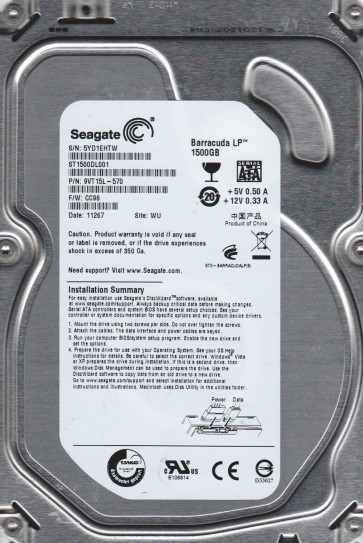
The Seagate ST1500DL001 is a 1.5TB 3.5-inch SATA hard drive from the Barracuda Green series. It operates at a lower spindle speed (typically 5900 RPM) to reduce power consumption and heat. This drive uses Advanced Format (4K sector) technology. Key components include the printed circuit board (PCB) with the motor controller and preamplifier, the read/write heads, the platters coated with magnetic media, and the internal firmware (System Area) stored on the platters. The ST1500DL001 is known for specific failure mechanisms related to its firmware and head stack assembly.
Identifying Common Failure Types
1. Firmware Corruption (BSY / LED Blinking)
A very common failure. The drive powers on but does not become ready. It may be detected by the BIOS as “Seagate” or with an incorrect model number, and the drive light blinks continuously. The drive motor spins up but the host computer cannot access data. This is often caused by corrupt firmware modules in the System Area. The drive gets stuck in a “busy” (BSY) state. Data is typically intact on the platters but inaccessible.
2. Failed Read/Write Heads (Clicking or Ticking)
The drive emits a regular clicking or ticking sound (usually 3-10 clicks) and then spins down or goes silent. This indicates a mechanical head failure. The heads cannot read the servo patterns on the platters, causing the actuator arm to repeatedly park and retry. The platters are usually undamaged at the click site, but continued operation can cause platter damage. The drive will not be detected.
3. Stiction or Spindle Motor Failure (Humming / No Spin)
The drive makes a faint humming or buzzing sound but does not spin up the platters. This can be caused by bearing seizure (spindle motor failure) or physical stiction where the heads stick to the platter surface. In the ST1500DL001, stiction is less common but can occur after shock. A completely silent drive with no spin and no detectable motor movement often indicates PCB power protection failure or a fried preamplifier, often from a power surge.
Potential Recovery Paths
Professional Recovery Services
For firmware corruption with no clicking, a professional data recovery lab can use specialized tools (e.g., PC-3000, MRT) to repair the firmware modules directly. This process involves reading the corrupt modules, patching them, or replacing them with a donor set. Success rate is high (over 90%) if the heads are healthy. For head failure, professional cleanroom recovery is mandatory. The drive must be opened in a Class 10 or better cleanroom to replace the head stack assembly with a matched donor from an exact same model and firmware version. After head swap, firmware adaptation and imaging are performed. Cost ranges from $500 to $2500+.
DIY Methods (High Risk)
For firmware BSY issues: Experienced users with proper tools (PC-3000 or MRT) can attempt a firmware repair. A DIY terminal cable (USB-TTL) alone cannot fix this. You would need to short specific test points on the PCB to force the drive into safe mode, then use PC-3000 to rewrite the faulty modules. This is extremely technical and can permanently brick the drive. For clicking noises: A DIY head swap is almost never successful without a cleanroom. Opening the drive in a dust-free environment (e.g., using a improvised glove box) will introduce microscopic particles that will destroy the platters on spin-up. Do not attempt. For no spin: As a last resort, a PCB swap (board-swapping) can be attempted if the failure is purely electrical (e.g., burnt TVS diode on the power supply line). You must transfer the original drive’s System Area (ROM chip) to the donor PCB. A simple PCB swap without ROM transfer will work only for a few seconds before the new board locks the drive. This is non-trivial and requires fine soldering.
What Not to Do
Do not run any “fix” utilities like chkdsk, fsck, or ScanDisk. These tools treat the drive as healthy and attempt to repair the file system, which will corrupt data on a failing drive. Do not attempt to open the drive. The platters are extremely sensitive to dust. Even a single fingerprint can cause unrecoverable data loss. Do not apply any voltage, freezer, or hammer methods. Freezing a hard drive is a myth and can cause condensation that destroys the heads. Tapping the drive can break the delicate suspension arms. Do not continue to power cycle the drive repeatedly. If the drive is clicking, each power cycle grinds the heads further into the platters. Do not ignore the clicking. Immediate power off is critical. Do not trust data recovery software (e.g., Recuva, EaseUS) for hardware failures. These programs are designed for logical recovery (deleted files) and will not fix physical or firmware damage.
Summary
The Seagate ST1500DL001 is prone to firmware corruption (BSY) and head failure (clicking). Firmware issues often yield recoverable data with professional tools. Clicking noises require a cleanroom head replacement and are not DIY-friendly. The highest success rates come from professional labs that can perform firmware repair or head swaps. DIY attempts, especially any that involve opening the drive or running software, dramatically reduce the chance of recovery. The most critical step is to immediately stop using the drive at the first sign of trouble and consult a reputable data recovery provider.