
Data recovery on vintage hard drives like the Seagate ST3120026A starts with identifying the failure type – electronic, firmware, or mechanical. Each requires a different approach, and misdiagnosis can make things worse. Here’s a quick guide to help you assess your situation and decide on the next step.
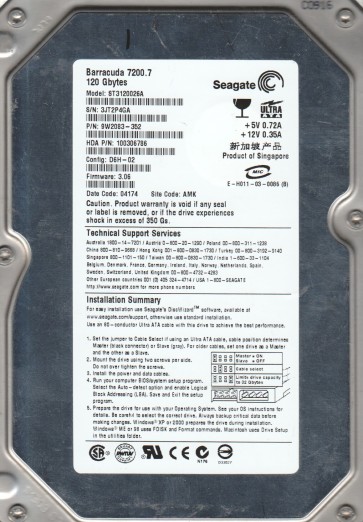
The Seagate ST3120026A is a 120GB 7200 RPM IDE (PATA) hard drive from the early 2000s utilizing a Glass platter design. This drive was common in desktop computers of that era. Key technical points: it uses a 40-pin IDE interface, has a 2MB cache buffer, and is based on Seagate’s older generation of motor controllers. The drive is recognized for its relatively low areal density for its time. Data on this model is stored on two glass platters, which are more brittle than modern aluminum substrates. The drive uses a voice coil actuator and typically has a single read/write head assembly. The controller board is located on the bottom and communicates through a Molex power connector and a standard IDE data cable.
Identifying Common Failure Types
1. Mechanical Head Crash or Stiction
A common failure in these older drives is a head crash where the read/write head contacts the spinning glass platter surface. This produces audible clicking, scratching, or a grinding noise. Stiction occurs when the heads stick to the platter surface after prolonged inactivity, preventing the motor from spinning up. The drive may power on but make no motor noise. Glass platters in this model are particularly vulnerable to cracking upon severe head impact.
2. Electronic Board (PCB) Failure
Controller board failures like a fried preamplifier, damaged motor controller chip, or burned-out TVS diodes are typical. Symptoms include complete power failure (no spinning, no LED activity), or drive spin-up followed by immediate spin-down. A common sign is a visible burned component on the PCB, often the 12V TVS diode (component D1). Electronic failure may also be caused by a faulty data connector or a damaged IDE cable.
3. Firmware Corruption or Bad Sector Proliferation
The drive may have corrupted firmware modules (like system area) which prevents normal recognition. Symptoms: drive spins up but is not detected in BIOS, or is detected with incorrect model string or capacity. Another scenario is rapid growth of pending reallocation sectors causing the drive to become extremely slow, freeze during reading, or produce high-pitched whining sounds from the spindle motor. Logical failure may also stem from a failing SA (servo) or bad translator module.
4. Motor Bearing Seizure
Over time, the fluid-dynamic bearings in these older drives can dry out or wear down. The spindle motor becomes seized and the drive will not spin up. You may hear a faint hum from current being applied to the motor but no rotation. The platters will not move, and the drive will sometimes emit a high-pitched whine before stopping.
Potential Recovery Paths
Professional Services
For any mechanical failure (e.g., head crash, stiction, bearing seizure), professional recovery is strongly advised. A data recovery lab with Class 100 cleanroom facilities is required to open the drive and replace heads or transplant platters. For Seagate ST3120026A, a specialist may need to use donor parts from an identical drive and perform firmware tuning to handle subtle differences in head alignment. Costs range from $500 to $2500 depending on severity. For electronic failures, a lab can perform board repairs or ROM swapping (NVRAM transfer) to match the drive’s adaptive data. File-level logical recovery (e.g., corrupt partition tables) is also a standard service.
DIY Methods
Caution: DIY is only safe for specific electronic or logical failures. Never open the drive enclosure in a non-clean environment. 1. PCB Replacement: If the drive has visible electronic damage (burned diode), you may try replacing the PCB with an exact match from an identical donor drive. First transfer the 8-pin flash ROM chip (usually an Atmel or similar) from the original PCB to the donor board. Without this ROM swap, the donor board will not match your specific head assembly parameters. Use a hot air station or a chip programmer for extraction. 2. Cable and Power Check: Ensure the 40-pin IDE cable is not damaged and the power connector provides consistent +5V and +12V. Test with a known-good IDE controller or USB adapter. 3. Software Recovery: For logical issues like a missing partition, use tools like DMDE or TestDisk in read-only mode. Never write to the failing drive. 4. Freezing Trick (last resort): If the motor is seized, some technicians place the drive in a sealed bag in a freezer for 2-4 hours then quickly power it on. This can briefly loosen bearings for data transfer, but it is extremely risky and may cause further damage.
What Not to Do
Do not power on the drive if you hear clicking, scratching, or grinding:each attempt destroys more data. Never apply excessive force to the top cover or attempt to open the sealed chamber. Do not use recovery software that writes (scanning or fixing) to the drive unless you have a full raw image. Avoid tapping or shaking the drive to free a stuck motor. Do not apply compressed air to the drive’s inside if the cover is open. Do not use the drive as a test unit for voltage checks if you are inexperienced. Do not attempt to re-solder components on the PCB without proper tools and schematic knowledge:it can short out other circuits. If the drive is detected but extremely slow, do not keep retrying reads:make a forensic image using ddrescue.
Summary
The Seagate ST3120026A is an aging IDE drive with glass platters that is prone to multiple failure types: head crashes, stiction, electronic board failures, firmware corruption, and bearing seizures. For mechanical failures, professional cleanroom recovery is essential. Electronic problems can sometimes be resolved by swapping the PCB and transferring the ROM chip, but careful donor matching is required. Logical failures can be tackled with read-only software imaging. Key warnings: avoid further power cycles on clicking drives, never open the drive in a normal room, and prioritize imaging over direct access. The drive’s age makes donor parts increasingly scarce, so professional intervention yields the highest success rate for critical data.