
Data recovery on vintage hard drives like the Seagate ST3300631A starts with identifying the failure type – electronic, firmware, or mechanical. Each requires a different approach, and misdiagnosis can make things worse. Here’s a quick guide to help you assess your situation and decide on the next step.
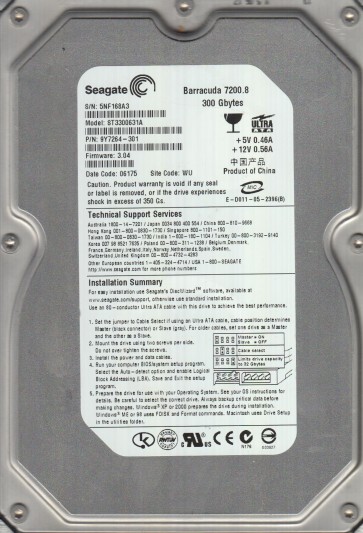
The Seagate ST3300631A is a 3.5-inch Parallel ATA (PATA/IDE) hard drive with a formatted capacity of 30GB and a rotational speed of 7200 RPM. Introduced in the early 2000s, this drive utilizes glass platters and fluid dynamic bearings (FDB). It is a single-platter drive with a recording density typical of its era. The drive controller board (PCB) features a Smooth motor controller and a traditional IDE interface connector. Due to its age, common failure modes include degraded spindle motor bearings, weakening magnetic domains on the platters, and failure of aging electrolytic capacitors on the PCB. The drive’s firmware is stored in a serial flash EEPROM on the PCB, which can become corrupted over time or due to voltage spikes.
Identifying Common Failure Types
1. Electronic Failure (PCB / Controller Board)
Symptoms: The drive does not spin up at all. There is no audible sound of platters rotating. The drive may be detected by the BIOS with an incorrect model name or no detection. Visual inspection of the PCB may reveal bulging or leaking electrolytic capacitors, especially near the power connector. A multimeter check may show a shorted TVS diode on the 5V or 12V power rail. This is often caused by a power surge or aging components. The motor controller chip or preamplifier circuit on the PCB can also fail.
2. Mechanical Failure (Spindle Motor or Head Assembly)
Symptoms: The drive powers on but makes a series of clicking, grinding, or scraping noises. The platters may spin but the read/write heads fail to move or move erratically. Clicking often indicates the heads are unable to read the servo patterns on the platters, possibly due to a damaged preamplifier or stuck actuator. A grinding noise suggests a failing spindle motor bearing (common with FDB units after many years of inactivity or use). The heads may have crashed into the platters, causing visible scratches or debris. The drive will not be recognized by the operating system.
3. Firmware Corruption
Symptoms: The drive spins up normally and sounds healthy (no unusual noises). However, the BIOS detects it with a strange model number, capacity (0GB), or fails to identify it. The drive may be locked, refusing read/write commands. This can happen due to a bad sector that corrupts a firmware module, an incomplete power-down sequence, or a virus. The drive may appear as a RAW filesystem or require a specific initialization sequence that the standard OS cannot perform. The SA (Servo Area) or system tracks containing the translator module may be corrupted.
4. Logical / Bad Sector Issues
Symptoms: The drive is detected and runs quietly but has unreadable files or folders. The operating system reports “cyclic redundancy check” (CRC) errors, bad sectors, or the drive becomes progressively slower. The file system may become corrupted, showing a raw partition or asking to format the drive. This is often a result of head degradation, weak magnetic domains, or physical scratches on the platter surface. It can also stem from a failing read channel or preamplifier.
Potential Recovery Paths
Professional Data Recovery Services
For the ST3300631A, professional recovery is recommended for any mechanical failure (clicking, grinding, head crash), severe firmware corruption involving the servo system, or when the platters themselves are damaged. A professional lab will use a cleanroom (Class 100 or better) to open the drive. They will perform a head stack replacement (HSR) or transplant the platters into a working donor drive. They possess specialized tools like PC-3000, DeepSpar DDI, or MRT to read firmware modules, created a direct heads map, and extract data sector by sector. Services like this cost $300 to $3,000+ depending on severity. For the ST3300631A, a donor drive with identical firmware revision and head assembly is critical.
DIY Recovery Methods
Caution: DIY methods carry a very high risk of permanent data loss, especially for mechanical failures.
For suspected Electronic Failure (No Spin / Incorrect Detection): The most common DIY fix is replacing the PCB (printed circuit board). However, you cannot just swap any identical PCB. The drive’s unique firmware and adaptive data (stored in the serial flash ROM) must be transferred to the replacement board. This requires a hot air solder station and good soldering skills to carefully desolder the original 8-pin SOIC serial flash chip and re-solder it onto the donor PCB. Alternatively, you can buy a pre-programmed PCB from a specialized supplier, but you must provide the drive’s model, serial number, and firmware version. After replacement, the drive may need a thermal recalibration or adapter adjustment. This is not a simple swap.
For Logical / Bad Sector Issues: If the drive spins normally and is detected, you can attempt software-based recovery. Use a dedicated tool like ddrescue (Linux) or HDDSuperClone to create a sector-by-sector image of the failing drive onto a known-good destination drive. Set the tool to skip bad sectors and retry them later. Do NOT use Windows chkdsk or any defragmentation tool, as they can cause further read damage. Use a read-retry limit of 1 to avoid damaging the heads on bad areas. Clone in reverse direction if possible. After cloning, use file recovery software like R-Studio or UFS Explorer to extract data from the image.
For Firmware Corruption (but no mechanical noise): A very risky DIY path involves using complex tools like MRT or PC-3000 UDMA (which cost hundreds of dollars) to read and repair firmware modules. If you are not experienced, you can easily render the drive permanently dead by writing incorrect firmware. The best DIY approach is to attempt to create a full raw image using ddrescue first, then use data recovery software that can interpret the raw file system even with corruption. Sometimes a simple power cycle or cold-reboot (refrigeration) trick can temporarily stabilize a failing chip, but this is rarely reliable and can cause condensation damage.
What Not to Do
- DO NOT open the drive under any circumstances if you are not in a certified cleanroom. Opening it even for a second introduces dust and particles that will scratch the platters and destroy data permanently. The ST3300631A uses glass platters which are especially vulnerable to scratches.
- DO NOT apply power to a drive that is making grinding or scraping noises. This can worsen the head crash and turn recoverable data into unrecoverable debris.
- DO NOT run chkdsk / fsck / defrag on a failing drive. These tools write to the drive and can overwrite data, corrupt the file system further, or cause the heads to lock up.
- DO NOT freeze the drive. This is a myth from older drives and can cause condensation, corrosion, and shock to the read/write heads. It does not fix the underlying issue and often permanently destroys the drive.
- DO NOT use high-level recovery software (like Recuva) on a drive with obvious mechanical or electronic failure. It cannot fix hardware problems.
- DO NOT use a PCB from an identical model without transferring the original BIOS/ROM chip. The drive will not initialize properly and may lose all data due to incompatible adaptive settings.
Summary
The Seagate ST3300631A is a classic IDE drive prone to specific failures: degrading electrolytic capacitors (electronic), spindle motor bearing wear or head crashes (mechanical), and firmware corruption. For any mechanical issue or severe firmware problems, professional data recovery is the only reliable path. For electronic issues, a careful PCB swap with ROM transfer may work for experienced DIYers. For logical bad sectors, creating a raw image with ddrescue is the best first step. Never open the drive, never run disk repair utilities, and always back up any working data immediately. The age of this drive means component failure is inevitable, so time is of the essence.