
Data recovery on vintage hard drives like the Hitachi HTS541680J9SA00 starts with identifying the failure type – electronic, firmware, or mechanical. Each requires a different approach, and misdiagnosis can make things worse. Here’s a quick guide to help you assess your situation and decide on the next step.
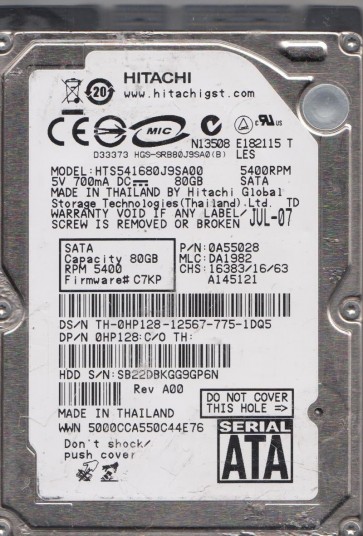
The Hitachi HTS541680J9SA00 is a 2.5-inch, 80GB, 5400 RPM SATA hard drive from the Travelstar 5K100 series. This drive typically uses perpendicular recording technology and a fluid dynamic bearing motor. It was widely deployed in laptops and external enclosures from the mid-2000s. The drive controller board is usually located on the bottom, and the heads park on a ramp outside the platters. Understanding this specific architecture is critical for assessing the physical state of the platters, the read/write heads, and the preamplifier circuitry.
Identifying Common Failure Types
1. Bad Sectors / Logical Corruption: The drive may make clicking sounds when trying to read specific data, or the operating system reports “read errors” or “cyclic redundancy check (CRC) errors.” This is often caused by damaged platter surfaces due to head crashes, age, or voltage fluctuations. The drive may still spin up and be detected but becomes very slow or hangs during file access. A sign of this is a steadily increasing number of reallocated sectors in the SMART data.
2. Electronic Failure (PCB Failure): The drive shows no signs of life: no spin-up, no sound, and is not detected by the PC. This can be caused by a failed voltage regulator, a blown TVS diode (often from a power surge), or a corrupted firmware chip on the printed circuit board (PCB). The motor may receive no power, or the preamp communication fails. In some cases, a visible burn mark or popped capacitor is present on the PCB.
3. Mechanical Failure (Head Crash / Stiction): You hear a distinct scratching, grinding, or repeating “click of death.” The drive might spin up briefly with a whirring sound that is followed by a click and then the motor stops. This indicates that the read/write heads have physically contacted the platters (head crash) or that the heads are stuck to the platters due to stiction. In severe cases, the platter surface is scarred, making data recovery extremely difficult.
Potential Recovery Paths
Professional Service (Recommended for all mechanical or critical data): For mechanical failures (head crashes, stiction) or seized bearings, a cleanroom (Class 100 or better) is mandatory. A specialist must perform a head stack replacement from a donor drive (exact same model, revision, and firmware version). For severe platter damage, a data recovery firm may use advanced techniques like magnetic force microscopy or direct platter imaging. Logical failures with bad sectors require specialized tools (e.g., PC-3000, DeepSpar) to bypass errors and create a sector-by-sector clone, with firmware adjustments if needed. Costs range from $300 to $3000+ depending on complexity.
DIY Software Recovery (Only for minor logical issues or corruption without hardware damage): If the drive is detected and spins normally but has file system errors, try read-only image cloning with tools like ddrescue (Linux) or R-Studio (Windows). These tools can repeatedly retry reading bad sectors while building an image. NEVER write to the original drive. For partition table issues, use TestDisk to recover lost partitions. A simple file recovery with Recuva can be attempted if the drive is fully readable. Warning: If the drive makes any abnormal sounds or fails to spin up, immediately stop all DIY attempts.
DIY PCB Swap (For specific electronic failures): If the drive is completely dead (no spin-up) and you suspect a failed PCB, you can attempt a board swap. You must source an exact match: same Hitachi HTS541680J9SA00 model, same firmware revision, and same date code on the PCB label. However, many Hitachi drives store unique adaptive data (like head parameters and calibration tables) in a serial flash chip on the PCB. Simply swapping the board without transferring this chip (via hot air rework) will result in the drive not working or being misdetected. Only attempt this if you have soldering skills and a hot air station. Otherwise, a professional service is strongly advised.
What Not to Do
– DO NOT open the drive enclosure. The platters are highly sensitive to dust. Even a single particle of dust can destroy the heads and the platter surface. Any attempt to open the drive outside a cleanroom almost guarantees permanent data loss.
– DO NOT power cycle a clicking drive repeatedly. Each spin-up can cause further head damage and scratch the platters, reducing the chances of recovery.
– DO NOT use chkdsk, fsck, or any disk repair tool on a failing drive. These tools write to the drive and can overwrite critical file system structures, making data unrecoverable.
– DO NOT freeze the drive. This is a myth that can cause condensation and permanent damage to the spindle bearing and platters.
– DO NOT attempt to shake or hit the drive to free stuck heads. This can cause catastrophic platter damage.
– DO NOT use data recovery software on a drive that is physically clicking or making scraping noises. It will only make the situation worse and may cause the heads to crash entirely.
Summary
The Hitachi HTS541680J9SA00 is prone to both logical and mechanical failures. The most common issues are bad sectors (logical damage), PCB failure (electronic failure), and head crashes (mechanical failure). The recovery strategy depends entirely on the failure type. For any mechanical issue (clicking, grinding, no spin-up) or for data of serious value, immediately cease all DIY attempts and contact a professional data recovery service. For minor logical corruption (drive is detected and quiet), a read-only sector-by-sector clone with ddrescue is the safest DIY path. Always prioritize preserving the current state of the drive over any DIY repair attempt. Data recovery is a trade-off between cost, time, and the value of the data.