
Data recovery on vintage hard drives like the Seagate ST3750840ACE starts with identifying the failure type – electronic, firmware, or mechanical. Each requires a different approach, and misdiagnosis can make things worse. Here’s a quick guide to help you assess your situation and decide on the next step.
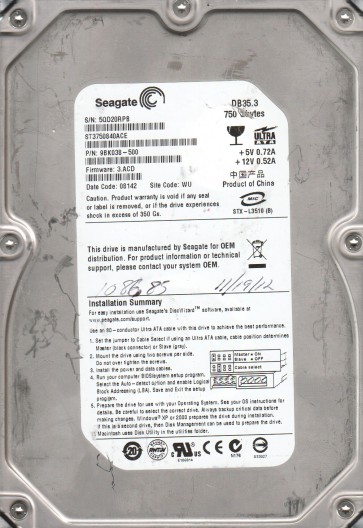
The Seagate ST3750840ACE is a 3.5-inch, 750GB, 7200 RPM hard disk drive (HDD) belonging to Seagate’s Barracuda 7200.10 family. It features a Parallel ATA (PATA/IDE) interface, making it an older generation drive commonly used in desktop systems, external enclosures, and legacy servers from the mid-2000s. This model utilizes perpendicular magnetic recording (PMR) technology and typically has a single or dual-platter configuration. Due to its age, the drive is susceptible to both mechanical wear and electronic component degradation. The controller board is a critical component, and the drive relies on a firmware zone that can become corrupted. Understanding that this is a legacy PATA drive is essential for planning the correct recovery approach, as modern SATA-based tools and interfaces may require special adapters.
Identifying Common Failure Types
1. Mechanical Failure (Head Crash / Stiction)
This is a physical failure where the read/write heads make contact with the platter surface or become stuck to the platter (stiction). Symptoms include a repetitive clicking sound (head slap), a grinding noise, or the drive motor failing to spin up (spinning up with a high-pitched whine and then stopping). This often occurs due to a sudden shock, power loss, or age-related degradation of the head actuator mechanism. Data recovery is extremely difficult and requires a cleanroom environment to replace heads. DIY methods are impossible without professional equipment.
2. Electronic Failure (PCB/Controller Board)
The printed circuit board (PCB) on the ST3750840ACE can fail due to capacitor leakage, voltage spike, or age-related component death (e.g., burned preamplifier chip, failed motor controller). Symptoms include the drive not being detected at all, no motor spin, or a “dead” drive that shows no activity. The drive may also have a burnt smell. The recovery path often involves replacing the PCB with a matched donor board, but only after performing a ROM transplant (if the drive uses a system-on-chip with on-board firmware). This is a common and often recoverable failure if the platters and heads are intact.
3. Firmware Corruption
The drive’s internal firmware (service area) can become corrupt due to unexpected power loss, bad sectors in the system area, or logical errors. Symptoms include the drive being detected but showing the wrong capacity (e.g., 0GB or 32GB), making constant recalibration noises, or clicking a few times before going silent (without a full head crash). The drive may also fail to spin up to ready. This is a software-level issue that requires specialized tools (e.g., PC-3000, MRT) to access the service area and repair modules. DIY methods are highly risky and can permanently brick the drive if wrong commands are issued.
4. Logical Failure (Bad Sectors / File System Corruption)
The drive may spin up, be detected, and appear in BIOS but fail to mount or read data, showing file system errors (e.g., “The disk is not formatted”) or very slow read speeds. This is caused by bad sectors on the platter surface or a corrupted file allocation table (FAT/NTFS). While the hardware is mostly functional, the data structure is compromised. Recovery can be attempted via software imaging tools, but running chkdsk or similar utilities on a failing drive can accelerate physical damage.
Potential Recovery Paths
Professional Data Recovery Services (Recommended for Mechanical / Electronic / Firmware)
For any non-logical failure, especially mechanical issues like head crashes or PCB failures requiring ROM transplant, professional intervention is the only safe route. A reputable service like DriveSavers, Gillware, or a local cleanroom lab can perform head replacements, platter transplants, or service area repairs using specialized tools (e.g., PC-3000, DeepSpar). They will provide a diagnosis and quote. Costs range from $300 to $3000+ depending on the severity. For the ST3750840ACE, availability of a donor drive of the same model and family is critical. Ensure the service guarantees a “no data, no charge” policy.
DIY Recovery Paths (For Logical and PCB Failures only – High Risk)
Case 1: PCB Replacement (Electronic Failure – DIY)
Warning: Do not swap boards without transferring the original ROM chip (8-pin SOIC) from the dead PCB to the donor board. The ST3750840ACE stores unique adaptive parameters in the ROM. Using a donor board without this chip will almost certainly prevent the drive from working. Steps: 1) Source a donor Seagate ST3750840ACE (same model, firmware version, and DCM (Drive Circuitry Member) number). 2) Use a hot air station or fine-tip soldering iron to carefully remove the original ROM chip. 3) Solder it onto the donor board. 4) Install the donor board on the drive. 5) The drive may now spin up and be recognized. If it clicks or fails, a professional service is needed.
Case 2: Software Imaging (Logical Failure – DIY)
Warning: Do not run chkdsk, defrag, or reformat the drive. These operations write data to the failing surface, potentially destroying evidence and making recovery impossible. Steps: 1) Use a PATA-to-USB adapter. 2) Boot from a separate healthy drive. 3) Use a sector-by-sector imaging tool like ddrescue (Linux) or HDDSuperClone (Windows/Linux). 4) Configure the tool to skip bad sectors (a retry count of 3 or less is recommended to avoid further stress). 5) Create a forensic image to another healthy drive (SATA + USB 3.0). 6) Once the image is complete, attempt file recovery with software like R-Studio or PhotoRec on the image file. This process may take days for a 750GB drive with bad sectors.
What Not to Do
- Never open the drive enclosure except in a certified cleanroom (Class 100 or better). The platters are sensitive to microscopic dust particles. Opening the drive voids any professional recovery chance and introduces contamination.
- Do not apply power if the drive makes loud clicking or grinding sounds. This indicates a mechanical head crash. Spinning it up further can destroy the platter surface, rendering data unrecoverable.
- Avoid running chkdsk /fsck or any file system repair tool on the failing drive. These tools write to the FAT/MFT tables, corrupting pointers and causing permanent data loss.
- Do not freeze the drive. This myth from the 1990s is dangerous. Thermal expansion can warp the platters, and condensation can cause electrical shorts on the PCB.
- Do not attempt to swap PCBs without transferring the original ROM chip. The drive will not work or may lock up, and a professional service will have to undo the damage.
- Do not use data recovery software that attempts to repair the drive (like most “undelete” tools) on the original drive. Always work on a cloned image.
- Never use the drive as a secondary source of power to test it. Using a faulty PSU (power supply unit) can damage the PCB further.
Summary
The Seagate ST3750840ACE is an aging PATA HDD prone to mechanical wear, electronic PCB failure, firmware corruption, and logical bad sectors. For mechanical or electronic issues involving head damage or complex firmware, professional data recovery is mandatory and the only reliable path. DIY recovery is only viable for simple PCB swaps (with ROM chip transfer) or logical imaging using tools like ddrescue. Always prioritize creating a full disk image before any other intervention. The most critical rule: stop using the drive immediately upon hearing abnormal noises or seeing detection issues, and never attempt repairs that write to the platter surface. Following the “What Not to Do” guidelines will maximize the chance of a successful recovery.