
Data recovery on vintage hard drives like the Western Digital WD7500AARS starts with identifying the failure type – electronic, firmware, or mechanical. Each requires a different approach, and misdiagnosis can make things worse. Here’s a quick guide to help you assess your situation and decide on the next step.
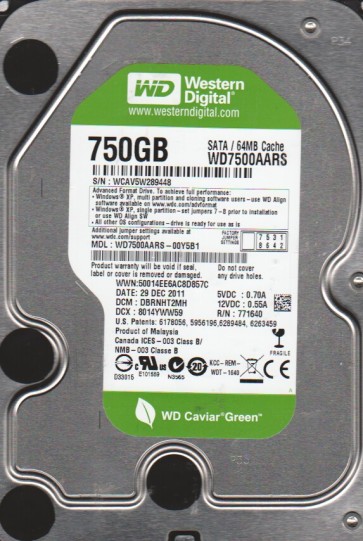
The Western Digital WD7500AARS is a 750GB 3.5-inch desktop hard drive from the Green Power (IntelliPower) series. Its key characteristic is a variable spindle speed (typically around 5400-7200 RPM) designed to optimize power consumption and reduce heat. This drive commonly employs Advanced Format (4K sectors) and uses a single-platter design in many revisions. Technicians must be aware of its use of the Marvell 88i8845 controller and its specific firmware architecture which is sensitive to weak head preamps and PCB component degradation.
Common Failure Types
1. Head Stack Assembly (HSA) Failure (Mechanical): Symptoms include repetitive clicking (click of death), whirring sounds without spin-up completion, or the drive being completely silent with no spin. Physical damage to the heads due to a shock event or contamination from internal outgassing is common in older drives. Heads may also fail gradually, producing read errors and slow performance before total failure.
2. Firmware Corruption (Logical/Firmware): The drive may spin up normally but is not recognized by the BIOS or operating system. SMART reports show high reallocated sector counts (05/C4) or pending sectors (C5/C6). Specific firmware modules like the Service Area (SA) can become corrupted due to write instability during power loss, leading to the drive locking up or hanging on initialization (Type 0 or Type 1 failure behavior).
3. Degraded or Weak Heads (Mechanical/Electronic): The read/write heads may be physically intact but have degraded signal strength. Symptoms include slow reading, repeated CRC errors, and bad sectors only appearing in specific zones of the platter. This is often a precursor to full head failure and is common after extended use with poor vibration control.
4. Stiction (Mechanical): The read/write heads can stick to the platter surface after the drive is powered off, especially if it was not parked correctly. Symptoms are a single brief whirring sound followed by the drive stopping. This often requires a gentle tap or specialized tool to free the heads.
5. Logical Damage (File System Level): Symptoms such as an “unallocated” partition, “RAW” file system, or “The file or directory is corrupted and unreadable” error. This is caused by corruption of the Master File Table (MFT), File Allocation Table (FAT), or directory entries due to a sudden power loss, improper ejection, or software malfunction. The drive hardware remains functional.
Potential Recovery Paths
DIY Methods (For Logical Damage Only): For file system corruption, use data recovery software like R-Studio, DMDE, or GetDataBack. Create a full sector-by-sector disk image to a healthy drive using a tool like ddrescue (Linux) or HDDSuperClone. Do not scan or write to the source drive. For a “RAW” partition, a deep scan in recovery software can bypass the damaged directory structure. For a single bad sector, ddrescue can skip it and continue imaging, allowing extraction of most files.
Professional Service (For Mechanical or Firmware Issues): Suspected head failure, clicking sounds, or firmware corruption requires a cleanroom (Class 100 or better) environment. A professional will perform a head stack replacement using a compatible donor drive (matched by PCB version and head map). For firmware issues, specialized tools like PC-3000 or MRT are used to rebuild Service Area modules, repair corrupt translators, or temporarily patch firmware to disable a failing head. For stiction, the technician will carefully release the heads using a tool inserted between the platter and actuator arm.
PCB Repair (For Electronic Failure): If the drive is completely dead (no spin, no sound), check the PCB. Common failures on the WD7500AARS include a blown TVS diode (surface mount fuse) or a failed motor controller IC. A technician can replace the TVS diode or swap the PCB after transferring a serial number ROM from the original PCB to the donor PCB. This requires a hot air station and soldering skills.
What Not to Do
Do not run a disk defragmenter or check disk (chkdsk /f) on a failing mechanical drive. This will induce massive head movement and likely cause a head crash, destroying the data. Do not open the hard drive enclosure. Ultra-fine dust particles will contaminate the platters and ruin the media. Do not apply external voltage, freeze the drive, or tap it with a hammer. These are myths that cause permanent damage. Do not attempt to swap the PCB without transferring the drive’s unique ROM (firmware) chip. A generic PCB swap will cause the drive to identify incorrectly and may destroy the Service Area. Do not continue to power cycle the drive if it makes unusual noises. Each cycle can physically damage the heads and platters further.
Summary
Recovering data from a Western Digital WD7500AARS requires a strict diagnosis of the failure type. Logical corruption can be handled with software imaging. Mechanical issues like head failure or stiction demand a professional cleanroom intervention. Firmware corruption requires specialized tools to rebuild logical structures. Avoid all risky do-it-yourself physical repairs. The most reliable path for valuable data is immediate power-off and consultation with a certified data recovery laboratory.