
Data recovery on vintage hard drives like the Seagate ST380022A starts with identifying the failure type – electronic, firmware, or mechanical. Each requires a different approach, and misdiagnosis can make things worse. Here’s a quick guide to help you assess your situation and decide on the next step.
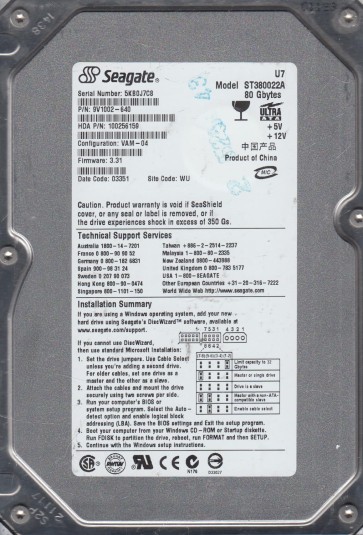
The Seagate ST380022A is a 80GB Parallel ATA (PATA) hard drive from the early 2000s, utilizing a 3.5-inch form factor and 7200 RPM spindle speed. It features a fluid dynamic bearing motor and a typical single-platter design. As an older generation drive, it is susceptible to specific failure mechanisms related to its mechanical components and aging electronics. The drive uses a standard IDE interface and is known for being a workhorse in its era, but its age means that lubricant degradation and component fatigue are common concerns.
Identifying Common Failure Types
1. Mechanical Failure (Head Crash or Stiction)
Symptoms include clicking, grinding, or whining noises, or complete silence with no spin-up. This is often caused by degraded spindle motor lubricant (leading to stiction) or a damaged read/write head contacting the platter surface. The drive may be detected by the BIOS but fail to read data, or it may not spin at all. This is a true hardware failure requiring cleanroom intervention.
2. Electronic Failure (PCB or Preamp)
The drive may power on but remain undetected, or show a “click of death” but with no mechanical grinding. Common failures include blown TVS diodes (transient voltage suppression) due to power surges, failed motor controller chips, or corrupted firmware on the main controller. A blown TVS can often be identified by visual inspection for burn marks or a short circuit on the PCB (printed circuit board) power input.
3. Logical Failure (File System Corruption or Bad Sectors)
The drive spins up normally, is detected by the BIOS, but the operating system cannot access the data. Symptoms include “RAW” file system, “CHKDSK” failures, or slow read speeds. This can result from sudden power loss, virus infection, or the development of bad sectors on the platter surface. It is often recoverable with software if the physical condition is good.
4. Firmware Corruption (ATA Password or Translator Issues)
The drive may be detected with a wrong model number, capacity (e.g., 0GB or 32GB), or may “hang” the system during detection. This is a software defect within the drive’s own embedded system, often caused by unexpected power cycles or head degradation. It prevents the normal translation of logical to physical sectors.
Potential Recovery Paths
DIY Methods (Only for Logical Failures & Mild Bad Sectors)
Software Recovery: Use tools like ddrescue (Linux) or HDD Raw Copy Tool (Windows) to create a sector-by-sector disk image onto a known good drive. Never use standard copy/paste. For file system corruption, use recovery software like R-Studio or ReclaiMe to scan the image. Important: Do not attempt this if the drive makes abnormal noises. Bad Sector Isolation: With ddrescue, use the -n (no scrape) mode first to skip difficult areas, then a second pass to retry. This minimizes further damage. PCB Swap (Generic Boards): If you have confirmed a blown TVS on the PCB, you can sometimes replace the PCB with an identical donor board. However, the ST380022A often requires swapping the original ROM chip (U12) from the old board to the new board, as the calibration data is stored there. This is a delicate soldering operation. Caution: If the drive has mechanical damage, any DIY attempt will cause permanent data loss.
Professional Services (For Mechanical, Electronic & Complex Firmware Issues)
Cleanroom Recovery: Required for head crashes or stiction. The platters are transferred to a donor drive with identical firmware and head geometry. Advanced PCB Repair: A professional will desolder and replace the motor controller or read/write preamplifier, and then recalibrate the drive. Firmware repair: Using PC-3000 or similar tools to rebuild the translator module, unlock the ATA password, or fix the service area defects. Cost: Professional recovery for this vintage drive typically ranges from $300 to $1500 USD, depending on the severity and cleanroom time required. Because it is an older drive, some specialized labs may still accept it, but turnaround times can be longer due to parts availability.
What Not to Do
– Never open the drive enclosure. The platters are sealed in a cleanroom environment; exposure to dust will destroy the data surface. – Do not apply power repeatedly if the drive is making abnormal noises. Each spin-up can further damage the heads or platters. – Avoid running CHKDSK / FSCK or any repair utility on a clicking or failing drive. This command can overwrite critical file system data. – Do not freeze the drive. This is an urban legend and will cause condensation, leading to corrosion and further damage to the motor and heads. – Never attempt a PCB swap without confirming the ROM compatibility for this specific drive. An incompatible board can fry the new electronics or misalign the heads. – Do not use data recovery software on a drive that is making scratching or clicking noises. You will only worsen the physical damage.
Summary
The Seagate ST380022A is an aging PATA drive prone to mechanical stiction, electronic PCB failures (especially TVS diodes), and logical corruption. For data recovery, the first step is to listen to the drive: quiet but detected means software or firmware issues; clicking or grinding means hardware failure. DIY recovery is only safe for logical problems, where you should create a disk image using ddrescue. For any mechanical or complex electronic issue, professional cleanroom services are mandatory. Avoid power-cycling a failing drive, never open it, and never attempt a simple PCB swap without ROM transfer. The drive’s age increases the risk of component failure, but with proper handling, data recovery remains feasible through skilled technical intervention.