
Data recovery on vintage hard drives like the Seagate ST3450856SS starts with identifying the failure type – electronic, firmware, or mechanical. Each requires a different approach, and misdiagnosis can make things worse. Here’s a quick guide to help you assess your situation and decide on the next step.
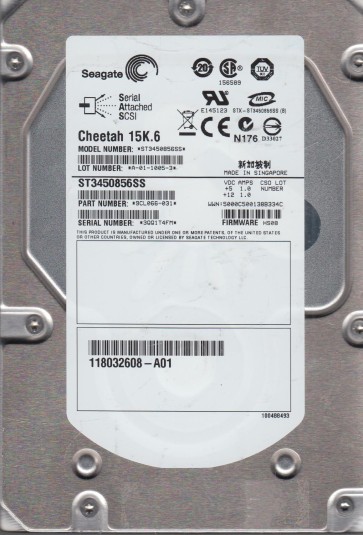
The Seagate ST3450856SS is an enterprise-class 3.5-inch SAS (Serial Attached SCSI) hard disk drive with a formatted capacity of 450GB. It operates at 15,000 RPM and typically uses a 16MB or 32MB cache buffer. This model is commonly found in RAID arrays, servers, and high-performance storage systems. It employs a Fibre Channel or SAS interface (depending on the specific model variant) and is built with dual-port capability for redundancy. The drive uses perpendicular recording technology and is designed for 24/7 operation in enterprise environments. Key components include the spindle motor, read/write heads mounted on a rotary actuator, a voice coil motor, a sealed head-disk assembly (HDA), and a printed circuit board (PCB) located on the underside. The PCB contains the main controller, SAS interface chip, motor controller, and flash memory for firmware. Understanding this hardware architecture is crucial because failure points can vary from the PCB to the internal mechanical components.
Identifying Common Failure Types
1. PCB (Printed Circuit Board) Failure
Symptoms: Drive is completely dead, makes no sound, does not spin up, and is not detected by the RAID controller or host system. This often results from power surges, faulty backplanes, or component aging. The PCB may show visible burn marks, bulging capacitors, or damaged port pins. This is a hardware failure but the drive’s internal mechanics and platters are typically intact.
2. Head Crash / Mechanical Failure
Symptoms: Drive produces abnormal noises such as clicking, scraping, grinding, or a repetitive ticking sound. Often accompanied by SMART errors or a “drive not ready” state. A head crash occurs when the read/write head contacts the spinning platter, damaging the magnetic layer. This is a severe hardware failure and can lead to media damage. Common causes include physical shock, contamination, or wear.
3. Firmware Corruption / Logic Failure
Symptoms: Drive powers up and may spin but is not recognized, reports incorrect capacity, hangs during initialization, or repeatedly attempts to recalibrate. The drive may click a few times then stop. This is a software/firmware issue within the drive’s internal memory or service area. It can result from unexpected power loss, failed firmware updates, or magnetic degradation of SA (Service Area) sectors. It is often repairable with specialized tools.
4. Bad Sectors / Media Degradation
Symptoms: Drive operates but shows increasing numbers of reallocated, pending, or uncorrectable sectors in SMART data. Performance may degrade, or the system may hang when accessing certain files. This is a physical media defect where the magnetic coating on the platter has deteriorated. It can progress to complete data loss. In enterprise drives like the ST3450856SS, this is often caused by age, thermal stress, or manufacturing defects.
Potential Recovery Paths
Professional Data Recovery Services
Recommended for: PCB failure, head crashes, severe firmware corruption, or any case where data is critical. Professional labs have class 10 or better cleanrooms (for HDA openings), donor drives of exact model and firmware revision, specialized tools like PC-3000 SAS or DeepSpar Disk Imager, and expertise in firmware repair. They can perform head replacements, platter transfers, or PCB repatching with NVRAM adaptation. Costs range from $500 to $3000+ depending on severity. Choose a service that offers free evaluation and does not charge for diagnosis. Warning: Avoid any service that quotes a fixed price without initial evaluation.
DIY Recovery Paths (For Software/Firmware Issues Only)
Firmware Repair: If the drive spins but is not detected, firmware corruption is a potential DIY route. Tools like MRT or PC-3000 (costly, for advanced users) can rebuild the translator module. For low-level: Ensure the drive is connected via a direct SAS HBA (not through a RAID card). Use ddrescue under Linux to create a disk image. Command: ddrescue -d -f -r3 /dev/sdX /mnt/recovery/disk.img /mnt/recovery/logfile.log. This attempts to read all sectors and handle errors. If the drive initializes, back up data immediately.
Bad Sector Imaging: For a drive with increasing bad sectors but still readable, use ddrescue or HDDSuperClone. These tools will skip unreadable sectors and retry them later. Do not use a standard copy or chkdsk. Always image to a known-good target drive of equal or larger capacity. Stop imaging if the drive begins to click.
PCB Swap (Highest Risk): Only attempt if the drive is completely dead and you have an exact donor drive (same model, same PCB revision, same firmware). Swap the original PCB’s 25QXX serial flash chip to the donor PCB using a hot air station. A simple PCB swap without transferring the ROM chip will not work due to NVRAM adaptation. This requires soldering skills and is risky without specialized equipment.
What Not to Do
- Never attempt to open the HDA (head-disk assembly) outside a cleanroom. Even a single dust particle can cause a head crash and destroy data.
- Do not apply power repeatedly to a clicking or grinding drive. Each spin attempt risks further media damage.
- Avoid using software like chkdsk /f, fsck, or any repair utility on a failing drive. These utilities modify file system structures and can overwrite critical data.
- Do not attempt a simple PCB swap without transferring the unique ROM/firmware chip. The drive will not spin up or will cause data corruption.
- Do not freeze or shock the drive. These myths can cause condensation or physical damage, especially in sealed enterprise drives.
- Do not use the drive in a RAID array after detecting abnormal sounds or errors. The RAID controller may try to rebuild or resync, further stressing the drive.
- Never disassemble the drive or remove screws yourself unless you are a trained professional. This voids any potential warranty and drastically increases recovery cost.
Summary
The Seagate ST3450856SS is a robust enterprise drive but is susceptible to specific failure modes: PCB failure (dead, no spin), head crash (clicking), firmware corruption (not recognized), and media degradation (bad sectors). For hardware failures (head crash, PCB with burned components), immediate professional recovery from a certified lab is mandatory due to cleanroom requirements and firmware adaptation. DIY recovery is only viable for logical/firmware issues using tools like ddrescue or specialized firmware tools, but never with standard file system repair commands. The golden rule: stop using the drive at the first sign of trouble, back up any accessible data, and do not attempt hardware repairs without proper equipment. Data recovery cost and success rate are heavily dependent on how quickly and carefully the drive is handled after failure.