
Data recovery on vintage hard drives like the Seagate ST380815AS starts with identifying the failure type – electronic, firmware, or mechanical. Each requires a different approach, and misdiagnosis can make things worse. Here’s a quick guide to help you assess your situation and decide on the next step.
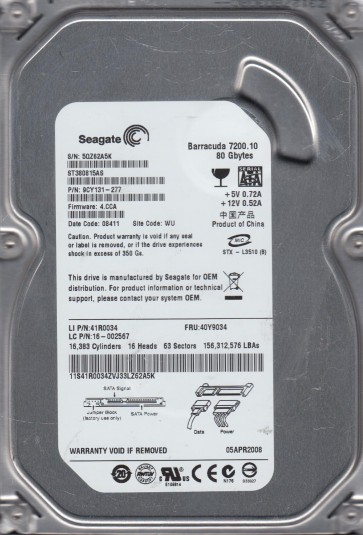
The Seagate ST380815AS is a 3.5-inch 80GB SATA hard disk drive from the Barracuda 7200.9 series. It typically features a single 80GB platter and a 2MB or 8MB cache. Key components include the main controller (often an Agere or Marvell chip), a fluid dynamic bearing (FDB) spindle motor, the SATA interface connector, the voice coil motor (VCM) for the actuator arm, and the read/write heads. This model is known for specific failure mechanisms, often related to weak preamplifier circuits on the flex cable or gradual stiction issues with the heads. Understanding that this is a relatively older drive means it likely has been running for many years, making mechanical wear a primary concern.
Identifying Common Failure Types
1. Mechanical Head Failure (Click of Death): The drive spins up but produces a repetitive clicking or ticking sound. This is often caused by the read/write heads hitting the crash stop or the platter surface due to failed preamplifier components, seized spindle bearings, or contamination. The ST380815AS is particularly susceptible to flex cable failure at the point where it connects to the preamp, leading to head slap. 2. Electronic / PCB Failure: The drive is completely dead (no spin, no sound) when powered. This is frequently due to a failed TVS diode on the SATA power line, a damaged motor controller IC, or a corrupted firmware ROM chip. A common symptom is the drive being detected with incorrect model numbers or capacity (0GB). 3. Logical / Firmware Corruption: The drive spins up normally and is detected, but the operating system cannot access data. The drive may show as “RAW” or “unallocated”. This includes bad sector remapping issues, file system corruption (NTFS/FAT32), or firmware module damage. For this model, translator module errors are common, causing infinite scanning or “no media” errors.
Potential Recovery Paths
Professional Data Recovery Services: For mechanical failures (clicking, grinding) or severe electronic damage, professional recovery is the only safe option. A cleanroom environment is required to replace heads or read platters on a donor drive. Specialized tools like PC-3000 or DeepSpar are used to handle firmware issues and extract data sector by sector. Costs range from $300 to $2000+ depending on the complexity. DIY Options (For Logical and Some Electronic Failures Only): For PCB failure (TVS diode only): If the drive is dead but has no burning smell, inspect the SATA power connector for shorted TVS diodes. Desoldering the shorted diode may bring the drive back temporarily. For logical failure: Use software like R-Studio, GetDataBack, or DMDE. Connect the drive to a different SATA port. Do not scan or write to the original drive. Create a sector-by-sector disk image to a healthy drive first, then recover data from the image. For bad sectors, use tools like HDDSuperClone or ddrescue (Linux) to skip problematic areas. Important: Never attempt a DIY head replacement or open the drive platter chamber. This will likely destroy the data.
What Not to Do
Do not power on a clicking drive repeatedly. Each click potentially damages the platter surface, rendering data unrecoverable. Do not open the hard drive enclosure. The internal environment is class 100 cleanroom. A single speck of dust can cause a head crash. Do not use recovery software that writes back to the failing drive. This includes defragmentation, chkdsk, or installing the software on the same disk. Do not freeze the drive. This is a myth that often causes condensation and ruins the platters. Do not attempt to replace the PCB without matching the firmware version exactly. The ST380815AS requires the NVRAM/firmware chip (often an 8-pin serial flash) to be transferred from the original PCB to a donor board, or the drive will not spin or will be misdetected.
Summary
The Seagate ST380815AS is an aging but functional drive with known failure points in the head preamplifier and electronic components. For any mechanical sound (clicking, grinding), stop immediately and seek professional help. For silent or logical failures, carefully assess the cause. A simple TVS diode fix or a proper firmware-aware image using recovery software can yield good results. The golden rule: prioritize safety. If the data is irreplaceable, always choose a professional lab to avoid permanent loss. Never risk a DIY mechanical repair.