
Data recovery on vintage hard drives like the Seagate ST3160021AS starts with identifying the failure type – electronic, firmware, or mechanical. Each requires a different approach, and misdiagnosis can make things worse. Here’s a quick guide to help you assess your situation and decide on the next step.
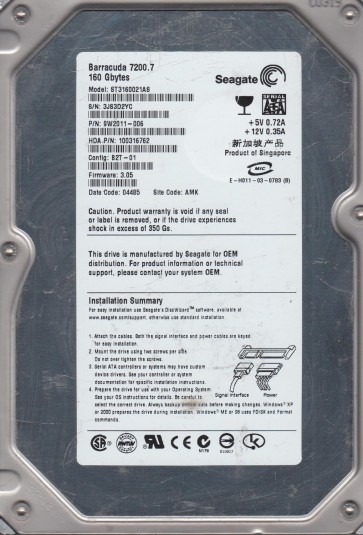
The Seagate ST3160021AS is a 160GB 3.5-inch SATA hard drive from the Barracuda 7200.7 series. This is a mature, single-platter drive known for its reliability but also exhibits specific failure patterns common to its generation. It uses a Fluid Dynamic Bearing (FDB) motor and a Marvell 88i6030-RC150 controller chip. Understanding this model is critical as its failure modes often require specific interventions to avoid permanent data loss.
Identifying Common Failure Types
1. Bad Sector Growth & Firmware Corruption: The ST3160021AS is prone to developing a large number of non-reallocatable bad sectors (primary defects). Over time, physical wear or a sudden power loss can corrupt the drive’s translator module (module 2B) on the platter. Symptoms include: the drive is detected by BIOS but with the wrong capacity (e.g., 0MB, 2GB, 33MB), clicking sounds from repeated retries, or the system freezing during file access. This is a firmware issue, not a mechanical head failure, though it can mimic one.
2. Head Stiction or Pre-Amp Failure: After long idle periods or due to a sudden shock, the read/write heads can stick to the platter surface (stiction). The drive will spin up but make a periodic “tick-tick-tick” sound without spinning down. Alternatively, the pre-amplifier circuit on the head stack assembly can fail, causing the drive to not spin up at all or to spin up with a high-pitched whine followed by clicking. The drive will often be detected with a “Buffer error” in terminal mode.
3. Motor Bearing Seizure (Less Common but Specific): While FDB bearings are durable, age-related lubricant degradation can cause the spindle motor to seize. The drive will either not spin up (silent) or will attempt to spin with a slow, grinding noise. In terminal mode, you will see a “Motor Spin Up Failed” error. This is a physical mechanical fault requiring a clean-room motor swap.
Potential Recovery Paths
DIY Methods (High Risk – Only for Software/Firmware Issues):
– For firmware corruption causing bad sector maps: Connect the drive as a secondary (slave) drive to a known-good system. Use advanced data recovery tools like MHDD or HDD Regenerator to attempt remapping. DO NOT run CHKDSK or any repair tool that writes to the drive. For translator issues, a terminal connection via a TTL-USB adapter can be attempted to read the firmware (often requires a specific “T2” command) but is extremely risky without proper knowledge.
– For bad sectors: Use ddrescue (Linux) or R-Studio to create a raw image of the drive skipping damaged areas. Set retry passes to minimal (1-2) to avoid stressing the heads.
Professional Services (Recommended for any Mechanical or Complex Firmware Failure):
– For head stiction: The heads must be carefully lifted off the platters in a class 100 cleanroom. A replacement head assembly from a donor drive (exact same model and firmware revision, e.g., 3.AAE) is required. Never attempt to pry the heads off manually.
– For motor seizure: The drive must be opened in a cleanroom. The platter(s) are physically removed and installed into a donor drive with a verified working motor. This is highly specialized and expensive.
– For firmware corruption with clicking: The drive must be placed into “safe mode” (disabling the heads during spin-up) to gain terminal access. Then, the firmware modules (data structures) are rebuilt from a donor. This requires equipment like a PC-3000 or DeepSpar DDI.
What Not to Do
1. DO NOT power cycle the drive repeatedly. If it clicks, let it spin down for 30 seconds before trying again. Excessive retries can damage the pre-amp or heads.
2. DO NOT attempt to open the drive yourself. These drives are not sealed with a screw; they have a prying lid. Even a single dust particle on the platter surface will destroy data integrity.
3. DO NOT use disk repair utilities like chkdsk /f, ScanDisk, or any “repair” function in Windows. These tools write to the disk and can corrupt the remaining data, and often trigger further head damage.
4. DO NOT expose the drive to magnets or strong electromagnetic fields. While modern drives are shielded, a strong neodymium magnet can corrupt the servo data on the platters.
5. DO NOT apply any physical force or tap the drive. Tapping can physically shift the heads, leading to platter scratches.
Summary
The Seagate ST3160021AS is a classic drive with three primary failure scenarios: firmware corruption (wrong capacity/bad sectors), head stiction (ticking), and motor seizure (non-spin). DIY recovery is only viable for non-mechanical firmware issues using disk imaging tools like ddrescue, and only if the drive is detected with correct capacity. Any clicking, grinding, or non-detection indicates hardware damage requiring professional cleanroom intervention. The single most important rule: if the drive makes unusual sounds, stop immediately and seek professional help. The cost of professional recovery may be high, but it is far cheaper than the permanent loss of irreplaceable data.