
Data recovery on vintage hard drives like the Seagate ST9160823AS starts with identifying the failure type – electronic, firmware, or mechanical. Each requires a different approach, and misdiagnosis can make things worse. Here’s a quick guide to help you assess your situation and decide on the next step.
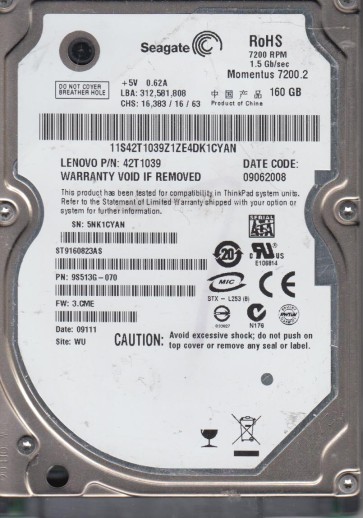
The Seagate ST9160823AS is a 160GB, 2.5-inch SATA hard drive from the Momentus 7200.2 family. It operates at 7200 RPM, which provides a performance boost over standard 5400 RPM drives. It uses a two-platter, four-head design. While known for its speed, this drive is prone to specific failure modes that can make data recovery challenging. Its age makes it susceptible to wear, and professional technicians have reported that this model can be prone to sudden failure.
Common Failure Types
1. Mechanical Failure (Head Crash)
Symptoms: Loud clicking, scraping, or grinding noises. The drive may fail to spin up or may not be detected at all.
Cause: Physical damage from drops, shock, or wear over time can cause the read/write heads to contact the platter surface, scraping off the magnetic media. This is a critical hardware failure.
2. Firmware Corruption
Symptoms: The drive spins up but is not recognized by the BIOS or operating system. It may be detected with an incorrect capacity (e.g., 0GB or 32MB) or an unusual model name. The drive may also become stuck in a busy state.
Cause: This model is known for firmware issues, particularly related to its translator module or system area corruption, often triggered by power loss or logical errors.
3. Logical Damage (Bad Sectors / File System Corruption)
Symptoms: The drive is detected and spins normally, but files become inaccessible, the system freezes during read attempts, or the drive shows as RAW or unformatted. SMART data may show increasing reallocated or pending sector counts.
Cause: Gradual degradation of the magnetic media from age, thermal stress, or head contact. Logical corruption can also result from improper shutdowns or software errors.
4. Stiction (Sticktion)
Symptoms: The drive fails to spin up or spins up briefly then stops. You may hear a faint whirring or buzzing sound, but no normal spin-up sequence.
Cause: Over time, the lubricant on the platters can become sticky, causing the read/write heads to adhere to the platter surface and preventing the spindle motor from rotating.
5. PCB / Electronic Failure
Symptoms: The drive is completely dead with no signs of power (no spin, no sound, no detection). Visible burn marks or damaged components may be present on the circuit board.
Cause: Power surges, static discharge, or component aging can damage the drive’s controller chip or TVS diode, cutting off power to the motor and preamp.
Potential Recovery Paths
DIY Methods (For Low-Risk Situations Only)
For logical damage (bad sectors, partition loss, accidental deletion): Use tools like TestDisk (partition recovery), R-Studio or UFS Explorer (file recovery), and ddrescue (disk imaging to a healthy drive). Avoid running chkdsk or fsck on the failing source drive.
For PCB failure: If the drive is dead but the firmware chip is intact, you may attempt a PCB swap. You must match the exact PCB model number and transfer the original ROM chip (8-pin flash memory) from the old board to the donor board. A simple board swap without ROM transfer will fail because the drive’s adaptive data is stored on that chip. This requires a hot air rework station and micro-soldering skills.
Professional Services (For Critical or High-Risk Cases)
For head crashes, stiction, or loud noises: Stop immediately. Professional cleanroom (Class 10) service is required to replace the read/write heads or unstick the actuator. Costs typically range from $300 to $800+ depending on the extent of platter damage.
For firmware corruption: Professional tools like PC-3000 or MRT are needed to access the System Area, repair corrupt modules, and rebuild the translator. This is not feasible with consumer software.
For severe bad sectors: Professionals use hardware imagers that can read damaged areas with custom retry algorithms and head voltage adjustments, maximizing data extraction while minimizing further damage.
What Not to Do
1. Do not open the drive’s sealed enclosure. Even a single dust particle will destroy the platters and data.
2. Do not use chkdsk /f, fsck, or reformat on a drive making unusual noises or with bad sectors. These commands force the drive to read bad areas, causing further media damage and data corruption.
3. Do not shock, shake, tap, or freeze the drive. Freezing causes condensation and head contamination, and is a harmful myth for this model.
4. Do not attempt a generic PCB swap without transferring the firmware chip. The ROM chip is unique to each drive; a swapped board will cause the drive to fail to identify or spin.
5. Do not use strong magnets or screwdrivers near the drive’s internal head slider area. Touching the head or platter pins will cause electrostatic discharge or physical damage.
Summary
The Seagate ST9160823AS is a fast 7200 RPM drive that is prone to mechanical wear (head crashes, stiction) and firmware corruption. Early diagnosis is critical: listen for unusual noises (hardware failure) versus a quiet, powered drive (PCB failure). The most reliable DIY approach is a byte-level clone (ddrescue) for drives with bad sectors only, or a ROM-swapped PCB for dead boards if you have the right tools. For all clicking, grinding, or non-detection issues, professional cleanroom and firmware recovery is the safest path. Avoid all haphazard fixes, especially freezer and chkdsk, as they guarantee data loss.