
Data recovery on vintage hard drives like the Seagate ST940210AS starts with identifying the failure type – electronic, firmware, or mechanical. Each requires a different approach, and misdiagnosis can make things worse. Here’s a quick guide to help you assess your situation and decide on the next step.
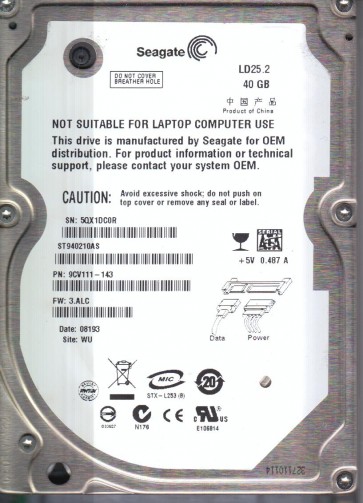
The Seagate ST940210AS is a 2.5-inch, 40GB (Plateau series) Parallel ATA (PATA / IDE) hard drive. It typically features a fluid dynamic bearing (FDB) motor and a single platter with an areal density common for its generation. The drive controller board (PCB) is often a common failure point due to power surges or aging components, particularly the TVS diodes and the preamp voltage regulator. The internal heads are sensitive to shock and mechanical wear. Due to its age, the drive’s lubricant may degrade, and the read/write heads can develop stiction (static friction) with the platter surface after prolonged inactivity. Understanding these specific failure modes is critical before attempting any recovery.
Identifying Common Failure Types
1. Electronic Failure (PCB / Controller Board): The drive is detected by the BIOS but makes no spindle spin-up sound. The drive may be completely dead (no power to the motor) or may emit a faint click without spinning. Common causes include a blown TVS diode, failed voltage regulator, damaged preamp, or corrupted firmware on the motor controller chip (usually a TI or Infineon IC). If the drive spins up but is not detected, the firmware or ROM may be corrupted.
2. Mechanical Failure (Head Crash / Stiction): The drive emits a loud, repetitive clicking sound (heads parking and unparking rapidly without reading data). The drive may spin up for a moment, then stop and repeat the click cycle. In severe cases, the heads are physically stuck to the platter (stiction). The drive may not spin at all if the motor bearing is seized (often due to lubricant failure). Any scratching or grinding noise indicates catastrophic platter damage.
3. Firmware Failure: The drive spins up normally and is detected by the BIOS (or software) but shows an incorrect capacity (e.g., 0MB or 4GB instead of 40GB). The drive may be recognized as “ST940210AS” but becomes unresponsive (hangs the system). This is often caused by corrupted module files on the system area, such as the translator, defect list, or the SA (Service Area) firmware modules. This failure is common if the drive has experienced a power loss during a write operation or if the SA read/write heads have degraded.
4. Degraded Heads The drive operates normally but produces consistent read errors, bad sectors, or very slow access times. Diagnostic software (like Victoria or MHDD) will show large clusters of uncorrectable or slow-to-read sectors. This is often a precursor to a full head crash and indicates the heads are physically degrading.
Potential Recovery Paths
Professional Data Recovery Service: This is the recommended path for all mechanical failures (clicking, grinding, stiction) and complex firmware cases. A professional lab will have cleanroom facilities (Class 10 or better) to safely replace heads or transplant platters. For electronic failure, they can perform ROM transplant, PCB rework (replacing faulty components), and firmware repair using specialized tools like PC-3000 UDMA or Atola Insight. Expect a high success rate (70-95% for logical and simple electronic issues, 50-80% for mechanical damage) but significant cost ($300-$2000+ depending on the damage and urgency).
DIY Recovery (Software/Logical Only): Only attempt if the drive makes normal spin-up and is detected with the correct capacity and no unusual noises. Use a tool like ddrescue (Linux) or HDDSuperClone (Windows bootable) to create a sector-by-sector image of the drive to a healthy target disk. Never scan or repair the drive directly. Once cloned, use recovery software like R-Studio, EaseUS Data Recovery Wizard, or DMDE to extract files from the clone. For a simple PCB failure (e.g., blown TVS diode), you can attempt to swap the PCB with a matching donor board (exact model and firmware revision) but you must transfer the drive’s unique ROM chip (8-pin serial eeprom) to the donor PCB. Without ROM transfer, the donor board will not match the head geometry and will likely cause further damage.
What Not to Do
Do NOT open the drive enclosure (e.g., remove the top lid) outside of a cleanroom. Even a single dust particle can destroy the platter surface. Do NOT apply power to the drive if it is making unusual sounds (clicking, grinding). Do NOT run chkdsk /f (Windows), fsck (Linux), or any disk repair utility on the failing drive. These tools will attempt to write to the drive, overwriting critical data. Do NOT freeze the drive. This myth often causes condensation that corrodes the heads and platters. Do NOT attempt to read data using the drive cable only (e.g., SATA to USB adapter) if the drive is not spinning. This will only stress the electronics. Do NOT attempt to swap the PCB without transferring the ROM chip; a direct PCB swap will not make the drive function correctly and can damage the logic board.
Summary
The Seagate ST940210AS is a legacy PATA drive with common failure modes including PCB electronic faults, head crashes, stiction, and corrupted firmware. For any mechanical symptom (clicking, grinding, no spin), professional cleanroom recovery is the only viable path. For software or simple electronic issues (bad sectors, no power but no noise), DIY is possible but requires careful procedures: clone the drive to a healthy target using ddrescue before any file recovery, or replace the PCB with a donor board plus ROM transplant for a dead PCB. Never attempt to repair a failing drive using disk check tools or physical manipulation outside a cleanroom. Prioritize creating a sector-level image before attempting any file system extraction, and if any step introduces risk (strange sounds or abrupt behavior change), stop immediately and consult a professional lab. Data is fragile; the drive is expendable.