
Data recovery on vintage hard drives like the Hitachi HTS541610J9SA00 starts with identifying the failure type – electronic, firmware, or mechanical. Each requires a different approach, and misdiagnosis can make things worse. Here’s a quick guide to help you assess your situation and decide on the next step.
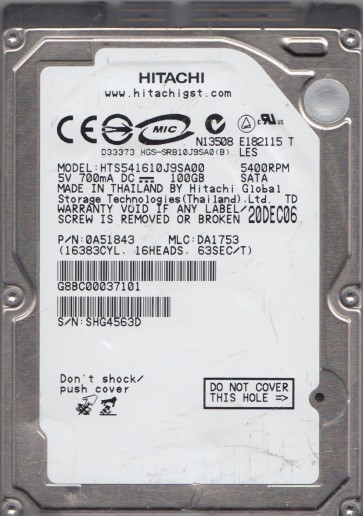
The Hitachi HTS541610J9SA00 is a 2.5-inch, 160GB, SATA hard disk drive from the Travelstar 5K100 series. It features a fluid dynamic bearing motor, a 5400 RPM spindle speed, and an 8MB cache. This drive was widely used in laptops and external enclosures from the mid-2000s. Its architecture employs a single glass platter and a dual-axis actuator arm assembly. Key firmware areas include the System Area (SA) on the platter, which contains translator modules, defect lists, and adaptive parameters. The preamp is located on the actuator flex cable. Understanding that this is an older SATA I (1.5Gbps) interface drive is crucial, as incompatibility with newer SATA controllers can sometimes cause false failures. The drive uses Hitachi’s proprietary FER (Flash Enhanced Reliability) technology for write caching.
Identifying Common Failure Types
1. Firmware Corruption (Module Errors)
A frequent failure mode involves corruption of the SA modules, particularly the “NVRAM” or “ATA” overlay files. Symptoms include the drive spinning up normally but not being detected by the BIOS, or being detected with an incorrect model name/capacity (e.g., “Hitachi HTS541610J9S” or “0GB”). The drive may click once and then idle. This is a logical/firmware issue, not a physical head crash. It often results from sudden power loss or improper sleep commands.
2. Head and Preamp Degradation
The HTS541610J9SA00 is susceptible to head stack assembly (HSA) degradation over time, especially in high-vibration environments. Signs include: the drive emits a ticking or clicking sound (multiple clicks per second) as it attempts to read the SA, or the drive spins up but produces a high-pitched whine. Data access may slow dramatically before total failure. This is a mechanical hardware failure. The preamp on the flex cable can also fail due to static discharge or wear, causing the heads to be “deaf” and unable to read data even if they are physically intact.
3. Stiction and Motor Failure (Bearing Lock)
Due to its age, the fluid dynamic bearing (FDB) can dry out or seize, especially if the drive was stored for long periods. Symptoms include: the drive fails to spin up (no vibration or sound), or you hear a faint “winding” sound as the motor tries but fails to rotate. In rare cases, the heads may stick to the platter surface (stiction) if the drive was parked improperly. This is a critical mechanical hardware failure. Attempting to force the platter to spin can cause permanent damage.
4. Bad Sectors and Media Surface Wear
Standard media degradation leads to growing reallocation counts and pending sectors. The drive may still be detected but is slow, or it reports read errors in specific areas (e.g., during file copies). SMART attributes like “Reallocated Sector Count” and “Current Pending Sector Count” will show high values. This can be a software/OS issue if caused by file system corruption, or a hardware issue if caused by platter damage.
Potential Recovery Paths
Professional Services (Recommended for Mechanical or Complex Firmware Failures)
- Clean Room Head Replacement: For head stack or preamp failure, a professional lab will open the drive in a Class 10 cleanroom, replace the HSA with a matched donor unit, and use specialized tools like the PC-3000 or DeepSpar to clone the drive sector-by-sector while handling bad areas. Cost typically ranges from $500 to $2500+ depending on urgency.
- Firmware Repair via ROM/NVRAM: For module corruption, a lab can disassemble the drive, read the firmware ROM chip directly, and rebuild the SA using specialized firmware adapters. This bypasses the need for platter removal and is less expensive ($300-$800).
- Motor and Spindle Extraction: For bearing lock, the platter must be transferred to a new motor assembly or a complete donor drive. This is a high-risk procedure requiring advanced tools like the JBC spindle puller and is only performed by top-tier labs (cost: $1500-$3000).
DIY Methods (Only for Logical/Software Issues with Absolute Caution)
- Frozen Drive Trick: For stiction or stuck bearings only. Place the drive in a sealed Ziploc bag and put it in a -20¡ãC freezer for 4-6 hours. Remove, quickly connect to another PC, and attempt to clone using a tool like DDrescue. This is a temporary measure and the drive will likely fail permanently after a few minutes. Do not use for clicking drives as it can worsen head damage.
- Image with DDrescue: If the drive is detected but has bad sectors, run `sudo ddrescue /dev/sdb /media/backup/image.img /media/backup/mapfile` on Linux. This creates a forensic image, retrying bad areas multiple times. Use a high-quality SATA cable and a UPS to prevent power loss.
- SMART Monitoring: Use tools like CrystalDiskInfo or smartctl to read the drive’s health. If Reallocated Sector Count is over 100, or Current Pending Sectors are non-zero, immediately stop using the drive and clone it. Do not attempt `chkdsk` or `fsck` on a failing drive as this can cause further corruption.
What Not to Do
- Do not apply external voltage to the motor pins. This high voltage spike can fry the preamp and controller chip, making recovery impossible even for professionals.
- Do not open the drive lid. The HTS541610J9SA00 uses glass platters, which are extremely sensitive to particles. Even a speck of dust under a head can scratch the platter, destroying data. The internal atmosphere is also critical.
- Do not use a “spin-up” tool or shake the drive. For clicking drives, shaking can misalign the heads further. For stuck drives, forcing spin-up with external power can destroy the motor controller.
- Do not run chkdsk or fsck on a failing drive. These utilities read and write to the SA and file system tables, which can cause a firmware crash or overwrite directory structures.
- Do not attempt to swap the circuit board (PCB) with a donor board. The HTS541610J9SA00 uses an adaptive ROM (U12 chip) that is unique to each drive’s head/media parameters. Swapping the PCB without transferring the ROM will result in “SF” or BIOS detection failure, or even firmer damage. If you must try, move the 8-pin SOIC-8 ROM chip from the old board to the new one.
Summary
The Hitachi HTS541610J9SA00 is an aging but stable drive with common failure points in firmware modules (particularly SA corruption), head/preamp degradation, and bearing stiction. For any mechanical failure (clicking, no spin, grinding), professional clean-room recovery is the only reliable path. DIY recovery is limited to logical issues such as bad sectors or temporary stiction, and must be performed using low-level imaging tools like DDrescue, not with file-system repair utilities. The highest risk is PCB swapping without ROM transfer and opening the drive. Prioritize making a full sector-by-sector image before any further operations. If the drive emits any abnormal noise (clicking, scraping, high-pitched whistle), power it off immediately and consult a professional data recovery lab.