
Data recovery on vintage hard drives like the Western Digital WD1001FAES starts with identifying the failure type – electronic, firmware, or mechanical. Each requires a different approach, and misdiagnosis can make things worse. Here’s a quick guide to help you assess your situation and decide on the next step.
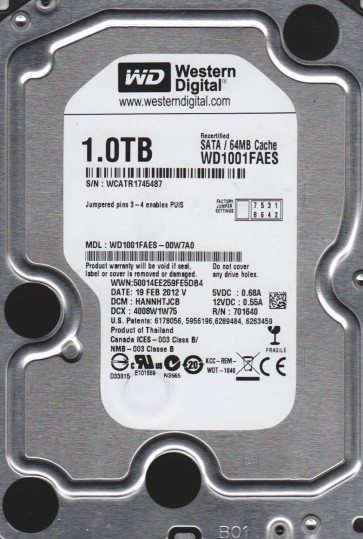
The Western Digital WD1001FAES is a 1TB 3.5-inch SATA hard drive from the enterprise-class RE4 (RAID Edition) series. It is designed for high-durability 24/7 operation in NAS and server environments, featuring a 7200 RPM spindle speed, a 64MB cache, and a dual-core processor for advanced command queuing. Its reliability is built upon rotational vibration sensors and a robust mechanical design, making it a common choice for small business servers and high-performance workstations.
Common Failure Types
1. Mechanical Head Crash
Symptoms: Loud clicking or scraping noises (often called the “click of death”), drive not spinning up, or BIOS detection failure. The drive may spin initially but then emit repetitive clicking sounds.
Cause: Physical contact between the read/write heads and the platter surface, caused by sudden shock, power surges, or gradual wear of the head actuator assembly. The WD1001FAES’s high track density makes it sensitive to head slap during transport.
2. Firmware Corruption (Module Errors)
Symptoms: Drive spins up correctly but is not detected by the BIOS or shows a “not initialized” status. In some cases, it may appear with an incorrect capacity (e.g., 0MB or 50GB). SMART status may report raw read error rates or reallocated sectors skyrocketing without physical damage.
Cause: Unexpected power loss during write operations, firmware update failures, or degradation of the SA (Service Area) sector on the platters. The WD1001FAES uses a complex system of translation maps (G-List, P-List) that can become corrupted.
3. Stiction (Media Stiction)
Symptoms: Drive does not spin up at all, even with power applied. There is no sound of heads parking or disk rotation. The drive may emit a faint buzz or click once when power is applied but fails to accelerate.
Cause: The read/write heads physically stick to the platter surface due to degraded lubricant or excessive vibration during shutdown. This is more common in units that have been powered down for extended periods or subjected to high temperatures.
4. Logical Corruption (Bad Sectors/File System Errors)
Symptoms: Drive is detected and spins normally, but files are inaccessible, directory structures are missing, or the operating system reports “disk not formatted” or “cyclic redundancy check (CRC) errors.” System may hang when trying to access certain folders.
Cause: Power outages, improper shutdowns, virus infections, or the natural reallocation of bad sectors. The file system (NTFS, ext4) may have damaged MFT (Master File Table) entries or directory pointers.
5. Preamp / Read Channel Failure
Symptoms: Drive spins normally but produces a “whining” or “whistling” sound rather than typical data seeking noise. The drive is detected but reports no data or zero capacity. Data recovery software sees a blank drive.
Cause: Failure of the internal preamplifier chip on the head assembly or the read channel circuitry on the PCB. This is a less common but distinct failure on older RE4 units due to component age.
Potential Recovery Paths
DIY Methods (Proceed with extreme caution)
- For Logical Corruption Only: Use sector-level imaging tools like DDRescue (Linux) or R-Studio (Windows). Create a full sector-by-sector clone to a healthy drive first. Do not attempt to repair or scan the original drive directly.
- For Simple Firmware Issues: If the drive is detected but shows incorrect capacity, a controlled firmware reset (not a format) using professional tools like MRT Pro or PC-3000 is required. This is not recommended for home users as it can instantly destroy the SA.
- For Stiction: Some advanced hobbyists attempt a gentle tap on the actuator arm to release the heads, but this often causes a head crash. It is almost always better to seek professional help.
Professional Data Recovery Services
- For Mechanical Failure (Head Crash or Stiction): A cleanroom environment (Class 10 or better) is required. The recovery process involves replacing the read/write heads with a known-good donor from an identical model and PCB revision. The technician then uses specialized firmware tools (e.g., PC-3000 or DeepSpar) to unlock the firmware and create a raw image.
- For Firmware Corruption: Professionals can access the Service Area directly via UART terminal or JTAG. They can reconstruct the corrupted translation tables (P-List, G-List) or replace specific firmware modules without damaging the platters. This often yields a 100% recovery rate.
- For Preamp Failure: This requires replacing the entire head stack assembly (HSA) in cleanroom conditions, as the preamp is bonded to the head assembly. This is a high-risk, high-cost operation but is the only option for data from a dead preamp.
What Not to Do
- Do not power cycle the drive repeatedly. If it is clicking or not spinning, repeated power applications can burn out the spindle motor driver chip or scratch the platters further.
- Do not open the drive enclosure. Hard drives are sealed and contain ultra-fine particles. Opening it outside of a cleanroom will introduce dust, which almost guarantees permanent data loss.
- Do not run CHKDSK, fsck, or any “repair” utility. On a failing drive, these tools often make the data more fragmented or overwrite critical file system structures, rendering data unrecoverable even by professionals.
- Do not freeze the drive. This is a myth that can cause condensation inside the drive, leading to corrosion and head damage. It is never a valid recovery method for modern drives.
- Do not apply voltage or tap the drive while powered on. This can cause catastrophic head-to-platter contact and destroy the data permanently. Always let a professional assess the damage first.
Summary
The WD1001FAES is a reliable enterprise drive but suffers from predictable failure modes: head crashes, firmware corruption, stiction, logical errors, and preamp failure. DIY recovery is only viable for logical corruption using sector cloning; all mechanical and firmware issues require a professional cleanroom service. Always prioritize creating a sector-by-sector clone before any repair attempts, and never open the drive. The highest chance of full recovery comes from immediate power-down upon hearing abnormal sounds and consulting a specialist with WD-specific tools.