
Data recovery on vintage hard drives like the Western Digital WD2000JB starts with identifying the failure type – electronic, firmware, or mechanical. Each requires a different approach, and misdiagnosis can make things worse. Here’s a quick guide to help you assess your situation and decide on the next step.
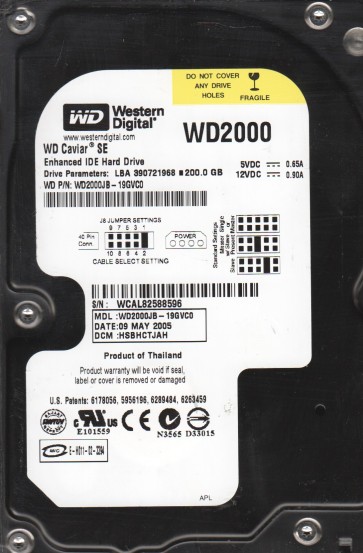
The Western Digital WD2000JB is a 200GB 3.5-inch hard drive from the Caviar series, utilizing PATA/IDE interface and a spindle speed of 7200 RPM. It is known for its reliability in desktop applications from the early 2000s. However, like all mechanical drives, it is susceptible to failure due to age, wear, and environmental factors. Understanding its architecture, including the EEPROM for firmware, the voice coil actuator, and platter stack, is critical for recovery.
Common Failure Types
1. Mechanical Failure (Head Crash / Stiction)
Symptoms: Loud clicking, grinding, or scraping noises; drive fails to spin up; drive spins up then stops; SMART reports “Reallocated Sectors” or “Current Pending Sector” counts rapidly increasing. Cause: Degraded lubricant, debris contamination, physical shock, or age-related wear causing the read/write heads to contact the platters.
2. Firmware / PCB Failure
Symptoms: Drive spins up but is not detected by BIOS; drive is detected with incorrect capacity (e.g., 0GB or model number garbled); drive clicks continuously after spin-up; drive reports “SMART Status Bad, Backup and Replace”. Cause: Corrupted firmware modules, damaged system tracks (SA/Service Area), or a failed preamplifier on the PCB board. Common on this generation due to aging capacitors and firmware bugs.
3. Logical Failure (File System / Partition Corruption)
Symptoms: Drive is detected correctly, but partition shows as RAW or unallocated; “File or directory is corrupted and unreadable” errors; data disappears; operating system hangs when accessing the drive. Cause: Improper shutdown, virus attack, accidental formatting, bad sectors triggering filesystem corruption, or power loss during write operation.
4. Electronic / PCB Component Failure
Symptoms: Drive shows no signs of life (no spin, no sound); a burnt smell from the drive; visible damage on PCB components (TVS diodes, motor controller chip). Cause: Power surge, incorrect power supply, age-related capacitor leakage or failure.
5. Bad Sector Development (Surface Degradation)
Symptoms: Slow read/write performance; frequent CRC errors during file copy; chkdsk or disk utilities find numerous bad sectors; system freezing or crashing when accessing specific files. Cause: Aging platter surface, head degradation, contamination, or previous head damage.
Potential Recovery Paths
DIY Methods (Low-Risk Scenarios)
Logical Recovery: For partition corruption (No physical damage). Use reliable data recovery software like R-Studio or DMDE. Create a sector-by-sector disk image to a healthy drive first using tools like ddrescue (Linux) or HDDSuperClone. Do NOT scan the original drive. Use file carving tools for severely corrupted filesystems. Firmware / PCB: If the drive is detected with wrong capacity (0GB), and you are technically advanced, you can attempt a firmware repair using tools like PC-3000 or MRT, but this is very risky without proper training. For a damaged PCB, a matched donor PCB (same DCM and PCB revision) may be swapped, but the firmware U12 chip (EEPROM) MUST be transferred from the original to the donor board.
Professional Services (High-Risk Scenarios)
Mechanical Failure: If you hear clicking, grinding, or scraping, stop all power attempts. The drive requires a cleanroom (Class 100 or better) to replace the read/write heads, relocate platters, or repair head stack assembly. Professional labs have specialized tools for Western Digital head stack replacement and alignment. Firmware / PCB: If the above DIY attempt fails or if the SA (Service Area) is severely corrupted, professional equipment can read the platter surface directly (via SA reader) and rebuild the firmware map. Bad Sectors: If there is progressive bad sector growth, professional tools like PC-3000 can disable the damaged heads or map out problematic zones to stabilize the drive for imaging. Cost expectation: Data recovery from WD20JB with mechanical or complex firmware issues typically ranges from $300 to $2500 depending on severity and turnaround time.
What Not to Do
1. Do not apply power multiple times to a clicking drive. Each power-on risks further head damage, scraping the platters and destroying data. 2. Do not open the drive enclosure. Hard drives are not vacuum-sealed, but the internal air is filtered. Opening it to a non-cleanroom environment will contaminate the platters with dust, making professional recovery nearly impossible. 3. Do not run chkdsk /r or disk repair tools on a drive with physical damage. This forces the drive to read failed sectors repeatedly, increasing wear and causing permanent data loss. 4. Do not freeze the drive. This is a persistent myth that can cause condensation, short circuits, and further mechanical damage. It is not a valid recovery method. 5. Do not continue scanning the original drive using data recovery software if the drive is making unusual noises or has visible bad sectors. Use imaging tools first to create a stable clone.
Summary
The Western Digital WD2000JB is a legacy drive prone to mechanical head crashes, firmware corruption due to aging, and logical partition errors. For logical issues, DIY imaging with reliable cloning software is feasible. For any physical symptoms (noise, non-spin, detection failure), professional cleanroom intervention is mandatory. Never attempt a DIY repair on a mechanically failing drive, and always prioritize creating a healthy disk image before attempting file recovery. If data is critical, stop all user intervention and contact a certified data recovery laboratory immediately.