
Data recovery on vintage hard drives like the Western Digital WD4004FZWX starts with identifying the failure type – electronic, firmware, or mechanical. Each requires a different approach, and misdiagnosis can make things worse. Here’s a quick guide to help you assess your situation and decide on the next step.
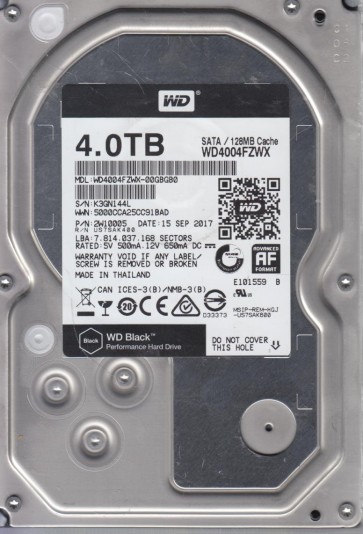
The Western Digital WD4004FZWX is a 4TB, 7200 RPM, 3.5-inch SATA hard drive belonging to the WD Black series. It features a dual-stage actuator for enhanced positioning accuracy and uses Shingled Magnetic Recording (SMR) technology. SMR drives can exhibit distinct recovery challenges compared to conventional perpendicular recording (CMR) drives, particularly concerning write amplification and firmware-dependent mapping tables. This model relies heavily on its internal firmware for logical-to-physical address translation, which adds a layer of complexity to data recovery.
Common Failure Types
1. Mechanical Failure (Head Crash/Stiction): Symptoms include repetitive clicking sounds (head slap), grinding noises, or the drive failing to spin up. Caused by physical contact between the read/write head and the platters, often due to shock, degradation, or contamination. SMR platters are highly sensitive and can suffer surface damage that spreads rapidly during a crash. Immediate power-off is critical upon hearing unusual sounds. Parasitic resonant vibrations in the head stack assembly (HSA) can also be a precursor.
2. Firmware Corruption (SA Area Issues): Common symptoms include the drive being detected as an incorrect capacity (e.g., 0GB or 1MB), taking excessive time to spin up, or refusing to spin down. The system area (SA) on the platters, which stores firmware and translator modules, can degrade. On this model, bad sectors in the SA often cause the drive to lock up or fail to execute normal read/write commands. In severe cases, the module for bad sector management (G-List or P-List) becomes corrupted, leading to unpredictable behavior.
3. Logical Damage (File System Corruption & Bad Sectors): Symptoms include slow performance, file read/write errors, and directory structure errors. File system corruption (e.g., NTFS volume boot record damage) or the growth of a significant number of user-area bad sectors. SMR drives exhibit poor performance when forced to rewrite data due to the write cache and zone structure. User-accessible bad sectors may be reallocated, but a large number can overwhelm the spare sector pool, triggering a cascade of failures.
4. Electronic Failure (PCB/Head Preamp): Symptoms include the drive not spinning up at all, no electrical activity (dead drive), or electrical burning smell. Failure of components on the printed circuit board (PCB), such as the motor controller chip, read channel, NVRAM (which stores adaptive parameters), or the TVS (Transient Voltage Suppression) diode. On the WD4004FZWX, a common PCB failure involves the preamplifier driver chip (preamp), which can fail due to electrostatic discharge or overvoltage. This is often repairable via component-level replacement.
5. Degraded Heads (Weak Read/Write): Symptoms include intermittent errors, slow transfer rates, and read-write verify failures. One or more heads in the HSA are failing but not completely crashed. This can manifest as read errors on specific platter surfaces. The drive may self-scan and reallocate sectors aggressively. In SMR drives, a degraded head can cause severe delays during garbage collection processes, making the drive appear frozen or unresponsive.
Potential Recovery Paths
Professional Service: For mechanical (head crash, stiction) and advanced firmware failures (SA corruption, translator issues), professional service is mandatory. This is a cleanroom environment with Class 10 or better air filtration. Technicians can perform donor head swaps (matching heads from a compatible donor drive), platter transfers (extremely complex and risky for SMR drives), and firmware repair using specialized tools like PC-3000, DeepSpar Disk Imager, or MRT. They execute controlled recovery imaging with sector-by-sector read retries and can handle head map adjustments. Cost is typically $300 – $3000+ depending on failure severity.
DIY Method (For Logical Damage Only): If the drive is mechanically sound and properly detected by BIOS, use advanced cloning software designed for unstable drives. Options include HDDSuperClone (free, Linux-based) for creating a raw disk image with intelligent read strategies (skip and retry). After cloning, extract files using file recovery software like R-Studio, ReclaiMe, or DMDE. Do not attempt this on the original drive for critical data. For a drive with only file system corruption and no bad sectors, tools like Recuva or GetDataBack for NTFS can be used on a read-only basis. A direct sector-by-sector clone using ddrescue is a standard first step; run it without trimming or SMR-specific optimizations.
SMR-Specific Path: For drives with firmware-induced slowness (TRIM issues or unresponsive zone), some professional services can modify the firmware to disable certain features (like garbage collection) to stabilize the drive for imaging. A user should never issue a TRIM or ATA Secure Erase command on a failed SMR drive, as this can permanently erase the logical-to-physical mapping, making recovery of original user data impossible without re-building the map from bits.
What Not to Do
Do not open the drive enclosure. Hard drives are sealed in a cleanroom environment. Even a single speck of dust can cause a catastrophic head crash once the drive is powered on after exposure to atmospheric air. Warranty is not the issue; physical destruction is.
Do not apply or cycle power repeatedly. Multiple power-on cycles on a mechanically failing drive can physically damage the platters (scoring). Each spin-up attempt can grind the head slider against the magnetic media.
Do not freeze the drive. This is a myth rooted in component contraction but is harmless-platter separation or condensation forms inside the drive. For WD Black drives, freezing can cause platter warpage or head slap. It offers no benefit for stuck bearings or failed PCBs.
Do not attempt firmware edits or low-level formatting without specialized tools and knowledge. Using a generic utility like MHDD to perform a ‘zero fill’ or a firmware flash intended for a different revision can brick the drive. The internal firmware is proprietary and sensitive; one wrong byte in the module can cause a drive to not spin up or not be recognized.
Do not attempt to replace the PCB board with a donor board from an identical model without transferring the original NVRAM (8-pin serial EEPROM) chip. The NVRAM contains drive-specific adaptive parameters and the encryption key (if any). A direct board swap without NVRAM transfer will result in an unrecognized drive or incorrect operation (e.g., track misregistration).
Summary
The Western Digital WD4004FZWX is a sophisticated SMR drive that demands a cautious approach to recovery. Mechanical failures (head crash, stiction) require immediate professional cleanroom intervention. Firmware corruption is common and complex, also mandating professional tools. Logical damage is the only area safe for DIY, using cloning tools like ddrescue on a mechanically healthy drive before any file system repair. Avoid power cycling, opening the drive, freezing, or any DIY firmware manipulation. Prioritize a clean, sector-by-sector image of the drive as the foundational step for any non-mechanical failure.