
Data recovery on vintage hard drives like the Seagate ST2000LM007 starts with identifying the failure type – electronic, firmware, or mechanical. Each requires a different approach, and misdiagnosis can make things worse. Here’s a quick guide to help you assess your situation and decide on the next step.
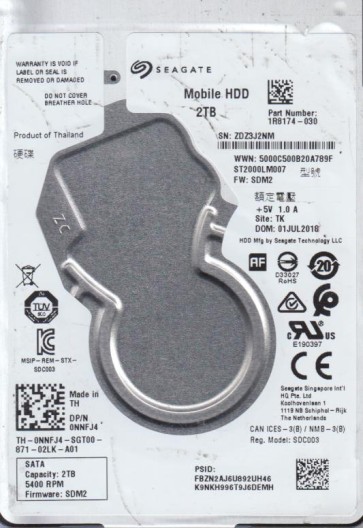
The Seagate ST2000LM007 is a 2.5-inch SATA hard disk drive with a 2TB capacity, commonly used in laptops, external enclosures, and gaming consoles like the PlayStation 4. It features a 5400 RPM spindle speed and utilizes Seagate’s SMR (Shingled Magnetic Recording) technology to achieve high areal density. This drive is known for its reliability but is susceptible to specific failure modes due to its mechanical complexity and firmware architecture. Understanding that the ST2000LM007 operates with a read/write head that floats on an air bearing over platters coated with magnetic material is crucial. The drive’s controller board interprets commands from the host system, while the firmware manages cache, error correction, and power management.
Identifying Common Failure Types
1. Mechanical Failure (Head Crash or Spindle Motor Seizure)
This is a critical hardware failure. Symptoms include clicking, grinding, or whining noises from the drive. A head crash occurs when the read/write head physically contacts the platter surface, damaging the magnetic layer and creating debris. Spindle motor seizure prevents the platters from spinning. The drive may fail to spin up, or you may hear a repetitive “click of death.” This type of failure requires cleanroom intervention. DIY recovery is impossible without specialized tools and a particle-free environment. Any attempt to power the drive can worsen platter damage.
2. Firmware Corruption
Firmware issues are common on the ST2000LM007 due to its complex translation layer for SMR. Symptoms include the drive being detected incorrectly (e.g., 0GB capacity, wrong model number), becoming stuck in a “Busy” state, or failing to initialize. The drive may appear to spin but remains inaccessible. This is often a logical problem, but it can be misdiagnosed as a mechanical failure. Specialized tools like PC-3000 or MRT can reflash or repair the firmware modules. Simple software tools will not work. Power cycling or resetting the drive can sometimes trigger a self-repair, but this is risky.
3. Bad Sectors and SMR Media Degradation
SMR drives like the ST2000LM007 are prone to performance degradation and bad sectors, especially after heavy use or abrupt power loss. Symptoms include extremely slow read/write speeds, file system corruption, and read errors. The drive may still spin and be detected, but data access becomes intermittent. This is a software-level issue that can sometimes be addressed with data recovery software. However, aggressive scanning with tools like ddrescue should be done carefully to avoid stressing the heads. The SMR architecture means that rewriting data can cause a cascade of relocations, further complicating recovery.
Potential Recovery Paths
Professional Data Recovery Services
For mechanical failures, head crashes, or severe firmware corruption, professional service is the only safe option. Companies like Seagate Recovery Services or specialized labs (e.g., DriveSavers, Ontrack) have cleanrooms (Class 10 or better) to open the drive, replace heads, or transplant platters. For firmware issues, they use hardware tools to access the service area directly. Cost ranges from $300 to $2000+ depending on complexity and urgency. Success rates are high (80-95%) for non-physical failures but drop for mechanical damage. Always verify the lab’s reputation and inquire about “no data, no charge” policies.
DIY Approaches (Only for Logical or Minor Firmware Issues)
Step 1: Assess and Isolate. Use a SATA-to-USB adapter or connect directly to a desktop. Listen for abnormal sounds. If the drive clicks or grinds, stop immediately and seek professional help. If it spins normally, proceed.
Step 2: Use Linux-based Tools. Boot from a Live Linux USB. Use lsblk to identify the drive (e.g., /dev/sdb). Use ddrescue to create a sector-by-sector image to a healthy drive of equal or larger size. Command example: ddrescue -d -r3 /dev/sdb /mnt/recovery/image.img /mnt/recovery/logfile.log. This tool skips bad sectors and retries, minimizing head wear. Never scan the original drive with Windows CHKDSK or any recovery software that writes data.
Step 3: Extract Data from Image. Once the image is created, use file recovery software like PhotoRec, R-Studio, or DMDE on a separate system. Scan the image file (not the failed drive) to recover partitions and files. Reinstall the original drive’s HPA or DCO if misidentified.
What Not to Do
- Do not open the drive. The internal platter chamber is sealed and requires a cleanroom. Even a speck of dust can destroy data when the heads are active.
- Do not apply high voltage or “freeze” the drive. Freezing can cause condensation and short circuits. It is an outdated and risky myth.
- Do not run CHKDSK or fsck on the failing drive. These tools write to the drive, potentially overwriting critical data or causing further corruption.
- Do not repeatedly power-cycle the drive. Each spin-up stresses the motor and heads. A seized motor may become stuck permanently after multiple attempts.
- Do not attempt to swap the controller board from a donor drive. Modern drives have adaptive data stored in the ROM or on the platters that are board-specific. Swapping boards without reprogramming can render data inaccessible.
- Do not use “data recovery” software that writes to the source drive. Always work on a cloned image or a different drive.
Summary
Recovering data from a Seagate ST2000LM007 requires a strict diagnosis based on audible and logical symptoms. Mechanical failures (clicking, grinding) mandate immediate shutdown and professional cleanroom intervention. Firmware corruption (wrong capacity, busy state) often requires specialized tools but may be addressable by a lab. Bad sectors can sometimes be handled with careful imaging using ddrescue under Linux. The golden rule is to avoid any action that writes to the failing drive. Prioritize creating a sector-by-sector image onto a known-good drive. Professional services offer the highest success rate for complex cases, while DIY is only suitable for logical issues where the drive spins correctly and makes no unusual noises. Never open the drive, freeze it, or run disk repair tools. Data recovery is a non-destructive process; preserving the current state of the drive is paramount.