
 If you have forgotten your password, you can attempt to reenter it or to recover it, by answering a question that you setup originally when you created your password. You are allowed 5 attempts before you must turn off your drive and turn it back on, to try again at which point you can try an additional 5 times. If you are not able to recover your password, the only other way to unlock the drive is to erase all of its contents.
- Click the Settings button. This will open the Settings for My Maxtor OneTouch menu.
- Click the Adjust Security Settings button.

- You will see the following. Click Erase Maxtor OneTouch
The Erase Drive feature is Data Destructive.
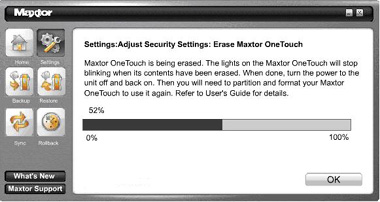
- Click Confirm to proceed, and then click Yes to start the Erase process.
This process can take up to 1 hour to complete. Do not stop the erase process.
- When finished you will be notified that the drive is erased. Click OK.
- Reconnect the Maxtor OneTouch III drive from the system. Upon doing so, you will be prompted to Format the drive.



The drive will be formatted into a NTFS format. Once it has been formatted you will need to go back and reset up any backups you might have had setup.