
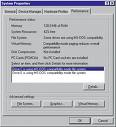
 The Performance tab in System Properties shows that one or more of the hard disks in your computer is using “MS-DOS Compatibility mode“. MS-DOS compatibility mode may be in use for either the file system or for virtual memory. You may also receive the following message: “Compatibility Mode Paging reduces overall system performance”.
This is not an operating system issue and it is not a hard disk drive error. MS-DOS Compatibility mode may be in use for any of the following reasons:
- An ‘unsafe’ device driver, memory-resident program, or virus hooked the system interrupt (INT21h or INT13h) chain before Windows loaded.
- The hard disk controller in your computer was not detected by Windows.
- The hard disk controller was removed from the current configuration in Device Manager.
- There is a resource conflict between the hard disk controller and another hardware device. The Windows protected-mode driver is missing or damaged.
- The Windows 32-bit protected-mode disk drivers detected an unsupportable configuration or incompatible hardware.
Related Links:
- Troubleshooting MS-DOS Compatibility Mode On Hard Disks
- Large IDE Hard Disk May Run In Compatibility Mode
- MS-DOS Compatibility Mode When Booting from Removable Drives
- MS-DOS Compatibility Mode Problems with PCI-IDE Controllers
- Windows Support for Large IDE Hard Disks
- Packard Bell Legend Hard Disk Using MS-DOS Compatibility Mode
