
Jumpers are small metallic pins that protrude from the end of a hard disc drive or from its circuit board, as shown below. Jumpers are used to configure the hard disc drive’s options, such as defining master and slave or cable select.
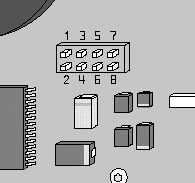
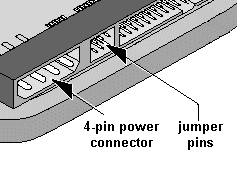
Every pin set has a specific numbering scheme, which is determined by its location on the drive. As shown above left, if the pins are on the circuit board, the pin number assignments are printed on the circuit board around the pins. As shown above right and below, if the jumper pins are on the end of the hard drive, Pin 1 will always be closest to the 4-pin power connector.

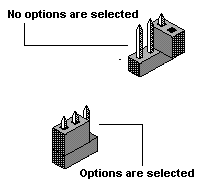
Below is a jumper shunt, which is used to connect two jumper pins. Connecting two jumper pins with a shunt completes an electrical circuit and enables or disables options of the hard drive. Extra shunts may be stored on a single pin as shown below because two or more pins must be connected by the shunt to complete the circuit and enable or disable options. When the shunt is only on one pin, it is not performing any function.
Jumper Settings:
Jumper Settings for Toshiba 2.5″ Hard Disk Drives
Jumper settings for Seagate and Maxtor ATA hard drives
Jumper Setting On Samsung (PATA) Hard Disk Drive
Maxtor & Quantum ATA Hard Disk Drive Jumper Settings
Jumper settings for Western Digital 2.5 inch and 3.5 inch EIDE drives